|
Written By:
Date Posted: October 11, 2001

. A good "big brand" name, with a good reputation for stability, ease of use, and impressive benchmarks. Asus have been major players when it comes to Motherboards for quite a while now, and have made a good reputation and name for themselves amongst all users. DDR. Another word that is doing the rounds lately. Put the two together and you have the A7V266 Main Board.
The Asus A7v266 Motherboard is an AMD Socket A Motherboard for use with Athlon and Duron processors, as well as provision for the Palomino Athlons too. The board supports 100 and 133 FSB (200 and 266) and for overclocking you can increase the FSB in 1mhz frequencies. The board is based on the KT266 platform with the VT8366 Northbridge.
Specifications
CPU: Supports AMD Athlon/Duron up to 1.4 ghz + on the socket A Format
Chipset: VIA KT266 VT8366 Northbridge with VT8233 Southbridge
Memory: 3 DIMM slots supporting upto 3GB of PC1600/PC2100 DDR SDRAM
Multi I/O: Ultra-DMA 33/66/100, AGP Pro slot with AGP 4x Support, Six USB ports (4 included) Five PCI slots, 1 AMR Shared, 2 Serial and one Parallel.
Sound: C-MediaCMI8738 6 Channel Audio Controller
BIOS: 2Mb Award® BIOS, PnP, ACPI, Trend® ChipAway Virus (TCAV), Green, Boot Block, BIOS
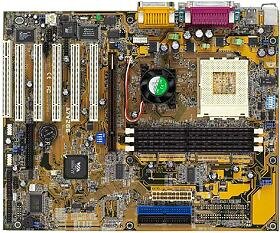
The general layout of the board at first glance looks good, however, after installing the board and putting the entire system together I did find a few annoying problems. The main one is the position of the AUX input for the onboard sound. Asus for some strange reason placed it just at the front of PCI slot number 4, which if all your cards don't have a cut out or indentation at that point (read: none of mine do), once you have connected the AUX to the output of your CD-ROM/DVD-ROM drive, it effectively renders that slot useless, as there is NO room left to put a card in without crushing the AUX slot connector. A real shame that.
In my system at the moment, all though I have one slot free, due to the placing of that AUX connector, I now have no free slots left : (. The other thing I didn't like was the placing of the ATX power connector. This one is open to debate though. It sits just next to the IDE slots, and as some of you may have noticed, the power supply cables can be pretty stiff and uncooperative in positioning, so when you're trying to build a "1337" system with the best possible airflow, the power cord would ideally be out of the way. This is not the case on this board.
One thing that I did find very nice to see, was the fan included on the Northbridge. These Northbridge chips can get quite hot, especially when overclocking, and the fan on this board will go a long way to providing extra performance and rock solid stability from the board. Another thing I liked about this board is the amount of room around the processor slot, this board is perfect for those huge HSF's, with screw holes around the slot provided too.
Onboard sound. Hmmmmmm, most people think of that as just another thing to disable in the BIOS, another thing to add into the cost of buying a new system. The C-Media Audio Controller provided on this board does an excellent job, and the included drivers are perfect for any setup. There are a few disadvantages to it, in that if you are running a 5.1 setup then you have lost your Line In and Mic In points, as these are used to provide the output to the rear, centre and bass in a 6 speaker configuration. The drivers for these also provide for 4, 2 and Headphone setups, though I honestly cant tell any difference between 2 and headphones.
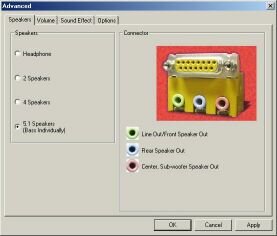  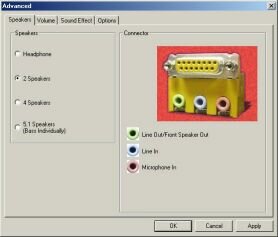
How does it sound? Pretty damn good surprisingly. Not as good as say a Soundblaster Live, but its not that far off, and as its included with the board, its something to take into account when buying a system on a budget.
Everything on the board is easily identifiable and labeled very clearly (which is good because I'm blind as bat!) and ties up exactly in the very impressive manual that comes with the board. I would have to say that the manual is not what I would call an idiots guide, but if you follow the instructions in the manual and use a little common sense, then anyone could install this board with very little ease or trepidation. The manual was well written and had lots of diagrams and pictures which tallied up perfectly with the board itself. The board also provides with the aid of a jumper for thermal sensing of Palomino chips, as well as Athlons/Durons. The board can be set to Jumperfree mode, which allows all setup and tweaking to be done from the BIOS, which is very well laid out and extremely easy to use. I also liked the safety features on this board. Whilst setting the system up I had to check that it was all posting correctly etc, etc. Each time I changed something critical the BIOS automatically set itself to 100FSB, reducing the chances of frying my processor. As soon as the system was up and running properly, all settings were saved, and the machine booted as per normal.
The software included with the board was good too. Asus Probe (for hardware monitoring), Via's 4in1's (ver 4.29a), PC Cillin (anti-virus) and of course, the driver and application software for the onboard sound. I have also heard that the thermal reports from Asus boards can be a little higher than truth, although this is not necessarily a bad thing. I cannot tell you myself if this is true or not as I lack a thermal probe a the moment. I can tell you that the system temperatures reported were quite excellent, sitting around the 28C mark.
There is also provision for 6 USB slots, with 4 provided with the board. 2 USB slots are in the usual place at the back of the motherboard, whilst another 2 are found on a PCI slot card which connects to the motherboard with a thin cable
Performance
The test bed consist of an unlocked, AHYJA core Thunderbird at stock speed. As comparison I will use sandv!per's results from his Abit KT7A-Raid review, with his 1.2 overclocked to 1.4. What I am mainly looking for here is to see if the DDR makes a difference:
Tbird 1.4 (10x133,1.75v)
Asus A7v266 (what else?)
512MB Crucial PC2100 cas2.5 Ram
1x40gig IBM Deskstar
Leadtek Geforce 2 Pro (please note that sandv!per used a Geforce 3 in his tests)
SiSoft Sandra - CPU
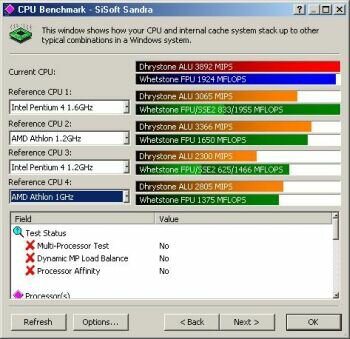
voOdOo's SiSoft's Scores
v!pe's SiSoft's Scores
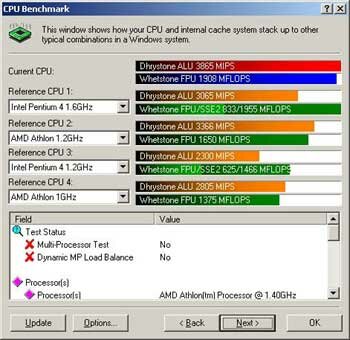
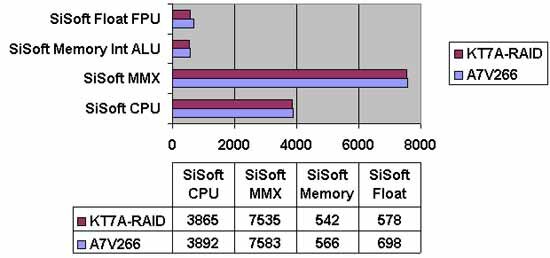
As you can see, in this test comparing my true 1.4 to sandv!per's overclocked 1.2, I have better benchmarks, though by not much. The extra performance that I am gaining over sandv!per could be down to the extra heat on his processor reducing performance slightly or more likely that using the A7V266 motherboard does indeed provide extra performance.
SiSoft Sandra - MMX
voOdOo's SiSoft's Scores
v!pe's SiSoft's Scores
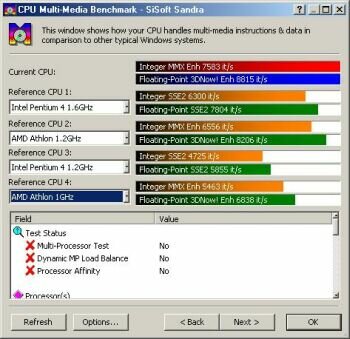
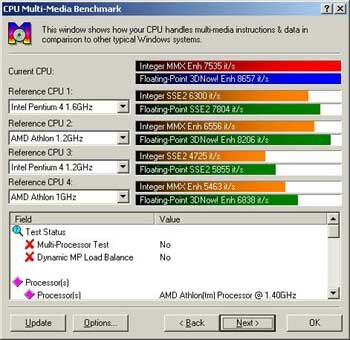
Now that is sweet! I'm fairly blowing away the P4 1.6 gig, and beating sandv!per's 1.2 @ 1.4 on Floating Point by over 150 points! The difference between my setup and the P4 1.6 is nearly 1000! Both sandv!per's and mine are of a kind with integer, with mine beating his by just 50. Interesting. (Ed. Bastage! :P)
SiSoft Sandra - Memory

voOdOo's SiSoft's Scores
v!pe's SiSoft's Scores
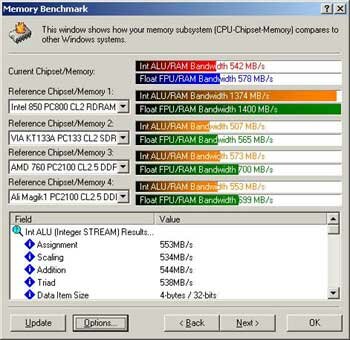
Now this is the test I was eagerly awaiting for the results of. Does my DDR setup really make all that diffrence? Well, again, I beat sandv!per, on the Int ALU/RAM test, but only by 24 points. Still, it is beating sandv!per's scores, and at the current price of RAM, be it DDR or PC133, I think it is worth the money. Floating Point however beats sandv!per's scores by a much bigger margin, 120 to be exact, now thats more like it! Comparing it to Sandra's comparison scores of a KT133A with CL2 SDRAM the gap is much bigger. I get higher on both accounts, 59 higher in Int ALU\RAM and a whopping 133 in Float FPU\RAM scores. (Ed. Statistical note: voOdOo mentions the words "beat" and "sandv!per" in the same sentence 3 times)
Conclusion? DDR ram does help, just not as much as most people think. Double Data Rate, does not mean Double the performance, but as I said before, at the time of writing this RAM is cheap, and it is worthwhile getting it in my opinion, and the A7V266 to go with it, a good combination of parts to make a good system.
Gaming Performance
Next up is the real important stuff. Games!!! The usual line up of testing programs were used here, 3DMark 2001 and Quake III Arena.
3DMark 2001

voOdOo's 3DMark Scores
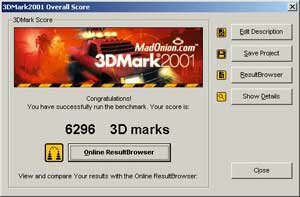
v!pe's 3DMark Scores
My 3DMark 2001 score is a lot lower than sandv!per's, however, he was using a GeForce 3, compared to my GeForce 2 Pro. Also, after achieving that score at 640x480*16, I decided to run a further test at the default 1024x768*32.
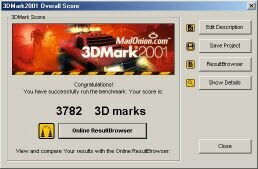
A damn fine score, and comparing it online with other systems with comparable graphics and CPU's I found I was in the higher percentage, the default average system scoring 3644 compared to my 3789 for 3D Graphics and CPU, the only difference being of course the Motherboard and Ram. Again, a nice little boost.
Next up is Quake 3, same test bed as before. Quake 3 is version 1.29h, using demo four.dm_66. Settings are Fastest, at 640x480, with sound on. To do the tests as I have, Bring down the console in the main menu (the ~ key, or the key found under the ESCape key; dependent on country) and type the following:
/timedemo 1
/demo four
The demo will play very fast and after it has finished bring down the console once again to see the results.
sandv!per's 1.4GHz (1.85v, 10x140): 149 Frames Per Second
voOdOo's 1.4GHz (1.75v, 10x133): 130 Frames per second
As you can see, I am not all that far behind sandv!per's score, though to be fair he was using a GeForce 3 : ). So if any GeForce 3 producing companies out there would like to send me one for review ....er ..... nm ; ). A pretty good frame rate score I think, and certainly not something to be sniffed at. So once again, the A7V266 board shows it's power, and indeed from looking around the net at other reviews and benchmarks of this board, they all pretty much concur with my own findings that this board really can pack some when it comes to games and other applications requiring a lot from the system.
Conclusion


I like this board. I like it a lot. You get a lot of board for your money and there are so many extra touches such as the 5.1 Sound onboard that can really make a difference to your wallet. The provision for up to 6 USB slots is a good feature too, 4 of which come with the board. The only real thing that lets this board down in my opinion is the placing of the AUX connector on the board. You can see from the benchmarks performed that the DDR does make a difference, all be it not as big as some people think, but a difference none the less. I would recommend this board to anyone, from beginners to hardware junkie's. Beginners will find setup easy enough, and experts will find the overclocking potential to be very good indeed. In the time that I have owned this board (3 weeks) I have had no problems with stability or problems of any kind. A damn good board, let down only by a poorly placed power connector and AUX connector. If you want to go the DDR route with your next system, this board would be a good choice.
NB : Some of you may have been interested in hearing about the Overclocking potential of this board. At this moment in time, I have got the system housed in a very poor case for cooling and was unable to do extensive research in to this. However, it is something I plan to follow up in the near future. For the moment, I did mange to get the computer to post and run Windows 2000 at 1.6gig. It was very easy to set it to this speed thanks to the BIOS and I had no stability problems or loss of data at all. I will update you with benchmarks ASAP.
Asus:
85%
Pros: 5.1 onboard sound, up to 6 USB ports, solid construction, stable.
Cons: Odd placement of AUX and ATX connections.
Home>>
|


