There was a time when many enthusiasts were content with buying a beige box. Overtime, mostly due to the popularity of LAN parties, enthusiasts would begin to customize their rig. In some cases, these modifications were functional, but in most cases, it was for aesthetic reasons. Everyone wants to stand out, and be it a fancy paint job, or a cool cutout in the side panel, everyone fought to be Waldo (read: standout in a sea of normality).
Case manufacturers see this as a cash cow though, and today, more and more companies are springing up, offering their cases to compete for your wallet. These companies offer pre-modded cases, either with windows, or with blowholes.
Getting further into this, aluminum cases were another market. Other than the physical benefits, they were sought after because they simply looked cool. Aluminum cases are becoming a dime a dozen these days. Once upon a time (read: 18 to 24 months ago), there were only a couple manufacturers, but now there are dozens. These cases can also be bought pre-modded, and even companies such as Lian-Li give their cases a little extra to catch the buyer's eye.

It should seem fitting then, that the pioneer of aluminum cases, Cooler Master, went back to the drawing board, and improved upon one of their most popular models, the ATC-201, and end result is the . Make no mistake though, as they didn't just add an air duct and call it a day. There were some overhauls done, and this is one case you're going to want to check out.
Specifications
Material: All Aluminum Alloys
Drive Bay: 5.25' Bays (exposed) x 4
3.5' Bays (exposed) x 2
3.5' Bays (hidden) x 4
Slot Bracket: 7
M/B Type: Standard ATX MB
I/O Bracket: Standard ATX
Power Supply: None
Cooling: Dual 80mm x 80mm x 25 mm Fan attached front panel. -- Air flow in --
One 80mm x 80mm x 25 mm Fan attached back panel.--Air flow out --
One 80mm x 80mm x 25 mmFan attached top panel. --Air flow out --
Weight: Case : 5Kg (12 lbs)
Dimension: 497 mm x 196 mm x 452 mm
The Cooler Master ATC-201A-SX2 ships in a fairly average sized box, just a little larger than the case itself. Everything is neatly packed, and there's enough folded cardboard and packing foam to keep things secure during shipping.
There isn't much in the way of instructions, except for a small leaflet on installing a redundant PSU. I suppose anyone who purchases an aftermarket case; i.e., you build a PC yourself, won't miss the instructions too much. There are plenty of screws provided, though sadly, no extra thumbscrews, which we'll get into a little later.
External Features


Click to Enlarge
As with most aluminum cases, the ATC-201A is light. At a mere 12lbs (case alone), you should have no problem lugging the rig from place to place. Like most of the aluminum cases on the market, you're on your own when it comes to the power supply. In most cases (no pun intended), stock power supplies aren't of the best quality, and I'll bet most of you have an aftermarket PSU anyways.


Click to Enlarge
There are 4 external 5.25" drive bays, and 2 external 3.5" drive bays. This should be enough expansion room for most users, as being a mid sized case, you do sacrifice the number of drive bays when compared to a full tower.
Our Cooler Master, and from what I hear, most Cooler Masters, was missing one external 5.25" drive bay faceplate. I suppose the idea behind it is you'll have at least one optical drive to put in there, but for those of you who wish to stealth their CDROM drive, you'll have to resort to painting it instead, or picking up one of Cooler Master's aluminum bezels.


Click to Enlarge
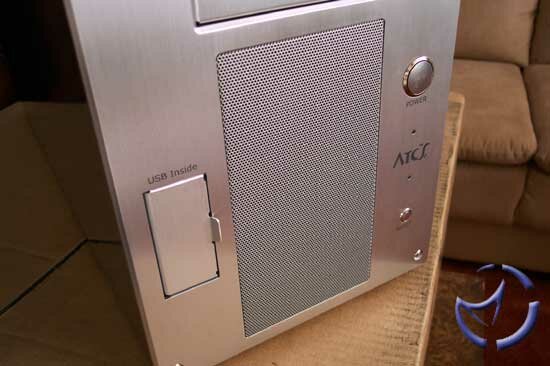
The ATC-201 has a mesh grill (to allow for airflow for the fans), which will be a hit or miss for some people. Personally, I find it a nice aesthetic (and functional) feature, whereas there are people who prefer an untainted front panel. We will discuss why this vent placement is better than how most cases draw air later on in the review.
The power button and reset button are nicely recessed on the right side. The power button is a little "squishy" for my tastes, but that's a minor complaint on my part. On the left of the vent are the USB 2.0 ports. Personally, I don't like the idea of USB ports that "show" on the front, so the spring door to cover the ports is nice. I'm not sure if it was our sample or if it'll be a common issue for all of the production 201As, but the spring door doesn't really lock in an open position. A couple of times, it just swung shut, bending the cable to my USB device. No damage was done, but you'll need to take some care with the door.

Click to Enlarge
Taking a cue from home audio equipment, there's a nice gold trim around the 4 feet on the bottom of the case. I do question the colour choice though, as being a silver case, a silver trim would be a better colour match for the rest of the case. The feet are fairly spongy, and do a pretty good job at keeping the case from slipping around.


Click to Enlarge
As with past Cooler Master cases, both side panels are removable. There are three thumbscrews on each side panel, and each panel has a small grip on the back to pull them off. The side panel on the left side has a pre-cut blow hole, which is referred to as the "Air Guide". The case is available without the Air Guide, but as our tests have shown, it works prety good. We'll talk more about this in the cooling features.

Click to Enlarge
One nice feature is the painted side panels (as well as the top panel). The paint is of car paint quality, though under a special garage light, we did notice a sort of "dusting" over the surface. This is unnoticable under normal light though, so I doubt anyone will bother wet-sanding it any further. As you can see above, the paint is very reflective, and will certainly impress people (who are into these things at least). At this moment, only metalic silver (4 coats) is available, but you can expect a high gloss black (6 coats), as well as an aluminum colour in the near future.
Internal Features

The interior is fairly spacious, and actually does not have the "crammed" feel I got when I was working with our Lian-Li PC65U. The hard drives and optical drives are held in place by screws. I would have personally preferred drive rails, but the screws do the job. The aluminum edges have been sanded down, to prevent scraping yourself, but there is still of an edge to them. I still managed to scuff myself a couple times, so don't just go charging in there when you're setting up your rig.


Click to Enlarge
Although I did not have any problem installing most of our components, we did stumble on an issue with the Vantec Nexus Fan Controller.

Click to Enlarge
Due to the fact that the screws on the Nexus are not flush with the unit, it simply will not fit. I ended up scratching up the inside drive bay pretty badly in the end. I'll probably will have to grind the screws off and do some soldering to get it to fit.
Ed Note: I have contacted Vantec about this and it seems that our problem is due to the fact that our Nexus Fan Controller is a pre-production sample. Thankfully, this issue has been corrected with the retail unit. You can take a look at a picture here.


Click to Enlarge
Although the interior is roomy, the inclusion of a pull out mobo tray can be a life saver. The tray should accomadate most ATX motherboards, and one nice thing I like about it is the use of traditional motherboard, screw-on standoffs. Earlier Cooler Masters, as well as Lian-Li, used clip-on standoffs. Although they look nice, a problem that arose was that they bent very easily, rendering them useless. Considering the amount of times that enthusiasts change mobos, this can be a problem if you've run out of these clip on standoffs.
Another well thought out idea is the mobo tray support. A lot of motherboard trays are simply "L" shaped (tray and back panel), and if you pull it out with a large heatsink and motherboard installed, the weight will flex the mobo tray. This problem in particular is the case with our Lian-Li, though nothing has broken yet. Although the support bracket was always present with past Cooler Masters, as well as other cases, the bracket here is a lot stronger than those you'll normally find.


Click to Enlarge
Thumbscrews are present throughout the case, including those to secure the PCI cards. A nice touch, and once you've gotten used to thumbscrews, you can never go back to using Phillips screws to secure your peripherals.

Click to Enlarge
The wiring required to plug into the motherboard run from the right side of the case. The only reason I'm mentioning it is because if you're picky about aesthetics, you'll know that case wiring is something you'll want to keep out of the way as much as possible. The wires here are somewhat hidden behind the 3.5" bays, saving you some of the work in trying to hide them.

Click to Enlarge
A problem with a lot of aluminum cases (again, an issue with Lian-Li, as well as others from reviews I've read) is it can be troublesome installing power supplies that have more than one fan. Enermax immediately comes to mind, as their secondary fan grill is not flush with the PSU, as well as those PSUs with front mounted fans. In these cases, some modifications to the PSU, or removal of a fan grill during installation is required. Not so with the ATC-201A, as our Enermax slipped right in without any problems.
Cooling
Cooler Master originally got their recognition from their heatsinks, so it's natural that the R&D into heat dissapation carried over into their case design. The ATC in its name stands for Active Thermal Convective System. The name is exactly as it implies... the case acts as a giant heatsink. This theory comes from, in part, that the case is made of aluminum, which as we all (should) know, is decent at dissapating heat. The Active Thermal Convective System however, is a bit different, as it represents the design in the case's airflow, air pressure, air resistance, and ventilation. By default, the ATC-201A-SX1 comes with four 80mm fans, as well as the Air Guide, which is a 10cm hole and duct.


Click to Enlarge
Fan #1 is located in the top of the case. The fan is configured to exhaust air from the top, which in theory, should work pretty well. As hot air rises, the fan will accelerate the air flow out the top. Previously, Cooler Master cut into the top of the case to create the vents for the fan, but now there is a mesh screen, which should allow for more airflow out of the case. Like the front screen we'll be talking bout, there is a foam filter between the fan and screen. I have not figured out a way to remove it yet, so cleaning will be a bit of a chore.


Click to Enlarge
By removing the front mesh screen, we can see the filter Cooler Master has installed into it. Although it is removable, Cooler Master didn't exactly make it easy for us to clean. To get to the screen, you'll have to remove the front bezel, which is secured by six hex screws. The screen then requires the removal of four small Phillips screws, which will almost certainly drop unless you use a magnetic tipped screwdriver. The screen secures the filter itself by folding portions of it into the filter. An air gun is all that's needed to clean out dust particles, but I wish there was an easier method of removal.
The benefit of Cooler Master's method, as opposed to some other cases is the mesh screen allows for direct airflow to the intake fans. For some cases, the front bezel does not lie flush with the front panel of the case, so air is drawn from the front still, but from beneath the case. I am not sure how much this affects airflow inside the case, but Cooler Master's method, in theory, should work better.
Fans #2 and #3, which are the two front fans, are configured as intake fans. Not only do they serve as intake fans, they also serve as hard drive coolers as well. Although the air will now be somewhat "warmed-up" by passing through the hard drives, I don't think it will affect temperatures all that much.

Click to Enlarge
The last fan, #4, is located in the back, next to where the CPU would be. This fan serves as an exhaust fan. Like the changes to the top panel, you'll see that Cooler Master no longer uses ventilation holes stamped out of the metal, but rather, they use a traditional fan grill which will allow more air to pass through the back.


Click to Enlarge
An optional feature, the Air Guide is the most significant change in the ATC-201. Ducts are nothing new, but for those who don't know, the idea behind them is they assist in isolating the air around the CPU and to help keep the heat away from the rest of the PC. Dell has been using ducts for years, though they do it much differently. Unlike Dell, there is no fan built into the duct (they don't use fans on their CPU heatsinks).
On the ATC-201A-SX2, there is another mesh screen built into the side (otherside is the Air Guide duct), with a nice acylic decoration around it. We'll see later on if the duct affects temperatures at all.
By adding a PSU, you should have a minimum of 5 fans (perhaps 6 or even 7 depending on the PSU), where 3 fans exhaust air, and 2 are intake. In terms of noise, there is quite a bit of it, though a high speed CPU fan, such as a Delta, will still overpower the noise generated by the case fans.
Cooling Performance
Other than the aesthetics, an important aspect when shopping for a case, is the cooling performance. Contrary to popular belief, having a large tower with 10 fans blowing in every direction is not necessarily going to mean it's going to keep your components cool.
Test Bed
AMD Athlon 1700+ w/Swiftech MCX462+
MSI KT3 Ultra2
2 x 256MB Crucial PC2700
2 x 80GB Maxtor 7200RPM
PNY Verto GeForce 4 Ti4600
Plextor 24/10/40 CDRW
AOpen 1640 DVD
Enermax 430W
Comparison cases will be a Lian-Li PC65U, which is also a mid tower aluminum case, as well as a full tower, steel construction AOpen HX-08. All three cases are configured with their stock cooling for the initial tests. The second group of tests will be with all three cases with all their fans off (except on the power supply).
I should note that for the first two tests, we have removed the Air Guide from the ATC-201A, and taped the side screen shut. The last test will be with the Air Guide enabled. Temperatures were read with the Vantec Multifunction Panel (which fit just fine btw), except for the CPU and system temperatures, which were gathered from . Temperatures will be presented in Celcius, but you can grab a Celcius to Fahrenheit converter . Temperature readings are taken at full load, with Prime95 and Folding@Home enabled.
Stock Fans On

Both the Cooler Master and Lian-Li are the top performers of the three. Between the three, the AOpen seemed to be the noisiest, as I would guess that the larger case echo'd a little more. Hard drive cooling was led by the ATC-201A, as well as the video card and system cooling tests.
Although the Lian-Li also has dual intake fans blowing directly over the hard drives, the way the hard drives were arranged (sideways), it was a tighter fit than the dual drives in the Cooler Master. Furthermore, there's a bit more obstruction on the Lian-Li, as the air filter is thicker, and the front vents are not as free flowing as the screen mesh on the ATC-201A.
System cooling temperatures were drastically lower with the Cooler Master. This can probably be attributed to the top blowhole wicking away the rising hot air. To equalize the playing field, we'll now conduct tests with all the fans off (except on the power supply). All ventilation holes on all three cases will now be cardboarded, and taped off.
Stock Fans Off

By turning off the fans (and taping shut any ventilation, save for the power supply), we can get a better idea of how well each case handles heat. The AOpen does the worst, but not really as bad as I thought it would do. It's possible that being such a huge tower, there's just more air volume to heat up. The Lian-Li fairs much better, but like I said earlier, the interior is a bit more cramped when you load it up. The CDROM drives are very close to the PSU, and being a shorter case than the Cooler Master, wiring becomes more of an issue. The Cooler Master does the best, keeping temperatures just a bit lower than the Lian-Li. Now, let's see how things are when we enable the Air Guide.
Air Guide Enabled vs Air Guide Disabled

Testing the Cooler Master with the Air Guide enabled netted some interesting results. System temperatures actually increased slightly, but CPU temperatures did lower by a small margin. What is probably happening that the CPU fan is configured to draw air into the heatsink, and the Air Guide is channeling cooler outside air on to the heatsink. The reason we're not seeing a more drastic drop in temperatures though is because the Air Guide does not reach the motherboard, thus not cutting the heatsink off completely from the rest of the components. The increase in system temperatures is probably the result of the Air Guide obstructing some of the air flow to the rear vent, though I think this rise in temperature is worth the drop in CPU heat.
I should note that these temperatures for the CPU were obtained by running our Smart Fan 2 at full speed. When we ran the fan at low speed, CPU temperatures were the same, regardless if the Air Guide was used or not. What is probably happening is that at low speed, the fan simply isn't drawing air in fast enough to matter if the air was being channeled or not.
Installation Notes
I have already mentioned the Vantec Fan Controller issues, but other than that, all our hard drives and optical drives had no problems. Our KT3 Ultra2 had no problems fitting, nor did the Air Guide "miss" our CPU/HSF. The problem with the Air Guide compatibility is if you use a dual CPU setup, a Slot-1 or A motherboard, or an ATX motherboard with an oddly placed CPU socket. For the most part, the majority of ATX motherboards should have no problems. One other heatsink that comes to mind as possibly having problems with the Air Guide is the Zalman CNPS3100-Plus, as the cooling fan may not allow for the Air Guide to fit.
Final Words
Cooler Master has taken everything that was good about their ATC-201, and carried it over into the the ATC-201A-SX2. This includes the sharp aesthetics, the thumbscrews, the removable motherboard tray, the slick paint job, and its ATC technology. What has been improved with the latest version is the stronger construction overall (thanks to thicker aluminum, though I wouldn't use the case as an ottoman), the Air Guide, and dropping the older ventilation cutouts with either grills or mesh screens instead.
Complaints are minor, but there are a few things that did bother me. The foam filters used in the top and front ventilation screens are problematic to clean, as they don't lend themselves to easy de-installation. The USB door, though a nice touch, does not lock into place, possibly slamming shut if you're using it. I am not going to penalize the trouble with the Vantec Nexus Fan Controller woes, since it was a pre-production product we used, but be aware that peripherals with outside screws not flush with the unit will have problems installing. The edges in the interior could have been folded, or covered with some protective plastic to protect your hands would have been nice as well.
I will flat out say that the Active Thermal Convective System does indeed work here, as our overall temperatures are in fact lower than they have been before. Whether fans are off or on, the case itself does wick away heat, though I would not quite go as far as turning off fans on your heatsinks. Our tests have shown, though not dramatically, that the Air Guide does indeed lower CPU temperatures slightly. I also find the side cutout a nice aesthetic feature, though you're free to remove the Air Guide and place an additional side fan in its place. All this cooling also does not come at the expense of your ears, as the stock fans, though noticable, are not deafening. Anyone used to 3-4 case fans probably won't notice a thing.
You do pay a fair penny for a quality case, but it is cheaper than past models, and you get exactly what you pay for. I have seen nice aluminum cases, and I have seen ugly ones, but Cooler Master cases always catch my eye whenever they are on display. No doubt, it'll draw a remark or two if it's sitting on your desk.

Pros: Beautiful, cool, removable motherboard tray, thumbscrews, quality construction and Air Guide.
Cons: USB Door needs work, cleaning the air filters inconvenient, expensive (but worth it).
Bottom line: Make no mistake... is a lot to spend on something that sits under your desk, but a case like this deserves to sit on top of it. It's roomy, and acts like a heatsink for those $3000 PC parts inside. In terms of quality and R&D, it's pretty tough to top Cooler Master. If you have any comments, be sure to hit us up in our forums.
HOME