|
I know that sometimes Viperlair can be all about performance and tweaking your PC to get the most out of it, whether for gaming or just for bragging rights. As of late though, I have noticed a trend towards Home Theater PC's (HTPC), not around the web as such where it has been a popular theme for a while, but within our own Viperlair forums. With this in mind, I searched the web for sometime trying to find who had the top of the line enclosures we could take a peek at that were built for HTPC's. My search led me to the site who I contacted to take a look at their latest HTPC enclosure the , and find out why it is the talk of the HTPC forums.
Size: ATX Desktop
Construction: Aluminum
Drive Bays: One 5.25" (Exposed)
One 3.5" (Hidden)*
Power Supply: Included Ahanix HTPC 300W (ATX 2.03 compliant / AMD/Intel Approved)
Available Colors: Hair Brushed Finish Silver / Black
Fan Configuration: 2 x 60mm Silent Rear outtake.
VFD: 2x16 character/Samsung SDI/Parallel connector/
* - a 2nd 3.5" drive can be installed below the 5.25" drive, if your motherboard does not have it's IDE interfaces directly behind the Drive Bay or of you are using entirely IDE drives.
Pulling the D.Vine 5 out of the box I was confronted with a unit that is both light and very aesthetically pleasing. This Black, brushed aluminum case looks clean, and from the front of the unit, you do not get the impression you are looking at a pc, but some sort of modified Amp/Receiver.
Inside the case at the rear we see the typical bag of screws that allow you to secure all of your internal equipment, two small exhaust fans and the included Ahanix Power Supply along with an extra cable that connects to the parallel port (this is for the front LCD Display on the D.Vine 5). At the middle front of the case is the drive bay, (well, it does hold one 3.5" and one 5.25" drive) and the front panel PCB's. On the bottom of the case middle/front, is the only inlet air vents. It will be interesting to see if this causes an issue with maintaining a cool operating environment while viewing CPU demanding video.
Unlike most HTPC enclosures on the market, the D.Vine 5 has the ability to house either a MicroATX or Standard ATX motherboard. This does lend to a slightly larger footprint overall, but Ahanix was able to keep it at the size of a typical high end Receiver/Amplifier that you would see in the same Home Theater rack. The lines on the case are crisp and the finish is nothing short of inspiring. Ahanix has done its homework and come up with a well finished, ready to sit next to your other Home Theater gear, piece of equipment.
Inside the case there is slightly less attention to detail as they have made the space fit the external design and not choreographed it for ease of installation. The Drive Bay is not the easiest to get to, and requires removal if you are going to be exchanging the DVD-ROM or the motherboard. Obviously there is no removable motherboard tray, as this would add weight and probably would not be functional with the design they are trying to achieve. The rear fans are of differing depths; this appears as though it was built in a "what is available" scenario. One fan uses the 3 pin motherboard connection, the other uses a piggy back Molex connector, and again I feel that it was built with what was on the shelves, not what was planned. Although most people will not see it this way, I did, and for some reason it bothered me.

The PSU was only anchored at the rear of the case, allowing it to flex the side somewhat. Overall internally is not a bad design, just not the best I have seen. Let's see how everything comes together as we build it.
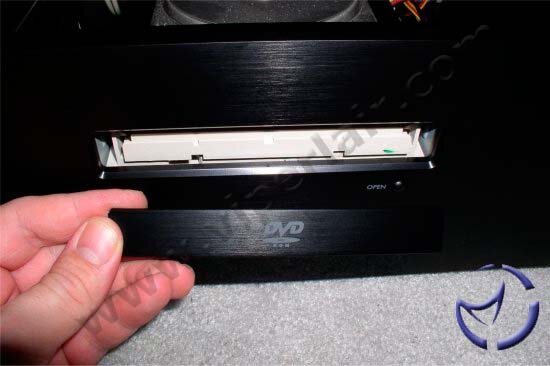
I pulled out the bag of goodies and found that Ahanix has not included an installation manual; there is however a piece of paper that is the Quick Installation Guide. This also instructs you to connect to their web site and either download the manual or print it off (PDF format). Included in the miscellaneous parts bag is a new DVD ROM cover that matches the case, something I was thinking was going to be hard to do, very nice catch Ahanix. Checking over the front panel connectors I see there is only PWR-ON / PWR-LED / FP-RESET included. I guess you don't really need to hear the PC Speaker beep, or see that pesky blinking HD indicator, at least not in the HTPC world.
NEXT
|