While overclocked Prescotts are near impossible to effectively cool with air cooling, the Athlon 64 is less of a challenge. Make no mistake though, Athlon 64s still run plenty warm and still require effective cooling to maintain stability, especially when overclocked. Another advantage the Athlon 64 has over the Prescott (the LGA775 specifically) is the abundance of choices when it comes to performance air cooling. If you want extreme air cooling (which sounds like something of an oxymoron to myself), you do have choices. If you're more interested in silence, the pickings aren't as varied, but they do exist.
Thanks to (and VL), we got a chance to test the . Like previous Thermalright coolers, the XP-120 shares many of the same design decisions, and includes heatpipes similar to those found in their XP-90. The "120" in the name comes from the fact that you can fit a 120mm fan on top of it. We'll talk more about that later on in the review.
The heatsink ships in Thermalright's standard brown box (larger than usual). Inside are the fan wire clips, installation tools (covers Athlon 64, and Intel Socket-478), thermal paste, AMD retention bracket, and an installation guide.
Editor's Note: Shortly before going to press, on the information page of Crazy PC's site, there is an option to add an adapter for LGA775 for $6.99.
Specifications
| Fan |
DEFAULT - NO FAN. Heatsink is compatible with following fan sizes: 120x120x38mm, 120x120x25mm |
| Heatsink Dimensions |
L110 x W125 x H63 (mm) Fin only, without fan |
| Compatibility |
AMD Athlon 64 Socket 930/940 processors, Intel P4 Socket 478 |
| Material |
Aluminum |
| Weight |
370g |
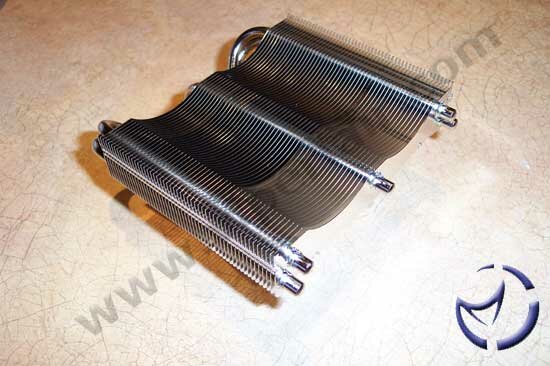
The XP-120 is mostly an aluminum design (save for the nickel plated copper base). While copper would have been a better choice, as it absorbs more heat (great for that initial blast when turning on the PC), aluminum does dissipate heat quicker. Despite the huge size, the heatsink is surprisingly light though still a bit heavier than your standard stock heatsink. As mentioned previously, the heatsink is designed for 120mm fans and only includes clips that will work with fans up to 38mm thick.
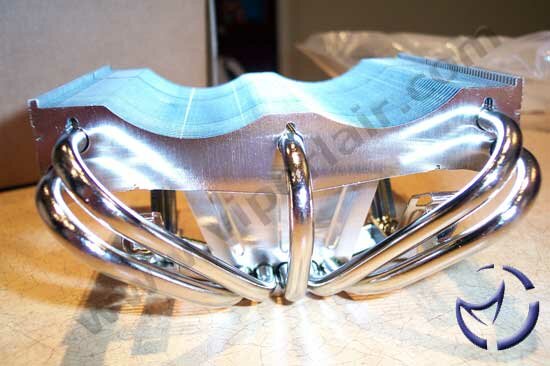
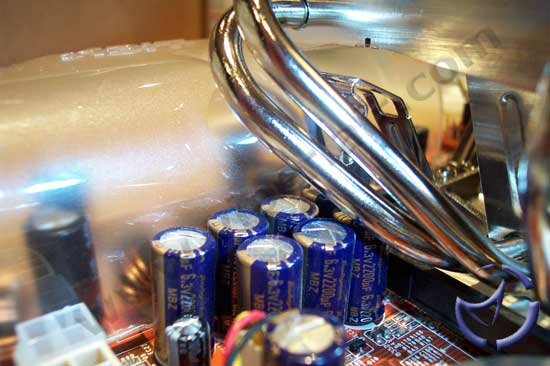
Unlike your typical heatsinks, the XP-120 is not a "square" design, but rather, it is tapered going up. Considering the girth of the cooler, this is a smart move as a square heatsink of this magnitude would not fit on any motherboard. The benefit of the design is compounded by the fact that the five heatpipes add to the overall dimensions of the cooler. The heatpipe design is designed to eliminate the gravity effect that can plague coolers. By drawing heat away from the core and into the pipes, it allows all the fins to effectively cool the pipes allowing for better performance, in theory, than fins alone which may not all be used as heat doesn't necessarily travel in a straight line. A side benefit of the heatsink's size is that it can also cool down the MOSFETS and capacitors which will aid in overall system stability.

|

|
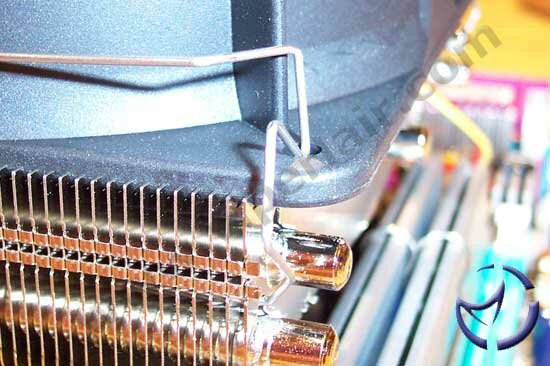
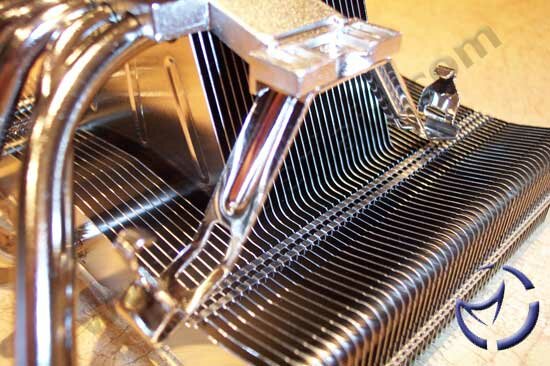
Like their previous coolers, the edges of the heatsink are staggered to accommodate the fans. Rather than using push pins, or traditional screws for installation, they use metal wire clips to secure the fan. To install, you place the wire retention mechanism into holes (on both sides of the heatsink, on either edge). The corners of the hooks then go into the fan holes themselves. While this didn't "feel" as secure as screwing a fan into the base, it is much quicker to use and seems to hold the fan down effectively.
The base is machined flat, though not quite to a mirror shine. The thermal paste test indicated good contact and lapping is probably not necessary. The clips needed for installation are pre-bolted down into the base of the heatsink as well, saving the user time in placing these in themselves.
Pentium 4 installation is as using the installed clips, and connecting them into the heatsink retention mechanism. Athlon 64 installation is more involving, as it requires motherboard removal, but no more complicated than removing the default AMD retention bracket and using the one Thermalright includes.
There will be some potential clearance issues with the XP-120 that you should be aware about depending on the motherboard layout. On our MSI K8N motherboard, using Corsair ProSeries ram we were not able to fit the heatsink as the ends of the heatpipes would bump into the ram modules preventing heatsink installation. Standard ram modules corrected this issue.
Outside of the ram, motherboard compatibility may be another concern depending on the design of the board. We had problems with an ABIT KV8-MAX3 board, where the capacitors interfered with installation. It would be a good idea to read over Thermalright's compatibility list for and boards on their site. There is also a possibility that PSU placement in some cases may interfere with installation, especially if the motherboard tends to be flush with the PSU.
Test Setup
ASUS P4C800-E: Pentium 4 2.4C (12x250) @ 1.8v, 2 x 256MB Kingston HyperX PC3500 (2.5-3-3-6), HIS Radeon 9600 XT, Lian Li PC65U.
MSI K8N Neo: Athlon 64 (10.5x209) @ 1.95v, 2 x 512MB Kingston HyperX PC4000 (2.5-3-3-6), ATI Radeon 9600 XT, Lian Li PC60.
Going up against the Thermalright XP-120 for both platforms will be the Cooler Master Hyper 6 outfitted with two Cooler Master 80mm fans. In both platform tests, a Sunon KD1212PMB3 120mm fan will be used to cool the XP-120. Arctic Silver 5 was the thermal paste of choice for our testing.
Prime95 was run for six hours, with Folding @ Home running in the background everyday for seven days to allow the thermal paste to even out. During the actual tests, we ran Prime95 for 15 minutes, with Folding @ Home running in the background. Readings were taken every minute until the test period ended using Motherboard Monitor. Ambient room temperature was maintained at 23°C/74°F.
Performance (Load in °C)

|
Coolers @ Full Load
|
Max Temp (°C)
|
| Thermalright XP-120 w/Athlon 64 |
41
|
| Cooler Master Hyper 6 w/Athlon 64 |
43.5
|
| Thermalright XP-120 w/Pentium 4 |
39.5
|
| Cooler Master Hyper 6 w/Pentium 4 |
40.5
|
The Cooler Master Hyper 6 was our reigning champ of air cooling for most of this year, but it looks like it's ceding the throne to Thermalright's XP-120. It's a close fight with the Pentium 4, with a mere 1°C separating the two, but the Athlon 64 shows a wider gap at 2.5°C.
Final Words
While we did not use the absolute most powerful fans in our tests, doing so would only net better numbers. However, noise levels would naturally increase which is something we'd like to expand on here. The Hyper 6 setup with the dual fans is already fairly noisy as it is, and we have attached Delta 80mm SHE fans before (load temps are about 2°C lower than what we've seen today on the Hyper 6) but the noise was unbearable when using that config for extended periods. The Sunon fan used on the XP-120 is rated at 35dBA, and was very quiet in comparison to the test config of the Hyper 6 used today. The performance of the XP-120 combination still came out on top, and performed on par with the Hyper 6 in it's "ultra noisy" setup.
On the negative, the main problem we have with the Thermalright XP-120 is the size. Motherboard and case installation can be an issue, but if you read over Thermalright's compatibility chart, there should be no surprises. While the heatsink's girth is a problem, the large 120 fan setup will allow the heatsink to cool nearby capacitors and MOSFETS (though it is not the heatsink that does this, but the air movement from the fan).
While water cooling will cool as effectively (if not better), and also be near silent as the XP-120, that solution will be much more expensive as well as more difficult to install. We're not trying to say that the XP-120 is a water cooling replacement, but it's damn near perfect performance and noise-wise when it comes to air cooling.
Just a quick note: Crazy PC is offering 5% off this cooler, as well as most of their products until the end of this year. Just enter "CPCVL123104" without the quotes for your VL discount.

Pros: Good performance, excellent quality, universal.
Cons: Large size means the cooler will not fit on all motherboards.
Bottom Line: The performance was very good, regardless of platform. While we were impressed with the performance, the real slam dunk for us is the noise, or lack thereof. You can place a monster 120mm tornado on the XP-120, but using a much quieter 120mm fan is still very effective and one piece of the puzzle if you're looking into building a silent system without using water.
If you have any comments, be sure to hit us up in our forums.
HOME