2D Quality/TV Out
We all know that 2D quality is something that is very important to many people, and as was first introduced in our Parhelia review we will test the 2D quality of this card, both with black text on a white background and vise-versa. Also new is a image test with 4 800*600 pictures stitched together to create a 1600*1200 background image. The monitor used was a refurbished Dell 21" P991 Trinitron monitor, and all tests were run at 1600*1200. The monitor provides a very good picture as well as allowing for two separate inputs to be used. We used the Parhelia, MSI 8888, and the MSI GeForce Ti4600 8X's ability to clone the primary screen to test seven of the eight video out ports of these four cards (cannot test the third head of the Parhelia with clone). The reference video card was a Matrox G400 (not MAX) which is one of the better 2D video cards that have been released. So how did the integrated video card of the 2D, in my eyes?
| |
G400 |
Parhelia (H1) |
Parhelia (H2) |
MSI MX (H1) |
MSI MX (H2) |
MSI GF4 (H1) |
MSI GF4 (H2) |
Chaintech IGP
|
| Black Text |
5 |
7.5 |
7.5 |
5 |
5 |
4 |
3 |
5.5 |
| White Text |
5 |
8 |
8 |
6 |
6 |
3 |
1 |
6 |
| Bitmap |
5 |
9 |
9 |
4.5 |
5 |
4 |
4 |
5 |
| Overall Rating |
5 |
8.25 |
8.25 |
5.25 |
5.5 |
3.75 |
3 |
5.5 |
We can see that in this case (and note that it's just one person's testing) that the Parhelia has a quite better quality graphic, with the image being very crisp and vibrant, on both heads. The MX did about as well as the G400 beating it when it came to white text on a black background, as it was crisper than the G400. The only difference between the two heads of the MX was when it came to the image, and this wasn't much of a difference, just a slightly nicer image. The GeForce Ti4600 8X does rather poorly compared to the G400 and even its slower sibling, the MX 440. The black text was slightly blurry on the first head and very blurry on the second head. White text was somewhat off color on the first head, but was horrendously purple on the second head, thus the score of 1. The image quality was slightly below that of the G400 and wasn't as vibrant. Overall the GeForce Ti4600 8X has a very weak 2D output. The IGP graphics of the Chaintech motherboard did pretty well, equaling the quality of the GeForce 4 MX, which is a good feat.
How did some video cards do with TV-out quality? Let us see how four video cards (G400, Parhelia, and GF4MX, GeForce Ti4600 8X) handle sending the images to the TV-in of the MSI GF4MX card, compared to the reference image. If anyone would like to see the uncompressed images please e-mail me or let me know in our forums.

Reference Image

Parhelia TV-out
|

G400 TV-out
|

MSI 8888 TV-out
|

MSI GeForce Ti4600 8X
|
There was very little difference between the Parhelia, MSI 8888, and the G400. The MSI GeForce Ti4600 8X card on the other hand has very poor TV-Out, quality, not to mention a image that is not properly displayed. The Parhelia and the MSI GF4 MX take the (note that this was just a loop back for the MSI test). All the cards except the GeForce Ti4600 8X are just slightly brighter than the reference images, the GeForce Ti4600 8X has a very bad quality with a definite green ting to it.. The quality of most of these cards is pretty good and would look good sent out to most TV's, however I wouldn't use the GeForce Ti4600 8X for this purpose, unless I happened to get a bad card. Sadly I wasn't able to get any TV-Out images from the Chaintech motherboard, as it died on me, in a RAM installation problem, before I could do this test as well as the audio tests.
3D Quality
3D quality is very important, and while this card includes improvements to it allowing for higher quality graphics, it also allows for the ability to increase the quality of the picture in any game. Like all the other GeForce 4 (and MX) series it has 'Accuview' Antialiasing, and up to 8X (64 samples) ansiotropic filtering. Let us see what improvement increasing the quality settings does for the quality of the picture, which we will compare to the Parhelia and Kyro II. If you would like to see any of these pictures in bmp format, please e-mail me or let me know in our forums.
| Parhelia |
MSI GF4/GF4 MX/IGP |
Kyro II |

No AA or Ansiotropic filtering
|

No AA or Ansiotropic filtering
|

No AA or Ansiotropic filtering
|
| |
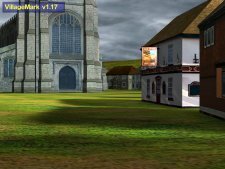
2X AA
|

2X Horizontal AA
|
| |

Quincunx AA - Ansiotropic filtering
|

2X Vertical AA
|

4X AA + 2X Ansiotropic filtering
|

4X AA + 2X Ansiotropic filtering
|

4X AA + Ansiotropic filtering
|

16X FAA + 2X Ansiotropic Filtering
|

4XS AA + 2X Ansiotropic filtering
|
|
| |

4XS AA + 4X Ansiotropic filtering
|
|
| |

4XS AA + 8X Ansiotropic filtering
|
|
We can see the 4XS mode of antialiasing is a very large improvement over the previous maximum AA setting of Nvidia based video cards. If we look at the pictures of 4X AA and 4XS AA of the MSI card we see that this setting brings the image fairly close to the quality of the 16X FAA of the Parhelia, though it is still not quite as good as the Parhelia. The ansiotropic filtering of the Nvidia card is better than the Parhelia is in my opinion at the same settings, and is equal to the quality of the Kyro II's ansiotropic filtering. All in all given 4XS and 2X ansiotropic, this card is almost as good as the Parhelia for AA and better than the Parhelia and similar to the Kyro II in ansiotropic filtering. With the improvement in ansiotropic filtering the quality of the MSI card increases more. This can be seen by looking at the ground in the pictures, there is a noticeable difference between the 2X, 4X and 8X ansiotropic settings, as the ground looks much sharper and more detailed with the increase in the number of samples used to create this image. A note that I could not get the IGP or the GF4MX to provide anything higher than 2X ansiotropic filtering for testing. So let us now look at the performance of this motherboard, both the video aspect as well as the chipset design.
Benchmark System
| CPU: |
AMD Athlon XP 1800+ |
| Motherboard: |
MSI 745Ultra
|
Chaintech 7NIF2
|
| Memory: |
1 - 256MB Corair PC3200, 1 - 256MB OCZ PC3500 |
| Hard Drives: |
4.3GB Quantum 5400RPM, 40GB Maxtor 7200RPM (D740X)
|
| Video Card: |
Matrox Parhelia 128MB - (200MHz/250MHz) |
|
nForce 2 IGP 64 MB - (200MHz/166MHz) |
|
MSI 8888 64MB - (275MHz/257MHz) |
| Operating System: |
Windows 2000 Professional Service Pack 3 |
| Drivers: |
Parhelia 1.2.0.31 |
|
nForce 2.03 driver pack |
|
MSI 8888 - 43.45 |
| Other Cards: |
D-Link 538TX NIC, Firewire card |
| Cooler: |
AMD 1800+ Retail Heatsink |
| Case: |
InWin Q500 |
| Power Supply: |
Enermax EG365P-VE 350Watts |
| Software: |
Fraps 1.9c |
| Direct X Benchmarks: |
Unreal Tournament 2003 (HardOCP software - using dm-antalus) |
|
Unreal Tournament 2003 (HardOCP software - CPU test) |
| OpenGL Benchmarks: |
Jedi Knight II Jedi Outcast (timedemo) |
| Other Benchmarks: |
VirtualDub 1.4.10 |
DivX 5.03 |
|
Truespace 4.2 |
|
DUMeter 3.03 Build 110 |
All tests were run at 1024*768 with all settings at maximum except antialiasing and ansiotropic filtering were not enabled. 1600*1200 was run without ansiotropic filtering and AA enabled. All tests were run 3 times with the highest of the closest two frame rates being used. All frame rates were graphed using Fraps 1.9 to measure the frame rate each second, as seen in the Parhelia review mentioned previously.
The Truespace benchmark used the same process mentioned in my previous article using the following settings, the image was then rendered to 1600*1200. The DivX tests took the video from the DVD of "The Hitchhiker's Guide to the Galaxy" (NSTC) which equaled 8555 frames without any audio being encoded. For the DUMeter tests, we took about 3GB of files (about 3000 files) ranging in size from a couple of KB's to a couple of hundred MB's. We sent the data to and from the system using, in the case of the network cards, a 10/100 switch and the master network card was the Gigabit NIC on the MSI 845PE. So let us see how this motherboard performs compared to other motherboards and other video cards.


