When Nvidia first released the nForce chipset in June 2001, many people were hoping that this would be THE chipset for the Athlon processor. But as happens there were lengthy delays and nForce based motherboards didn't appear until some months later. The performance of the chipset, while good was not earth shattering, and the late release helped dampen much of the enthusiasm that people had about the nForce chipset. The other factor in its less than stellar sales was the fact that the first north bridge released were the ones with integrated graphics, which drove up the price of the motherboards based on them. This increase in price of these boards wouldn't have mattered much, but the target group for the higher priced motherboards, the enthusiast, for the most part already had a good video card and didn't want to waste money on something they would never use.
While there were many presentation problems with the nForce chipset, it also had some very useful and high quality technologies included in it. Such things as the integrated Dolby Digital encoder/decoder, allowed for high quality onboard audio, thus perhaps saving a PCI slot for something else. Another very interesting feature is one of the first uses of AMD's high speed Hyper Transport technology in a product, which Nvidia used to connect the north bridge (IGP) to the south bridge (MCP) to allow for more bandwidth than the normal north/south bridge PCI bus design (800MB/s - 266MB/s). Lastly and most importantly was the inclusion of 'Twinbank' which basically allowed for two 64-bit DDR DIMM's to be used as one 128-bit DIMM thus doubling the theoretical memory bandwidth without increasing memory speed (IE Rambus, 72 pin SIMM's), this was not a new idea but it was one of, if not the the first, to offer this implementation for the Athlon platform with DDR memory.
When the nForce 2 was launched in July of 2002 it was met with a more guarded optimism as it looked to only offer some basic improvements over its previous version. There were some minor improvements to both the SPP/IGP and MCP. The MCP had one major improvement, the inclusion of integrated networking, as well as the ability to have dual onboard network cards (3COM/Nvidia).
Chaintech has only recently gotten into the process of making nForce motherboards. They have only started using the nVidia based chipsets, starting with the nForce 2. So how is their implementation of the nForce chipset, do they do a good job with one of their first attempts at making an nForce 2 motherboard?
Chaintech 7NIF2 Board
This board is not one many would consider, as it is a µATX case. But does it have any interesting features that help it stand out and make it an eye catching motherboard? Let us look at the board to see. To see the exact specifications of this motherboard, please look at
Here is an itemized list of what was included in the box:
- The Chaintech 7NIF2 motherboard
- 1 - 80 Pin IDE cable, 1 - Floppy cable
- 7NIF2 Specific back plate
- Manual and Addendum
- Quick Reference Guide
- Driver CD
The Motherboard - Continued
The motherboard itself is obviously a µATX motherboard, and as such only sports a 1/3 (AGP/PCI) configuration for slots. The AGP slot is an 8X compatible one, and works well with the MX 440 8X previously tested. The location of the IDE ports was adaquate with the ports actually being located near where they would normally be on a full ATX board. The three RAM slots are also located in their standard positions with the first two used to enable the single channel mode and the single DIMM slot used for Dual Channel mode.
The location of the ATX power connector is in one of my least favorite positions, as it located above the CPU socket, so that you have to route the power supply cable around the CPU heatsink. This location of the ATX power connector is common in most boards with only a few exceptions existing. The two fan headers avaliable are located in opposite positions, with one being just above the CPU socket and the other being right near the IDE connectors, with the only other connector powering the IGP's fan/heatsink combination.

The heatsink fan that was put on the IGP was much like that found on low to mid end video cards as the cooler. The fan itself blows over a solid piece of aluminum with the fins of the heatsink only existing on the outside of the heatsink. This doesn't really allow for a great amount of heat transfer, but it does save in height of the cooler as you don't have two levels, fins and fan. Upon taking off the heatsink I was expecting to see a TIM or even a small dab of thermal paste, but to my surprise I found that there was no material to help thermal transfer between the IGP and the heatsink. I therefore put some thermal paste on and put the heatsink, which uses spring pins, back on the IGP.
The IGP underneath the heatsink is a A3 stepping of the nForce 2 IGP and was made fairly recently, which means most of the bugs, if any, have been worked out. The 'southbridge' is the MCP not the MCP-T, which has support for Dual LAN and firewire. The MCP is still a good controller as it still has an integrated LAN controller and support for USB2 and ATA133. Though it doesn't have support for the extra features of the MCP-T this is still a good amount of features to be included in this small board.

The back I/O panel is somewhat different from that of the standard ATX back plate. First we notice that the USB ports have moved from their location right beside the PS/2 ports, and have moved along with the network connector to the other end of the panel. Both serial ports are gone, replaced with the VGA port and the SVHS connector. Chaintech helpfully provides a back plate connector so that you can use all these pieces.
The CPU socket came with a nice little warning sticker on it, which tells you to make sure that the heatsink is actually on properly, which is a good reminder for all, and especially the beginner system builder. Also looking at the CPU socket we see that there is the actual 4 holes around the socket for heatsinks or for some water-cooling setups. The area around the CPU socket is a good amount though on the front of the socket there isn't a lot of clearance between the socket and the capacitors and the IGP heatsink, as you can see above.
BIOS and Overclocking
One of the most important features, at least for the tweaker, is the BIOS. In it you can edit settings so that you get the best performance from your system, and as such perhaps increase the speed of your RAM and CPU. While many of the screens inside the BIOS are the same, lets look at two of the interesting BIOS screens specific to the Chaintech 7NIF2.

This is where most of the tweaking of settings will occur. You have the option to increase the FSB in mostly 1MHz increments, with a few exceptions. One thing to notice is that there is no CPU multiplier support in this board, so you cannot underclock your TBred to be able to use the 166MHz FSB. The memory frequency has many options, ranging from SPD to 200%. With the tested memory we had the memory speed at 120% (166MHz @ 133MHz FSB). This allows you to control exactly how fast you need the memory to be, perhaps since you are still running PC1600, or using the integrated graphics and you want to get the most out of you PC2700 or even PC3200. The memory settings can be changed quite a bit, with the RCD and RP settings going from about 1 to 7, and the RAS going down pretty far as well.
The Frame Buffer is obviously to pick how much of your memory is going to be used by the integrated graphics, the most common options should be one of 32MB, 64MB or even the highest 128MB options. For our tests we used the 64MB frame buffer, to give it the exact same amount as the GF4MX also tested. The option for AGP frequency gives you the option of locking the AGP card to a specific speed, though why anyone would want to set it to 50MHz is beyond me, though there is the standard 66MHz speed option as well. There is also the obvious support for AGP 8X, which detected our MSI GF4MX correctly and ran it at 8X. Lastly there is an option for the TV mode that the SVHS output will use, and most if not all standards are included here.

In this screen you get to see the current temperature of the system, as well as the voltages of all the relevant parts of the system. The only selectable option is for the shutdown temperature, of which you get a choice of 85, 90, 95, and 100ºC before the system shuts down.
The system we received and all of the 7NIF2's did not have any multiplier or voltage adjustments, so we could only overclock our test TBred using stock voltages. In this the system POST'ed at and was stable at 150+ MHz, but this in no way tells the true limits of this systems possible 200MHz FSB, but rather of the CPU's overclocking ability at stock voltages. As for the IGP portion of the system, it seemed possible to overclock the core and memory through drivers, but not through the hardware settings. The stock speed of the core of the video card, as read by Rivatuner was 200MHz, so there should be some room for overclocking there, and I will update this review if I manage to get a hold of another board. We know that this is an IGP based system, and as such is built around the GeForce 4 MX series, so lets look at how it looks, quality wise, first in 2D and then in 3D.
2D Quality/TV Out
We all know that 2D quality is something that is very important to many people, and as was first introduced in our Parhelia review we will test the 2D quality of this card, both with black text on a white background and vise-versa. Also new is a image test with 4 800*600 pictures stitched together to create a 1600*1200 background image. The monitor used was a refurbished Dell 21" P991 Trinitron monitor, and all tests were run at 1600*1200. The monitor provides a very good picture as well as allowing for two separate inputs to be used. We used the Parhelia, MSI 8888, and the MSI GeForce Ti4600 8X's ability to clone the primary screen to test seven of the eight video out ports of these four cards (cannot test the third head of the Parhelia with clone). The reference video card was a Matrox G400 (not MAX) which is one of the better 2D video cards that have been released. So how did the integrated video card of the 2D, in my eyes?
| |
G400 |
Parhelia (H1) |
Parhelia (H2) |
MSI MX (H1) |
MSI MX (H2) |
MSI GF4 (H1) |
MSI GF4 (H2) |
Chaintech IGP
|
| Black Text |
5 |
7.5 |
7.5 |
5 |
5 |
4 |
3 |
5.5 |
| White Text |
5 |
8 |
8 |
6 |
6 |
3 |
1 |
6 |
| Bitmap |
5 |
9 |
9 |
4.5 |
5 |
4 |
4 |
5 |
| Overall Rating |
5 |
8.25 |
8.25 |
5.25 |
5.5 |
3.75 |
3 |
5.5 |
We can see that in this case (and note that it's just one person's testing) that the Parhelia has a quite better quality graphic, with the image being very crisp and vibrant, on both heads. The MX did about as well as the G400 beating it when it came to white text on a black background, as it was crisper than the G400. The only difference between the two heads of the MX was when it came to the image, and this wasn't much of a difference, just a slightly nicer image. The GeForce Ti4600 8X does rather poorly compared to the G400 and even its slower sibling, the MX 440. The black text was slightly blurry on the first head and very blurry on the second head. White text was somewhat off color on the first head, but was horrendously purple on the second head, thus the score of 1. The image quality was slightly below that of the G400 and wasn't as vibrant. Overall the GeForce Ti4600 8X has a very weak 2D output. The IGP graphics of the Chaintech motherboard did pretty well, equaling the quality of the GeForce 4 MX, which is a good feat.
How did some video cards do with TV-out quality? Let us see how four video cards (G400, Parhelia, and GF4MX, GeForce Ti4600 8X) handle sending the images to the TV-in of the MSI GF4MX card, compared to the reference image. If anyone would like to see the uncompressed images please e-mail me or let me know in our forums.

Reference Image

Parhelia TV-out
|

G400 TV-out
|

MSI 8888 TV-out
|

MSI GeForce Ti4600 8X
|
There was very little difference between the Parhelia, MSI 8888, and the G400. The MSI GeForce Ti4600 8X card on the other hand has very poor TV-Out, quality, not to mention a image that is not properly displayed. The Parhelia and the MSI GF4 MX take the (note that this was just a loop back for the MSI test). All the cards except the GeForce Ti4600 8X are just slightly brighter than the reference images, the GeForce Ti4600 8X has a very bad quality with a definite green ting to it.. The quality of most of these cards is pretty good and would look good sent out to most TV's, however I wouldn't use the GeForce Ti4600 8X for this purpose, unless I happened to get a bad card. Sadly I wasn't able to get any TV-Out images from the Chaintech motherboard, as it died on me, in a RAM installation problem, before I could do this test as well as the audio tests.
3D Quality
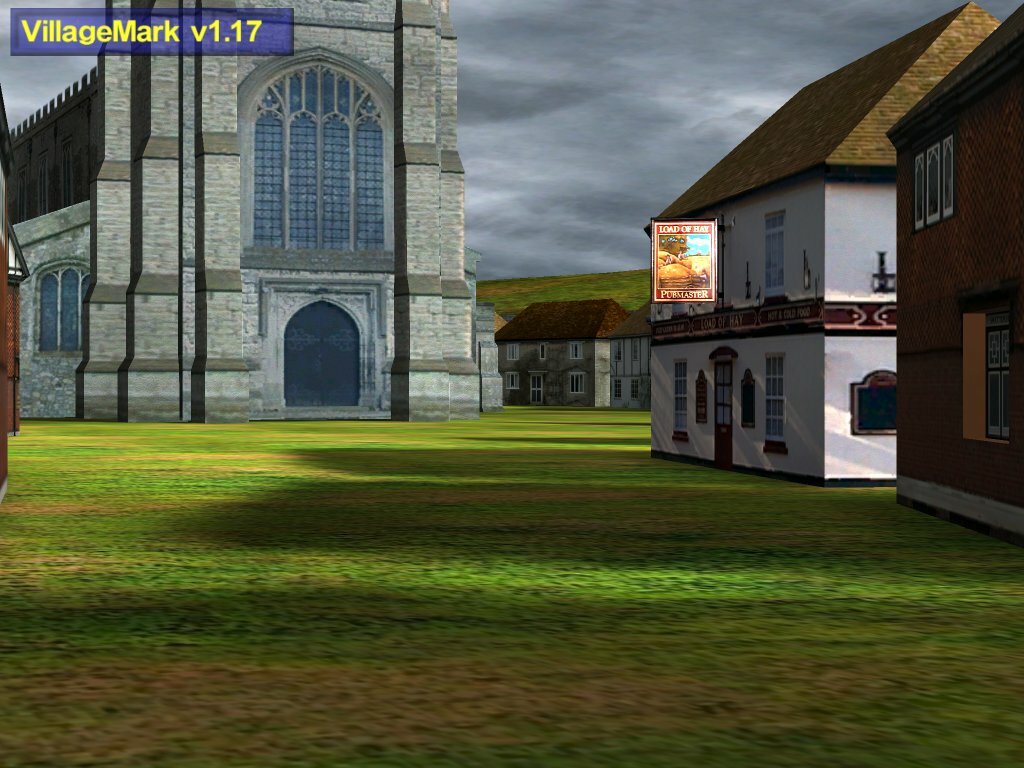
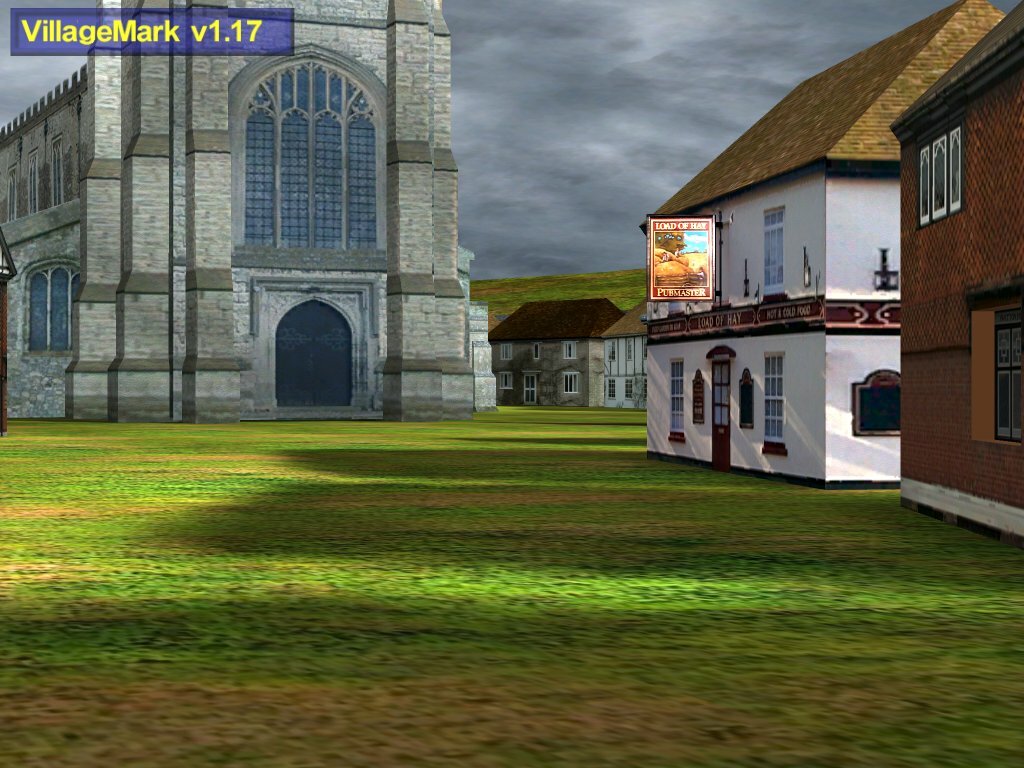
3D quality is very important, and while this card includes improvements to it allowing for higher quality graphics, it also allows for the ability to increase the quality of the picture in any game. Like all the other GeForce 4 (and MX) series it has 'Accuview' Antialiasing, and up to 8X (64 samples) ansiotropic filtering. Let us see what improvement increasing the quality settings does for the quality of the picture, which we will compare to the Parhelia and Kyro II. If you would like to see any of these pictures in bmp format, please e-mail me or let me know in our forums.
| Parhelia |
MSI GF4/GF4 MX/IGP |
Kyro II |

No AA or Ansiotropic filtering
|

No AA or Ansiotropic filtering
|

No AA or Ansiotropic filtering
|
| |
2X AA
|

2X Horizontal AA
|
| |

Quincunx AA - Ansiotropic filtering
|

2X Vertical AA
|

4X AA + 2X Ansiotropic filtering
|
4X AA + 2X Ansiotropic filtering
|

4X AA + Ansiotropic filtering
|

16X FAA + 2X Ansiotropic Filtering
|

4XS AA + 2X Ansiotropic filtering
|
|
| |

4XS AA + 4X Ansiotropic filtering
|
|
| |

4XS AA + 8X Ansiotropic filtering
|
|
We can see the 4XS mode of antialiasing is a very large improvement over the previous maximum AA setting of Nvidia based video cards. If we look at the pictures of 4X AA and 4XS AA of the MSI card we see that this setting brings the image fairly close to the quality of the 16X FAA of the Parhelia, though it is still not quite as good as the Parhelia. The ansiotropic filtering of the Nvidia card is better than the Parhelia is in my opinion at the same settings, and is equal to the quality of the Kyro II's ansiotropic filtering. All in all given 4XS and 2X ansiotropic, this card is almost as good as the Parhelia for AA and better than the Parhelia and similar to the Kyro II in ansiotropic filtering. With the improvement in ansiotropic filtering the quality of the MSI card increases more. This can be seen by looking at the ground in the pictures, there is a noticeable difference between the 2X, 4X and 8X ansiotropic settings, as the ground looks much sharper and more detailed with the increase in the number of samples used to create this image. A note that I could not get the IGP or the GF4MX to provide anything higher than 2X ansiotropic filtering for testing. So let us now look at the performance of this motherboard, both the video aspect as well as the chipset design.
Benchmark System
| CPU: |
AMD Athlon XP 1800+ |
| Motherboard: |
MSI 745Ultra
|
Chaintech 7NIF2
|
| Memory: |
1 - 256MB Corair PC3200, 1 - 256MB OCZ PC3500 |
| Hard Drives: |
4.3GB Quantum 5400RPM, 40GB Maxtor 7200RPM (D740X)
|
| Video Card: |
Matrox Parhelia 128MB - (200MHz/250MHz) |
|
nForce 2 IGP 64 MB - (200MHz/166MHz) |
|
MSI 8888 64MB - (275MHz/257MHz) |
| Operating System: |
Windows 2000 Professional Service Pack 3 |
| Drivers: |
Parhelia 1.2.0.31 |
|
nForce 2.03 driver pack |
|
MSI 8888 - 43.45 |
| Other Cards: |
D-Link 538TX NIC, Firewire card |
| Cooler: |
AMD 1800+ Retail Heatsink |
| Case: |
InWin Q500 |
| Power Supply: |
Enermax EG365P-VE 350Watts |
| Software: |
Fraps 1.9c |
| Direct X Benchmarks: |
Unreal Tournament 2003 (HardOCP software - using dm-antalus) |
|
Unreal Tournament 2003 (HardOCP software - CPU test) |
| OpenGL Benchmarks: |
Jedi Knight II Jedi Outcast (timedemo) |
| Other Benchmarks: |
VirtualDub 1.4.10 |
DivX 5.03 |
|
Truespace 4.2 |
|
DUMeter 3.03 Build 110 |
All tests were run at 1024*768 with all settings at maximum except antialiasing and ansiotropic filtering were not enabled. 1600*1200 was run without ansiotropic filtering and AA enabled. All tests were run 3 times with the highest of the closest two frame rates being used. All frame rates were graphed using Fraps 1.9 to measure the frame rate each second, as seen in the Parhelia review mentioned previously.
The Truespace benchmark used the same process mentioned in my previous article using the following settings, the image was then rendered to 1600*1200. The DivX tests took the video from the DVD of "The Hitchhiker's Guide to the Galaxy" (NSTC) which equaled 8555 frames without any audio being encoded. For the DUMeter tests, we took about 3GB of files (about 3000 files) ranging in size from a couple of KB's to a couple of hundred MB's. We sent the data to and from the system using, in the case of the network cards, a 10/100 switch and the master network card was the Gigabit NIC on the MSI 845PE. So let us see how this motherboard performs compared to other motherboards and other video cards.
Unreal Tournament 2003
We all know UT2003 for its beautiful graphics, and the game itself isn't too bad either. The quality of the graphics is what brings many modern CPU's and video cards to their knees. So therefore this is a good test to see how well both video cards and motherboards perform. We used the Hard OCP CPU test, which is run at 640*480 and uses the dm-inferno map, which is one of the most power hungry maps included. The Video tests were run with a slightly modification to the program, instead of all the maps, we only tested dm-antalus, which apart from dm-inferno, is a very power hungry level. This test was run at both 1024*768 and 1600*1200 with the high settings. So lets see how the Chaintech board and the IGP did.

| |
Minimum Frame Rate |
Average Frame Rate |
Maximum Frame Rate |
| Parhelia NF2 SC: |
81 |
126.33 |
186 |
| Parhelia NF2 DC: |
82 |
124.83 |
186 |
| Parhelia SiS 745: |
83 |
124.67 |
180 |
| NF2 IGP DC: |
60 |
100.13 |
150 |
| NF2 IGP SC: |
41 |
71.34 |
106 |
We can see that in the CPU test the nForce 2 doesn't show any advantage at all compared to the SiS 745 chipset. Apart from the single channel mode IGP the systems all have extremely similar graphs, with only a few small differences between the different cards/platforms. The differences between the different systems is small to non-existent differences between the SiS 745 and the nForce 2, in either single or dual channel mode. In UT2003 the difference between with IGP enabled and it disabled is pretty high, about 25% in dual channel mode, though this may be more a video card difference than that of the lowered bandwidth to the CPU. However the differences between single channel mode and dual channel mode are very high, about 40.4%, which is nice to see. How about when we increase the resolution to 1024*768?

| |
Minimum Frame Rate |
Average Frame Rate |
Maximum Frame Rate |
| Parhelia NF2 SC: |
54 |
74.28 |
101 |
| Parhelia NF2 DC: |
54 |
74.07 |
93 |
| Parhelia SiS 745: |
54 |
73.52 |
94 |
| GF4MX NF2 SC: |
36 |
46.94 |
73 |
| NF2 IGP DC: |
30 |
39.47 |
57 |
| NF2 IGP SC: |
20 |
26.20 |
46 |
Here we see the limitations of the GeForce 4MX series start to creep in. Even the higher clocked MX 440, which has a 75MHz core speed difference and a 90MHz (180DDR) memory speed difference, is only 19% faster than the dual channel IGP. One may be able to play at 1024*768 with the integrated video card, as long as you lower the quality settings to normal or slightly lower levels. When we look at the graph of the IGP modes we see only three upward spikes in either mode and no real downward spikes. With the Parhelia there was very little difference between both chipsets, though in single channel mode the Parhelia tended to have more in the way of spikes. Does the performance situation change when we up the resolution to 1600*1200?

| |
Minimum Frame Rate |
Average Frame Rate |
Maximum Frame Rate |
| Parhelia NF2 SC: |
27 |
33.75 |
47 |
| Parhelia NF2 DC: |
27 |
33.85 |
50 |
| Parhelia SiS 745: |
27 |
33.70 |
48 |
| GF4MX NF2 SC: |
16 |
21.30 |
38 |
| NF2 IGP DC: |
14 |
17.74 |
28 |
| NF2 IGP SC: |
9 |
11.41 |
21 |
Here we see all three modes that we tested the Parhelia in are the same, which is good as this turns into a video test. The only noticeable difference in graphs between the GF4 cards is that the MX card has slightly higher peaks than that of the IGP. However it would be reasonable to say that anything from the GeForce 4MX card down is definitely not 'playable' at this resolution. The difference between the MX and the dual channel IGP isn't all that much, about 20%, and the difference between dual and single channel mode is a rather large 55%. But Unreal Tournament 2003 is only one of the newer games, can the nForce 2 and IGP perform better in a slightly older game?
Jedi Knight II
Jedi Knight II has been around for a fair while, and while based on the 'dated' Quake III engine it still proves itself an adequate test of the motherboard/memory and at higher resolutions it can still stress the video card fairly well. So lets see how the nForce 2 does, with and without IGP enabled.

| |
Minimum Frame Rate |
Average Frame Rate |
Maximum Frame Rate |
| Parhelia NF2 SC: |
73 |
92.33 |
118 |
| Parhelia NF2 DC: |
74 |
93.00 |
118 |
| Parhelia SiS 745: |
67 |
84.43 |
108 |
| GF4MX NF2 SC: |
83 |
105.18 |
135 |
| NF2 IGP DC: |
80 |
100.06 |
117 |
| NF2 IGP SC: |
58 |
67.97 |
78 |
Here we see something interesting, the integrated graphics of the nForce 2 in dual channel mode performs better than that of the Parhelia in any configuration. Though it still loses to the GeForce 4MX by a small amount it does very well, and is very playable at this resolution, even that of the single channel mode is playable. We see the improvements that adding more memory bandwidth and the other enhancements of the nForce 2 chipsets, as the chipset provides a 9-10% improvement over that of the SiS 745 chipset. This benchmark takes a lot of bandwidth and as such we see a 47% increase in frame rate when we feed the chipset twice the bandwidth and 3.2GB/s more than the CPU needs at maximum to the IGP. How though does the chipset perform at 1600, is it still playable or is it as with UT2003?

| |
Minimum Frame Rate |
Average Frame Rate |
Maximum Frame Rate |
| Parhelia NF2 SC: |
64 |
74.54 |
83 |
| Parhelia NF2 DC: |
71 |
80 |
90 |
| Parhelia SiS 745: |
65 |
74.08 |
84 |
| GF4MX NF2 SC: |
68 |
81.82 |
94 |
| NF2 IGP DC: |
40 |
53.32 |
64 |
| NF2 IGP SC: |
24 |
32.98 |
39 |
When we increase the resolution we see the performance of the IGP decrease compared to that of the GeForce 4 MX. Here the MX performs 53% better than the dual channel IGP, and it is also close to and can be considered playable. The differences between the two platforms is small to negligible, and the dual channel result can be considered a minor blip in the results. Overall from the Jedi Knight results bandwidth plays a big part in the performance of the system at 1024 for all video cards and at 1600 for the integrated video of the chipset. But people don't always play games how does the nForce 2 perform compared to the SiS 745 chipset in other applications?
3D Rendering & Video Tests
Over the past few years the increased power that CPU's have brought to the table has allowed more people to begin playing with creating their own 3D models. This has allowed people who previously wouldn't have been able to create a 3D animation video, to do a pretty good looking job of it. We will look at one of the programs designed for those just starting out, Caligari's Truespace 4.2. As with our "Battle at 650MHz" article we will render a picture with approximately 80,00 polygons on the screen at once as well as other feature mentioned in our test system setup.

Here we see that when we do not use the IGP of the nForce 2 we get the best results. The IGP does lower performance by about 3% which is hardly noticeable in most any situation. The difference between the SiS 745 system and the nForce 2 is about 2.6% in single channel mode, and about 3.3% in dual channel mode. There is not allot of differences between the systems, with only 3.6% differences between the slowest and the highest performing system. How about when we encode video does the size of the video (~2GB) and the size of each frame (~360KB) help the nForce 2 improve over the SiS 745 chipset in terms of speed?

Here the difference between the single channel mode, and the dual channel mode, with the IGP enabled, is about 3.6% which is more than we saw with the Truespace test. When we move away from the onboard graphics card, we see an improvement of 4.2% in single channel mode, and only 2.7% better with dual channel enabled. This is most likely because there is more than enough bandwidth in dual channel mode for basic 2D graphics and to satisfy the 2.1GB/s bandwidth the Athlon needs, and in single channel mode the video card takes some of the Athlon's 2.1GB/s bandwidth for the integrated video. What though about the nForce 2 as a chipset compared to the SiS 745? The difference is between 12.8% compared to single channel mode with the IGP enabled, to about a 20.1% increase with dual channel mode enabled. Lastly lets look at how the nVidia NIC compares to that of a DLink 538TX 10/100 network card, and that of a Firewire network card.

Firewire Download
|

Firewire Upload
|

DLink 10/100 Download
|

DLink 10/100 Upload
|

nVidia 10/100 Download
|

nVidia 10/100 Upload
|
We see from the results that the nVidia network card are at least as good, if not some what better than that of the DLink card for both upload and download results. However when compared to the Firewire card and its 400Mb/s network bandwidth both cards the nVidia card isn't nearly as fast as the firewire network.
Conclusion
So what can we conclude about this motherboard. Does the nForce 2 chipset improve performance compared to other Athlon chipsets? How does the integrated video compare to a standalone GeForce 4MX or a Matrox Parhelia? How doest the integrated NIC work, is it a better performing NIC than other cards?
Let us first consider the layout. For a µATX motherboard, it manages to pack a fair amount of feature in a small space. It has integrated audio, and integrated GeForce 4MX class video card with video out functions, a integrated 10/100 network card and still has room for all the standard card slots, though there is only 3 PCI slots for use. Gladly there is a separate AGP 8X slot, so that you can use an external video card instead of the integrated video.
Next is the BIOS, and while there are quite a few options that you can set to change the memory settings there isn't much more. You can change almost every setting related to memory including changing the speed of the memory compared to the FSB. There is no option to change the multiplier for those with unlocked processors, or even any options to raise the voltage of any of the onboard devices. This makes for a disappointing overclocking result, that is limited by the processors ability to increase in speed without a voltage increase.
The quality of the output is much like that of the MX, in the areas that I was able to test before the current motherboard died on me. This puts the 2D quality above that of the MSI Ti4600 8X that I tested previously, and makes it pretty comfortable to use at resolutions up to 1600*1200, and should have pretty decent TV-Out quality.
The performance of the motherboard, in comparison to another motherboard and also other video cards. The nForce 2 only shows a noticeable improvements in performance with Jedi Knight II at 1024*768 and also when rendering video into DivX format. With the IGP the performance was lower than that of a GeForce 4 MX in both games we tested, but was still playable using dual channel mode, using a resolution of 1024*768. With the IGP enabled there was a noticeable difference between single channel mode and dual channel mode in games with no real difference coming from having dual channel mode enabled without the IGP being enabled.
The price of this motherboard is only about , as seen from Pricegrabber.com. I would like to thank Chaintech USA for providing the review sample for us to test. I would like to note that the problem I had with my motherboard was not a motherboard problem, rather it was a silly mistake on my part.
Pros
-
Dencent Speed from integrated graphics
-
µATX motherboard
-
Faster than other chipsets
-
Good speed from NIC
-
Wide range of memory settings
-
4 socket mount holes
Cons
-
No major improvements due to dual channel memory mode
-
No MCP-T
-
Lack of Multiplier adjustments
-
Lack of Voltage Control
-
No Thermal Paste on chipset fan
-
Sparse bundle
Bottom Line
If you don't plan on overclocking this system and need an all-in-one motherboard, this motherboard has what you need in the way of performance. But the lack of overclocking options removes it from the overclockers options. It is ideal if you want to build an small multimedia PC.
If you have any comments, be sure to hit us up in our forums.
HOME