CD burning software is probably something a lot of you use everyday, but never really cared to think much about it. Truth is, 99% of the general PC end users probably just use whatever got bundled with their off the shelf burner, or system.
Although it's a cash cow for some manufacturers, the software they license to CDR/CDRW manufacturers are usually stripped down versions that provide basic funtionality. This again is alright for the majority of users, but power users would probably like a more feature rich bundle. Problem is, these full fledged packages usually contain an unnecessary amount of useless features, and bloat *cough*, like Roxio EZCD Creator. Nero is a popular alternative, and has been my personal choice for quite a while now.
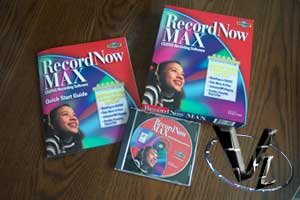
Recently, dropped us a line, informing us that the latest version of their CD authoring software may be of interest to us, and our readers. We received our RecordNow Max v4.0 in the mail, and since I was in the process of backing up my PC, this was as good a time as any to try out some new software. A quick look on their website revealed the features...
Easy to use interface
Burn DVDs (requires DVD burner or combo CD/DVD burner)
Includes DLA allowing you to read and write to a CDRW as if it were a floppy disk
Unlimited MP3 ripping
Record to multiple burners simultaneously
ISO and global image file support
Create Video CDs (VCD) and bootable CDs
Create Mix Mode CDs
Converts MP3 music on the fly
There were two things that immediately stuck out to me... MP3 ripping and the ability to burn DVDs. Although there are some CD software that can rip MP3s, I can't think of any that can burn DVDs. Granted, you need to get a DVD burner, but at least the feature is there should you need it.
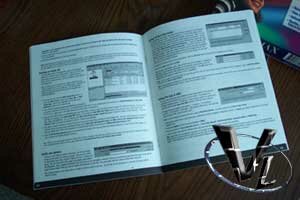
Being a retail package, it was nice to get an instruction manual. It's no garbage "Thanks for buying our product", and, "After installing, you're on your own to figure out our wacked out interface", either. It actually explains each part of the software quite clearly, and for the novice user, you'll be burning CDs in no time.
I, of course, put the manual aside and started installing. One day, this blatent disregard for user instruction will come back to haunt me, but not today, muahahahaha!! Erm, ok, back to the review...

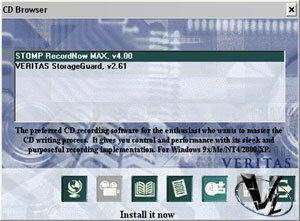
The only thing worth noting about installation is the "Veritas" splash screen. They aren't well known to the home consumer market, but they're an authority at the enterprise level. The fact that both Stomp and Veritas are business partners, adds a lot of credibility to the application. Then again, it could still suck, but we'll see about that.
You have the option of installing RecordNow, and/or . StorageGuard is a free utility that monitors your drive for data that's unprotected since your last backup. It's actually pretty useful if you don't want to backup stuff that's already been backed up before.
Every Microsoft OS is supported by RecordNow, except for the Server versions. I did find this unusual, since Veritas cut their teeth in the server market.
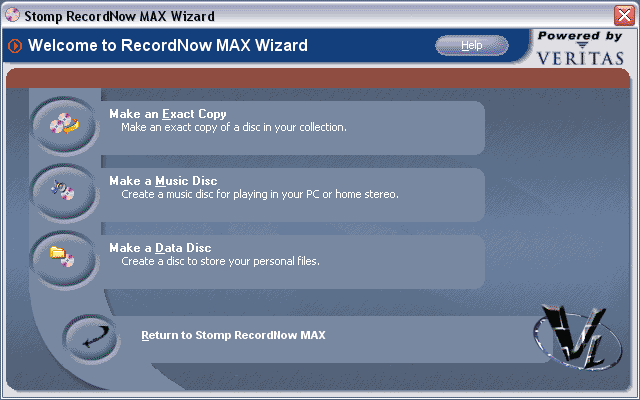
Much like most modern CD authoring applications, everything is wizard based. Unlike a few applications, RecordNow won't flood your taskbar with a bunch of resource grabbing background apps. Not much to say here. Simply start up the application, and choose whatever task you want to do.
Before we continue, it has been reported that if you have EZCD Creator already installed, this software would not. Ours did, so I can't confirm these reports.
CD Copying
I shouldn't need to remind you that you are obligated to follow any End User License Agreement that is specified on the media you are planning to copy. Illegal distribution of software and music is very, very bad. Now, with that out of the way, I usually make backups of software I don't want to lose. If my dog chews on it, or I misplace it, I'd be screwed. RecordNow Max makes CD copying a snap...
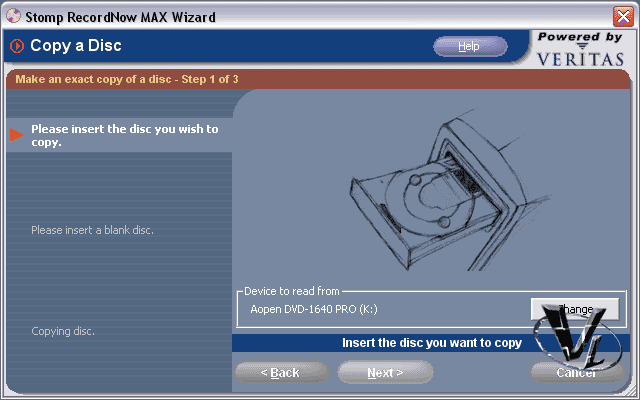
It's pretty much step-by-step when using a wizard. Simply pop in the CD you wish to backup, then the blank into the recordable, and wait until it's complete. We managed to backup one game CD without issue, but got stumped on another. The CD in question has "errors" written into it, but I thought the Plextor drive was the culprit. However, when we used CloneCD, the game backed up correctly. Damn that copy protection!
Data CD Creation
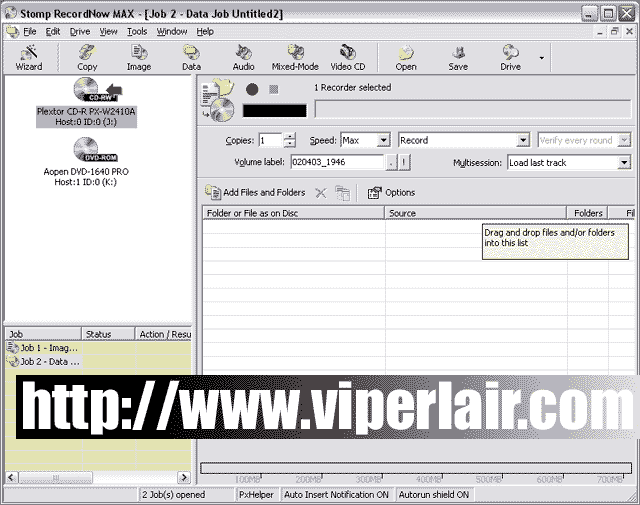
Other than wizard menus, RecordNow Max also supports drag and drop. Just open up an Explorer window, and drag the files you wish to burn on CD, and click record. Recording speed was as expected, about 5 minutes for a 650MB CD, which matches up nicely with Nero, which is over 40 seconds faster than EZCD. 40 seconds doesn't seem like a lot, but if you spend the afternoon burning CDs...
Music CD Creation

Music CDs are a snap to make as well. If you choose to create a CD from your MP3 collection, just drag-and-drop, or use the wizard. For best sound quality, and minimal errors, we burn at 1X, but the software allows you to use the maximum speed your drive supports.
A few features worth elaborating are burn-proof support, MP3 ripping capability, as well as the price. Provided your CD burner supports it, coasters will remain a thing of the past with this software.

Image Property of Stomp, Inc.
MP3 ripping worked as advertised, and with the capability of 320Kb/sec bitrates, your MP3s will sound good. Speed-wise, MP3s were ripped as fast as our Music Match software, though a bit slower than Audiograbber. Finally, we have the price. At a mere 50$, this is by far, one of the lowest price packages we've seen. A downloadable version is only 40$, making this a bargain.
Final Words
If you have a CD burner, which you probably do, then you know you need software for it. For the most part, the software you have will do the job. What makes Stomp's RecordNow Max different then?
Some of the high points are it's features. Typically, you'll need separate software to do specific tasks, such as burning DVDs, ripping audio, and of course burning CDs. Please be aware that we weren't able to test the DVD authoring capabilities due to the fact that, um, we don't have a DVD burner. RecordNow does it all, and at a much lower price point. It's easy to use, and doesn't flood your system with unnecessary bloat. It isn't as fast as some other software, but it's a lot faster than one of the most popular packages.
Things aren't perfect though. There is some incompatibility with systems with EZCD Creator installed (which isn't a bad thing  ), and it still hiccups with copy protected disks.
Anyone who is serious about backing up data, or media should definently check this out. You can grab a 30-day trial off there site, and I think you'll be pleasantly surprised.
Pros: Speedy, easy to use, feature rich, well priced.
Cons: Copy protected CDs are problematic, some incompatibilities with 3rd party CD software.


