Installation/Drivers
The installation of the card into the PCI slot went very easily, with the card being slightly out of alignment with the slot but that was easily remedied.
For drivers, when I first installed them it took a total of two reboots before the card and the software were installed. It was one reboot for the Santa Cruz drivers and then one reboot for the applications. To compare to the Live and Audigy it only took one reboot, as the software and drivers are combined.
But how much space does the drivers/software take up? The software installed was Playcenter/AudioStation, WaveStudio/AudioView, Surround Mixer/Santa Cruz sound panel and of course the drivers. For the Audigy the install was 153MB, while the Live 5.1 was 105MB. The Santa Cruz install was a 'paltry', at least when compared to the Audigy and the Live 5.1, 75MB. Having a slimmer install is more efficient and wastes less of your precious hard drive space and doesn't feel as 'bloated'. The updated drivers for the Santa Cruz are available for download, unlike Creative's products, and weigh in at a good 20MB download.
After the drivers/applications are installed the Creative cards so what that extra 30-75MB install did. The Creative cards now have both an auto loaded disc detector and/or an EAX video at start up, which really irritates me. The Santa Cruz's mixer is actually integrated into the standard sound controllers on the taskbar, unlike Creative products which uses a separate program for a mixer. The styling of the mixer was very nicely laid out and looked very professional.
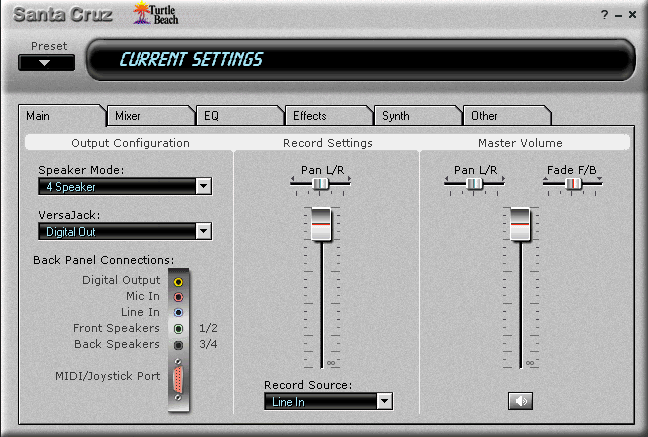
These are probably the two most important areas of the Santa Cruz's control panel, the Main tab and the Mixer tab. The Main tab controls what speaker mode the system is using, what the versa jack is used as: analog input, analog output (5.1 analog), or digital output; this tab also controls the main volume and fade/balance for the speakers and also the recording source. The mixer tab controls what can be heard and how loud it is, for example you could adjust it so that your wave audio will only come out the rear right speaker, while your midi comes out the rear left speaker and your CD is being played on only the front speakers.
Previous Page - The Card - continued
Next Page - The Versa Jack/Outputs
|