The Versa Jack/Outputs
Now lets look at the interesting feature only on the Santa Cruz, the Versa Jack. As we saw in the control panel the Versa Jack can be configured on the fly for one of three duties, digital out, analog out, or a secondary line in. The addition of the secondary line in is the only difference between the rear ports of this card and the other cards it was tested against. The extra line in is called the 'auxiliary-in' in the control panel. You can also record both the line-in and the auxiliary-in using the stereo mix selection in the recording tab.
The digital out function of the Versa Jack is just like that on any of the Creative cards with digital out, it just sends the signal to an external amp to be processed there. The digital out allows both Dolby Digital and DTS pass through and also allows for standard audio to use this path, such as wave, MP3's, Midi files, etc. to be processed. But the digital out does not allow for the signal from the line-in to be sent to an external receiver/amp, in fact I asked this of one of Turtle Beach/Voyetra's technical support people and the exact response is as follows:
"We apologize but the Line In will not pass out the digital out on-the-fly. It will need to be recorded first and then played back to get it out the digital output. Regards, Tom"
This isn't good as one of my main uses of my computer is as a TV, and I only use the digital out of my sound card to connect to my Dolby Digital receiver, so therefore I am reduced to not being able to listen to TV programs unless I record them. As a side note both Creative cards do allow for sound from the line-in to be sent through the digital out. The cable needed to connect the digital out an receiver/amp is a 1/8" to dual RCA audio cable (seen below), and to get the digital signal you need to connect the red connector to the digital connector on the receiver/amp. With the cable attached like that you can play both digital and analog sounds (as mentioned previously).
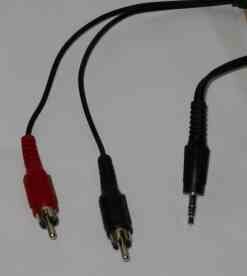
The analog out function of the Versa Jack works as stated, basically sending out the sub/center channel information to a compatible set of speakers/receiver.
Previous Page - Installation/Drivers
Next Page - Test Systems
|


