The ATI TV Wonder VE Remote Control Edition
The ATI TV Wonder VE Remote Control Edition ships in a rather compact box. Everything is tightly packed, and padded to protect it during shipping.
Other than the card and remote, you'll also have the drivers, audio line-out cable, software and quick start guide.

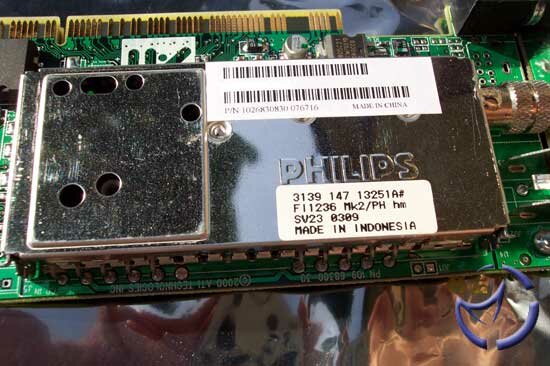
The card was much smaller than we thought it would be, but considering it isn't a graphics card in the traditional sense, there isn't any real reason to be loaded with chips on the PCB.
The TV tuner is the same as with ATI's recent All-In-Wonder cards. The Phillips tuner is an analog receiver, and since the majority of the public still uses an analog cable for TV viewing, there isn't really any point adding the digital tuner. The Conexant chip is responsible for the output of the image. No Theater 200 here folks, as that's reserved for their AiW cards.
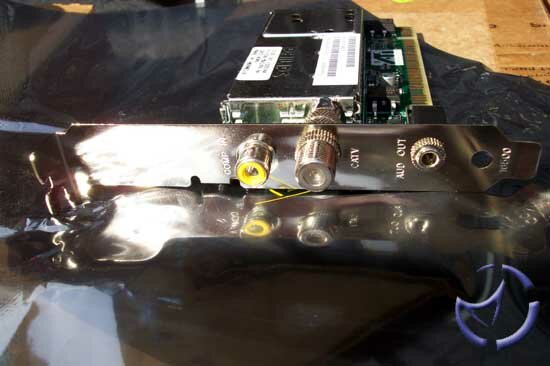
Your input options are fairly limited, but consider that you only need TV capture and sound, you'll understand why it's so bare.

Installation

Installation is as easy as it sounds, not much to say there. Simply remove the panel and insert the card into the PCI Slot. At the rear of the card you have a composite RCA jack, a 1/8 audio jack and the coaxial connector for your cable. In order to watch TV just plug your cable into the coaxial jack and if you wish to watch/record video(or camcorder) insert the RCA cable into the composite plug. As for the sound, take the output of the 1/8 jack of the TV Tuner card and plug it into the 1/8 jack line of your sound card. That's pretty much it. The wire required for installation is included with the bundle.
Software setup is a snap as well, just insert your ATI Wonder CD and click the install button. That will install the driver and multimedia center including the optional components as selected. To activate the remote, click "Remote Button" on the driver disk installation menu. In the maintenance section there is a display adapter information section, a problem reported section and a driver update (useful) button. It's not really a large bundle but may well prove to be useful to a novice user. Now you'll just need to configure some regional settings such as country and area code. A very nice feature is the ability to update the TV guide listings software, which we will get to in a bit. You'll control it through the sound properties menu of your sound card (especially line in).
Time for the good part, we'll start off with the most important thing, quality!! As ATI launches new products, the quality continues to get better and better. As for this TV tuner card in comparison with the TV wonder USB edition, we can see a slight improvement. Since you'll be using a monitor don't expect a crystal clear image in full screen mode, but it'll still turn out pretty good. In windows mode the quality is perfect, which even surprised me! You can constantly work with the application and it won't lag, only when you have an application minimized and you maximize it that you're going to see interference in your TV windows screen.
When it comes to sound, I'm more than a little disappointed. Here are a few reasons why. What's the use in having a TV tuner card in your computer with a nice sound system when all you have to use is mono sound? Hello, we're not in the 70's anymore! Which one will it be, the TV wonder VE or TV wonder ?
The TV wonder has stereo sound which I would have been willing to pay a few extra bucks for. A bit of a let down, mono is like a black and white TV. Although I expected a negative aspect to this product I would never have guessed it to be this. Second let down is the interference like lagging you get when you adjust the volume on the remote control. If you plan on recording be sure to set the volume "before" and not to touch it while it records. The third setback I found was the noise that you hear anytime you flip through the channels. Despite all of this there are a lot of upsides that will help downplay the setbacks.
The digital VCR and scheduled viewing are very useful. As the name implies, it lets you record everything on the TV channel or caption from and external source or tuner source. It records right onto your hard drive as well as giving you many options to choose from. The options for the recording are really quite good. You can choose your compression method and the size of the windows for recording and create custom settings so you may record a movie without using all your hard drive space within an hour. The predefined quality setting sare :
- DVD quality type MPEG 1 : video 352X240, NTSC 8 MB/s, audio 48000 KHZ, 15 Gigs : 4 hours and 26 minutes
- Good Type MPEG 2 : video 6240X240, NTSC 6 MB/s, audio 44100 KHZ, 15 Gigs : 5 hours and 53 minutes
- Longer TYPE MPEG 2 : video 640X240, NTSC 2.00 MB/s, audio 44100 KHZ, 15 gig : 17 hours and 7 minutes
- Video CD type MPEG 1 : video 352X240, NTSC 1.13 MB/s, audio 44100 KHZ, 15 Gigs : 1 day and 5 hours
Custom was quite handy, simply adjust the settings and save them once you've got them right. I was able to record a two hour film of decent quality and sound to under 700 MB. After a while of tinkering, I got the settings right, saved them, and was finally free of headaches.
Software
The Gemstar GUIDE Plus+ was a very useful program for me. It let's you view descriptions of all your channels while having a small windows in the upper left corner displaying what's currently on. The nice part is that you can schedule recordings from within the guide so you won't miss the show or forgot to press the record button. You can program it to automatically change the channel when your favorite show starts, that way you will never miss the beginning of a movie or miss the entire movie and hate yourself after because you were to busy chatting away! And the most important thing is that it's FREE !!
The Multimedia center is especially nice, no more having two or three different applications for your music, VCD and DVD players. It's a central point for all your multimedia. The file player, VCD and audio CD are all very impressive and of great quality. I won't much more into detail here since in essence we're indirectly talking about it throughout the review.
The Remote Wonder is so great, first of all it's A BIG PLUS for the radio frequency signal! Now one remote to control my TV in the living room or in my bedroom! All the televisions are plugged into my TV out card of the PC, so just one remote to control them all.

As for the web function, its very nice but not really that useful, more of a toy to play with. Using your remote to browse the net is a bit tricky especially since you don't have a keyboard on it, but for playing music and video it's fine. The DVD function works the same as a normal remote. The remote is quite handy for things like configuring the buttons(6) as you choose, like for instance shutting down your PC with a push of a button. I'd say a little more, but that's been covered in our Remote Wonder review.
A few more features to cover
My favorite TV wonder VE feature was the TV desktop which essentially replaces your desktop with the TV station you choose. It's quite cool since you can work with your application while simultaneously watching television. The hot word function was not the most useful thing for me but could definitely be for someone else. What is does is display the word that you selected in the caption screen. A nice one was the TV Magazine function which basically creates a magazine of your captions, pretty much like a book. The still capture option has it's ups and downs. I have a picture to show you, in slow motion video the capture is great (picture on the left - good.jpg), while on the other hand in fast action the picture seems to have a lot of missing pixels (on the right - bad.jpg)
Here are a few specs that should be helpful to the serious buyer, for comparing this card with other ATI cards.

Compatibility and problems I had
I won't deny that it took me four days of trying to set it up with my old motherboard, before I just gave up and bought a new motherboard. I had an ASUS A7A266 motherboard, which froze up all the time when I installed the card. I even considered exorcising the damn thing!! My ABIT NF7-S took it and then it worked like a charm.
Final words
If you use a TV tuner for video caption recording it's a great deal because your sound will be through your sound card, and the video is good quality. If you use the card for recording TV and don't mind the poor quality of mono sound it's still good. But for more serious user to have a great sound I would recommend going for the TV wonder (not the VE edition). All in all, when you look at the card's price (), it's a pretty good deal considering the radio frequency remote included. If you are on a low budget, and in search of a TV Tuner, this should be on your short list. If you have any comments, be sure to hit us up in our forums.

Pros: Good image quality , compression is impressive, simple to use
Cons: Poor sound quality, still images with glitches