With the X1900 family (R580) released last week, it marked a fairly major refresh in ATI's product line in terms of VPU features. It also happened fairly quickly as the X1800 series (R520) was released just last October. As many of you may have already seen last week through various online reviews, the R580's performance has improved drastically over the R520's numbers, particularly in shader performance.
While we expected some kind of All-In-Wonder to follow suit, we did not expect a new high-end part to show up a mere week after the desktop product, let alone a mere 60 days or so after their previous flagship All-In-Wonder. Never rest on your laurels they always say, and today we're ready to present to you ATI's latest addition to the All-In-Wonder family.
The ATI All-In-Wonder X1900 PCIe
Those of you following the X1900 announcement last week are probably well aware of the CrossFire, XTX and XT variants of the product but this AIW uses another SKU which is the X1900. As the name suggests, the All-In-Wonder X1900 PCIe is strictly a PCI Express part, and is their third such offering from the AIW X1000 family.
Pictured above to the left is the new ATI All-In-Wonder (AIW) X1900 PCIe; in the center the AIW X1900 PCIe and AIW X1800 XL; on the right, the rear shot of the AIW X1900 PCIe. In terms of total PCB space, there isn't much difference between the X1800 and X1900, but under the hood is a totally different story. The latest AIW sports 256MB of GDDR3 clocked at 480MHz. Some enthusiasts may bemoan the fact that ATI couldn't cram more memory, but given the complexity of the product, this was a necessary compromise.
This little cheat sheet should better illustrate the differences between the various high-end cards (previous and current) in ATI's AIW family.
|
All-In-Wonder Comparison
|
|
X1900
|
X1800 XL
|
2006
|
X800 XL
|
X800 XT
|
| PCI Express |
Yes
|
Yes
|
Yes
|
Yes
|
No
|
| Core Clock |
500
|
500
|
450
|
400
|
500
|
| Memory Clock |
480
|
500
|
400
|
490
|
500
|
| Vertex Pipelines |
8
|
8
|
2
|
6
|
6
|
| Pixel Pipelines |
48
|
16
|
4
|
16
|
16
|
| Microtune Tuner |
IC 2121
|
IC 2121
|
IC 2121
|
IC 2121
|
MT2050
|
| Shader Model 3.0 |
Yes
|
Yes
|
Yes
|
No
|
No
|
| Avivo, H.264 Acceleration |
Yes
|
Yes
|
No
|
No
|
No
|
As you can see, clock speeds for the core and memory are generally equal, but as the old saying goes, clock speeds do not always tell the whole story. Built on the 90nm fab process, the X1900 carries a core clock of 500MHz, which is between 125MHz to 150MHz slower than the high-end X1900 cards (CrossFire, XTX and XT), but still matches their VPU feature sets. These matching items include Avivo display, H.264 hardware acceleration and Shader Model (SM) 3.0 support.
The last item, SM 3.0, is of note as ATI gave it a major boost with the R580 family. Despite the same VPU clock speed as the previous generation AIW X1800 XL, ATI has increased the number of Shader processors from 16 to 48 in the AIW X1900. The number of discrete flow control units have increased by the same margin which results in almost triple the number of Pixel shader operations per second.

As mentioned earlier, the VPU is clocked at 500MHz and built on the 90nm manufacturing process. While the main benefit will be the ability to scale clock speeds upwards, the core will consume less power than previous models based on the R400 core. A PCI Express power is still required for the AIW X1900, but no adapter is included anymore. According to ATI, to properly meet the PCI Express specification, a proper CPU power supply is required to power each PCI Express device. All of the Radeon X1900 based cards including All-In-Wonder X1900 require that the PC's power supply has a graphics card connector on it.
Given that the AIW X1900 is clocked quite a bit lower than the X1900 XT and XTX, it does not need to use the huge heatsink and fan combo those cards require. The cooler on the AIW X1900 is copper based, and is identical to the one slot cooler found on the X1800 XL. Like the R520, the R580 runs at two different clock speeds depending whether you're in 2D or 3D mode, and impacts the fan speed accordingly. In a mATX case, the fan seemed to be spinning full speed all the time, and although it's quieter than the two slot coolers found in the X1900 XT and XTX, it is far from silent. In our Lian Li V1000 midtower, the noise was far more acceptable since the ambient case temperature was lower as well.

Moving on to the multimedia features, we have both the Microtune 2121 TV Tuner and the Theater 200 chip returning to the show for the latest AIW. The Microtune 2121 first showed up on the AIW X800 XL and it is significantly smaller than previous chips used. It does preserve some PCB space, and the new chip uses 10% less power than before (the new chip consumes less than 2W), therefore it runs cooler.
A mainstay since the R300 based AIWs, the Theater 200 is one of ATI's current Video Processing Engine (VPE) chips. It uses a 3-line comb filter and dual 12-bit analog-to-digital converters (ADC) to improve image and sound quality, and clean up some of the noise associated when converting an analog stream.

The IO connections are pretty much a straight copy of what we've seen before on recent AIW products. For your input and output options, moving from left to right is the first Coaxial connector for the FM receiver, followed by the second Coaxial connection for standard cable television. Next we have the input connection for the video input and output blocks (as well as a VGA output), followed by the DVI connection.
Along with the AIW X1900, there were the usual suite of items included. We received a press kit for review, but you can expect video cables, a remote, input and output blocks as well as multimedia software and Adobe Photoshop Elements 4.0 and Premiere Elements 2.0 in the retail package.

Much slimmer than previous models, the Remote Wonder Plus is a newer remote last seen here with the AIW X800 and X1800 XL. While the current lineup of All-In-Wonder cards are supported by Microsoft's Media Center 2005, the remote is not, and a MCE remote will be required to use Media Center's advanced features. The Remote Wonder Plus itself is good for up to 60', even through walls (though the wall thickness, and other factors will affect this) and is fully programmable to perform a number of Windows functions. If that isn't enough, there are plenty of free plug-ins all over the web to extend the functionality.

|

|
As we've seen from the last several AIWs, there are couple of stackable blocks for input and output, each with raised and recessed nubs to lock them together. The input block (left image) has four connection points in the following order; S-Video, Composite, left and right audio. The output block (right image) has the same connections as well (heading the opposite direction), plus the following attached lower on the cable; SPDIF, Line-In and Line-Out.

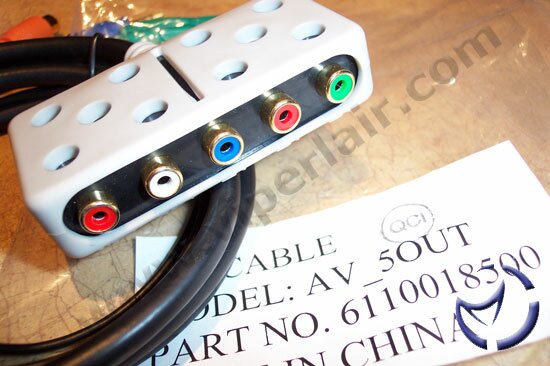
The special dongle above will allow you to either use a traditional CRT monitor as a primary or secondary display. Like before, the All-In-Wonder does not accommodate dual DVI display methods. Connected to this dongle are also the input and output feeds for the blocks mentioned earlier, as well as the block pictured below.

The YPrPb connections, AKA, Component, are the premium output connections for the All-In-Wonder X1900. Short of the newest high definition standards, this is one of the best video connections available, surpassing that of S-Video. Unfortunately, you are only limited to YPrPb output from the PC and not the other way around.
Gaming Performance
Athlon 64 3500+, Foxconn WinFast 6150K8MA-8EKRS, 2x1024MB Corsair XMS PC3500, Seagate 400GB Barracuda 7200.8, onboard audio enabled, Microsoft Media Center 2005, Catalyst 6.1.
The games to be used for benchmarking are as follows:
Doom 3 v1.3
Unreal Tournament 2004 v3355
Far Cry v1.33
Half-Life 2
3DMark06
We'll be pitting the ATI All-In-Wonder X1900 up against the AIW X1800 XL, MSI 7800 GTX and Asus N7800 GT. All the cards are packing 256MB of ram, clocked at factory defaults and using the latest drivers found online as of January 28, 2006.
All testing will be done with default driver installations, set to quality, with 2xAntiAliasing and 8xAnisotropic filtering turned on in the driver's control panel. 's default timedemos will be used to collect our scores. 3DMark06 was run with all the tests supported by hardware turned on, default options, 3 times and averaged out.
All games were set to their highest allowable game settings. The latest chipset and video drivers at the time of testing were used for the tests.
NEXT