
may not be a familiar name to most users, but they've been active in the memory market for quite some time. From regular ram modules, to CF cards, it was strange to me how they jumped into the video card market. Like Visiontek, PNY was one of the first to announce GeForce 4 products, and have them released to retail before most others.
We covered the GeForce 4 Ti4600 technology previously, so if you haven't read it yet, we encourage you to check it out. I have been sitting on this review for some time now, but let's face it, every Ti4600 review is pretty much the same. We're going to cut right to the chase, as by now, I'm sure you've read more GeForce 4 reviews than Jenna Jameson has done movies. If you don't know what I'm talking about, just forget it...
The Card
Like all GeForce 4s (MX and Titanium), nVidia have added nView capability to all their GeForce 4s. PNY has added this support to their product, so dual-monitor gimps no longer have to choose between dual action, or fast 3D gaming, but now they have an all-in-one solution.

![]()
![]()

A rather unspectacular box encases the Verto Ti4600. I'm not too sure about the box image. It doesn't really scream "POWER!!!!" to me, but rather, it just plain creeps me out. I think the designers have been watching too many Star Trek: The Next Generation (Borg) reruns.
You don't get a whole lot, which isn't surprising given the price of this card is among the cheapest of GeForce 4 Ti4600s. You get the manual, a driver CD, and a copy of Star Wars: Starfighter. I don't really know why that game was included, since the true power of the Ti4600 isn't exploited with it, but for those of you into console shooters, have fun. 

There have been reports of the PCB being purple. Um, ours was not. In fact, the card is about as "reference" design as they come. Nothing wrong with that, as this usally means lower prices, but don't expect much in the way of hardware freebies.

![]()
![]()

Speaking of reference, you got the standard nVidia designed fan. Because of it's design, heatsinks aren't needed on the ram. The GPU heatsink actually blows air over the ram. Personally, I think it looks cool, plus it gets the job done. The core is not overclocked, and speeds along at 300MHz.
Despite manufacturing ram, PNY doesn't do so with the Ti4600. Like most Ti4600 cards, they stuck with the Samsung BGA DDR SDRAM. Rated at 350MHz (700MHz DDR), our card's ram was clocked at the nVidia recommended 650MHz.

![]()
![]()

Unlike the Visiontek Xtasy Ti4600 we looked at, the Verto Ti4600 does not include the Philips video encoder/decoder (pictured top right). What does this mean? Well, to begin with, the S-Video port will only function as TV-out. You will be unable to capture video, let alone do any editing. Like we said, the Verto is one of the lowest priced Titaniums available, and you have to trim hardware somewhere.
Like all Ti4600s, the capacitors on the Verto Ti4600 may cause issues with some motherboards. The reference Ti4600 design does indeed follow AGP 2.0 specifications, so you're going to want to check your motherboard manufacturer to see where you stand.

Rounding things out are the I/O connections. nView is supported, but you'll need to grab a DVI-to-VGA connection if you want to drive two CRT monitors, as no such cable was included.
Overclocking
Overclocking such a fast card may seem like overkill, and unless you plan to play at high resolution, it is. As we've stated a dozen times before, low resolution is more CPU taxing, and higher resolution is more video card intensive.
We managed to get an overclock of 310/715, which seems to fall in the average range of most overclocks. I can say that the numbers were much better than our Visiontek results.
Benchmark Setup
AMD Athlon XP 2000+ (1.67GHz)
Asus A7V266-E
512MB Kingston DDR PC2100
3D Mark 2001 SE
Quake 3 Arena
Return to Castle Wolfenstein
Villagemark
Comparison Hardware:
Visiontek Xtasy 6964 GeForce 3 Ti500
ATi Radeon 8500 LE
Visiontek GeForce 4 Ti4600
As mentioned in our previous Visiontek review, we actually tested the PNY GeForce 4 solution earlier. This will be the last video test with the above test bed (since somebody won it last month). Realizing the Radeon 8500 and Ti500 may be outclassed for these tests, both are still fine cards for todays gamers. They were king of the hill not too long ago, and I'm including them simply for the sake of showing how far graphics speed has come. Because of the power of the modern video card, we're dropping all tests of below 1024x768 for the top end cards. I figure, if you paid 400$ for a video card, you better already have at least a 17" monitor and play at high resolutions. With the faster processors available, high resolution will shift the onus of the work on the video.
Quake 3: Arena
id Software's last game engine has spawned several excellent games since the release of Quake 3: Arena a few years ago. It's getting a little old, but many still use it as a measure of a video card's OpenGL performance. 1024x768 is a piece of cake for most new video cards now, so let's take a look, starting at 1280x1024.

The GeForce 4 Ti4600 flexes it's high resolution superiority by over 30%, when compared to the competition. Still, the older Ti500 and Radeon 8500 do very well, and any framerates in excess of over 150 will do more than enough for most people. Then again, with this much power in the Ti4600, why not go for more?

At over 150 frames per second, at maximum resolution, this is an impressive showing indeed, besting the previous "framerate kings" by over 25%. The differences between the PNY Verto and Xtasy Ti4600 are less than 1%, and well within our margin of error.
Return to Castle Wolfenstein
Grey Matter licensed the Quake engine to revive a classic. Return to Castle Wolfenstein uses a heavily modified Quake engine (it's actually modified Team Arena code), and therefore demands a more robust system to maintain Quake 3 framerates.
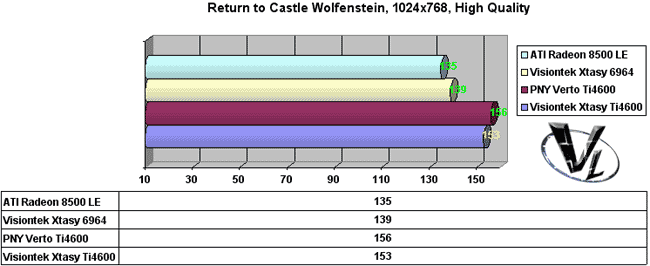
We no longer see the 200 frames per second we were used to with Quake 3, but all our contenders do quite well for themselves. Although not totally maxing out the Ti4600, it does keep a little over 11% in terms of framerates over the competition.
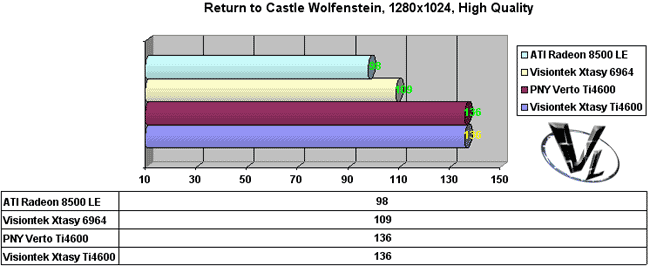
It's all about high resolution when we're talking about with the Ti4600. Older cards just can't keep up with the improved speed, and memory enhancements of the GeForce 4.
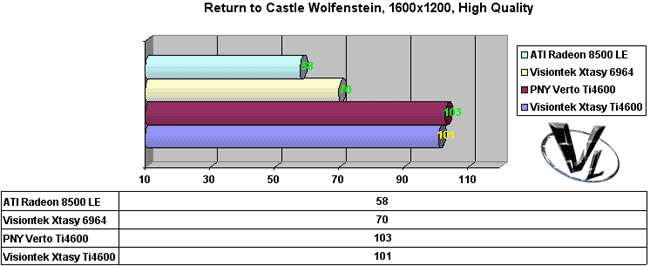
At over 100 frames per second, it's obvious who is the current high resolution king. Keep in mind that these are "averages", but the higher the average, the more likely the peaks and valleys of actual gaming will remain consistent.
3D Mark 2001 SE
A well known synthetic benchmark, we use it here for our Direct3D tests, as there aren't really many Direct3D benchmark programs I like that much. Add to the fact that you can compare yourself with other users add to it's value.
As with our previous benchmarks, 640x480 and 800x600 have been dropped. We chose the default settings, as well as test the AntiAliasing performance, including nvidia's new 4XS mode.

At 1024x768, this is the closest we've came to 10 000 3D Marks. Obviously, with a bit of tweaking, that number would have been attainable. It's about 15% behind, but the Radeon 8500 shows that it's still a contender for Direct 3D. I'm not really sure why the PNY kept scoring about 4% lower than the Visiontek, but that was the best I was able to manage out of it.

The Radeon maintains it's lead over the Ti500, but it pales in comparison to the Ti4600 scores. Keeping a 10% lead over the Radeon, the Xtasy is proving itself to be the current Direct3D champ.

By this point, we separate the dudes from the dudettes. At 1600x1200, we're seeing 3D Mark scores by the Ti4600 very close to the scores of the Ti500 and Radeon at 1280x1024. Take this as you will, but as we said before, 1600x1200 gaming is very possible now.

AntiAliasing has always been the thorn in a video card's side. Although there is a loss in performance, at 2xAA, we're still keeping above 8000 3D Marks. The Radeon 8500 isn't too far behind, but the Ti500 is faltering.

Going up 4xAA, we see a huge performance hit across the boards. The Ti4600 still does very well, when compared to the Ti500. A testament to nVidia's improvement to the architecture.

Dropping the Radeon 8500, we selected Quincunx AA via the Windows video control panel. Quincunx was nVidia's baby afterall, so we removed ATi's card from the equation. Comparing the Ti500 to the Ti4600, ...well, the benchmarks speak for themselves. I mentioned in my GeForce 3 review, and I want to point it out again. Quincunx isn't really all that nice. Actual gameplay felt jittery, and the image quality was more washed out than the other modes of AntiAliasing.

nVidia has been pimping their 4XS AA. It promises better image quality, as it samples pixels a little differently, and although the end result is a better picture, it hits the framerates very hard. Like we said, only Direct3D is supported at this time.
Villagemark
We added the Villagemark benchmark simply to test one feature, Occlusion Culling, or hidden surface removal. This trick is a good idea because, why render something you cannot see? No point in slowing the game down needlessly.
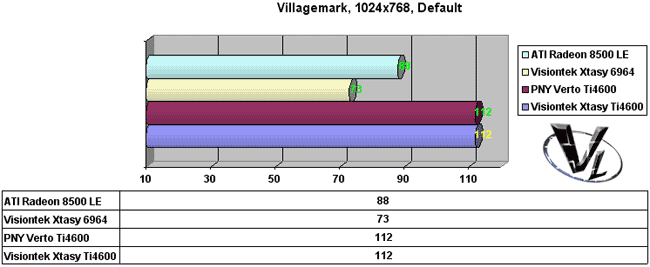
The benchmark was designed with the Kyro II in mind, but most modern video cards have some form of this optimization. Granted, the Ti4600 is a lot faster than the Ti500 in terms of raw power, but at almost 40 frames per second faster, my guess is the improved Occlusion Culling has been improved.
Image Quality
It's great having an ultra fast video card, but if your games look nasty, why bother? Thankfully, games look as good as they ever did, though in my opinion, the Radeon 8500 is still a tad nicer.
AntiAliasing was, well, pretty much the same as before. It's certainly faster now, but for OpenGL, image quality was comparable to the GeForce 3.
As with the GeForce 3, I didn't like Quincunx AA all that much, and much preferred 2xAA, and/or 4xAA. At 1024x768, I found 4xAA very nice, and playable so long as it's a single player game.
We tested the 4XS mode, and I must admit, the image quality was very nice.
Final Words
Like the Visiontek, this has been the fastest card we've tested, but I'll be honest and say that a Ti4600 would not be something I'd shop for now. The ATI Radeon 9700 would be on the top of my must have list for enthusiasts. Budget shoppers should opt for the Ti4200 or the ATI Radeon 9000 Pro. Then again, both ATI cards, though shipping to retail, may take awhile to become readily available.
As for the PNY Verto, well, it's fast, and relatively cheap for a Ti4600. It's about as "reference" as it gets, and there's nothing really anything special about the card that screams "buy me". I'm not trying to say our experience was bad, but there wasn't anything, other than the price, that makes me go "oooohhh"...
I liked the fact that it's cheap for a Ti4600, but it really lacks in the area of extras. The fact that it's a bare PCB does attribute to the lower price, so if you need a no frills Ti4600, this may be your ticket. Given that Visiontek is liquidating its assets, I expect to hear a lot more from PNY here in North America.
Pros: Still fast, relatively cheap, solid construction.
Cons: Plain, terrible software package, no extras.
Bottom Line: I'd recommend the Verto for anyone who simply wants a Ti4600 at the lowest price. For anyone who wants the fastest at the lowest price, I'd point then towards a Ti4200. If you have any comments, be sure to hit us up in our forums.
HOME


