|
Software
The Gemstar GUIDE Plus+ was a very useful program for me. It let's you view descriptions of all your channels while having a small windows in the upper left corner displaying what's currently on. The nice part is that you can schedule recordings from within the guide so you won't miss the show or forgot to press the record button. You can program it to automatically change the channel when your favorite show starts, that way you will never miss the beginning of a movie or miss the entire movie and hate yourself after because you were to busy chatting away! And the most important thing is that it's FREE !!
The Multimedia center is especially nice, no more having two or three different applications for your music, VCD and DVD players. It's a central point for all your multimedia. The file player, VCD and audio CD are all very impressive and of great quality. I won't much more into detail here since in essence we're indirectly talking about it throughout the review.
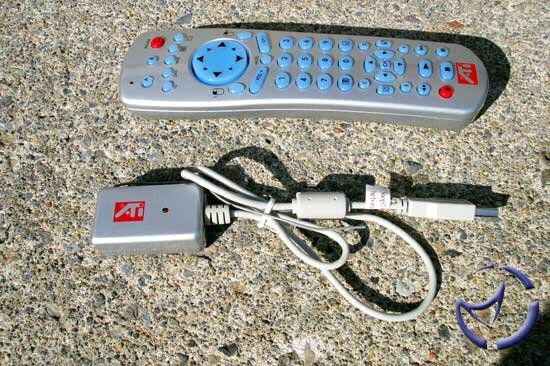
The Remote Wonder is so great, first of all it's A BIG PLUS for the radio frequency signal! Now one remote to control my TV in the living room or in my bedroom! All the televisions are plugged into my TV out card of the PC, so just one remote to control them all.
As for the web function, its very nice but not really that useful, more of a toy to play with. Using your remote to browse the net is a bit tricky especially since you don't have a keyboard on it, but for playing music and video it's fine. The DVD function works the same as a normal remote. The remote is quite handy for things like configuring the buttons(6) as you choose, like for instance shutting down your PC with a push of a button. I'd say a little more, but that's been covered in our Remote Wonder review.
A few more features to cover
My favorite TV wonder VE feature was the TV desktop which essentially replaces your desktop with the TV station you choose. It's quite cool since you can work with your application while simultaneously watching television. The hot word function was not the most useful thing for me but could definitely be for someone else. What is does is display the word that you selected in the caption screen. A nice one was the TV Magazine function which basically creates a magazine of your captions, pretty much like a book. The still capture option has it's ups and downs. I have a picture to show you, in slow motion video the capture is great (picture on the left - good.jpg), while on the other hand in fast action the picture seems to have a lot of missing pixels (on the right - bad.jpg)
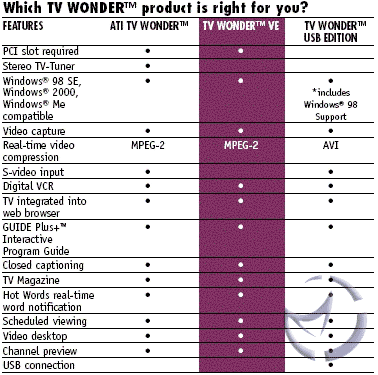
Here are a few specs that should be helpful to the serious buyer, for comparing this card with other ATI cards.
Compatibility and problems I had
I won't deny that it took me four days of trying to set it up with my old motherboard, before I just gave up and bought a new motherboard. I had an ASUS A7A266 motherboard, which froze up all the time when I installed the card. I even considered exorcising the damn thing!! My ABIT NF7-S took it and then it worked like a charm.
Final words
If you use a TV tuner for video caption recording it's a great deal because your sound will be through your sound card, and the video is good quality. If you use the card for recording TV and don't mind the poor quality of mono sound it's still good. But for more serious user to have a great sound I would recommend going for the TV wonder (not the VE edition). All in all, when you look at the card's price (), it's a pretty good deal considering the radio frequency remote included. If you are on a low budget, and in search of a TV Tuner, this should be on your short list.
Pros: Good image quality , compression is impressive, simple to use
Cons: Poor sound quality, still images with glitches

Agree? Disagree? Discuss it in our forums
Previous Page - Installation
Home
|


 ATI TV Wonder VE Remote Control Edition: ATI has always impressed us with their home entertainment based products. Today we'll see if they continue doing so.