Over the 25 years that Matrox has been around, they have built for themselves a reputation for making quality products, whether in the graphics field, their video group or their networking group. Many people recognize this desire that Matrox has to put quality ahead of other things in all that they build.
This is not to say that Matrox has not had its share of "failures". Their PowerVR powered M3D did not work as well as Matrox hoped. The lack of an OpenGL ICD for the G200 on release is still a sore point for many. More recently the dropping of support in Win2k and XP for hardware MJPEG capture boards (RRG, G200TV, G400TV) and the eventual departure of any video capture boards from the Matrox Graphics group angered many a user of these products.
Some of the early video cards, such as the Matrox Impression, the original Matrox Mystic or even the G400 were some of the best of their generations. Some people still use the Mystique even today. When the G400 came out it was one of, if not the, fastest video cards at the time and offered many new features to people, such as EMBM and DualHead.
The first Matrox video I encountered was a M3D, which I got as my first 3D accelerator instead of a Voodoo 1. It worked well, and I especially liked one game that came with the card. A few years after I had sold that card I was faced with a decision as to what video card to buy, a TNT2 16MB or a G400 16MB SH. I got the TNT2 and it didn't work, so I returned it and bought the G400 and it worked well in my K6-2/VIA system. I was so pleased with the card, and very curious about DualHead that I sold the single head card and bought a 32MB DualHead card. Both cards, which were bought about 2 years ago are still in running systems to this day, despite being overclocked to their maximum.
The release of the G400 was about 3 years ago and since that time Matrox has only released what could best be described as 'refreshes' of that card, in the G450 and the G550. But recently Matrox released the design of what seems to be the first of a series of new Matrox cards, the Parhelia 512. The card we will look at today is that first card, so let us look and see if the three years of waiting since the previous high end performance card, the G400, was worth it. Before we start however I would like to mention that this is going to be a very long review, but it will try to cover all the major points of the card in at least some detail.
The Parhelia
The Parhelia I received was an OEM model with 128MB of BGA DDR SGRAM (notice its not DDR SDRAM as many video cards use). Here is a couple of pictures of what the card looked like:
The Parhelia core features over 80 million transistors based on 0.15u technology, this is only eciplsed by the recently released Radeon 9700 card from ATi with over 100 million transistors. The OEM model of the Parhelia comes with a 200MHz core and 250MHz (500MHz DDR) memory. If we look at the memory we see that it is rated for 3.3ns, or is able to run at approximately 300MHz (the product corresponding to that part number can be ) which leaves room for, overclocking perhaps? Will the low clock speed of this card cause it any problems in our benchmark's, we will find out.
There is two DVI ports which allow for two digital LCD's to be put on this card as opposed to the one found on most of the GeForce series of cards (the only exception I know about is the Gainward GF4Ti4600 XP/750 Golden Sample) which is nice and helps future proof this card for DualHead with LCD's. The one feature I was hoping for was a separate SVHS port right between the two DVI ports as there is space and traces for it, which would possibly allow for future use of two DVI monitors and TV out.
The Parhelia - Continued
We will look at a few of the more interesting features of this card later on but for a more detailed set of specifications please look at . What else comes with this card, is the OEM version a bare bones part with none of the adapters that you would need for hooking up analog monitors? Lets see:

Here is an itemized list of what you get with the OEM card:
- DVI-VGA adapter (primary connector)
- DVI-Dual VGA adapter (secondary connector)
- VGA-SVHS/RCA adapter
- Driver CD
So you do get all that you need to use all three monitors on this card, as well as a connector to hook up your TV, whether it has an RCA or SVHS connector, to the computer. Missing was a connector for component outputs which would have been nice to see in a card that is designed for those who want the highest quality in TV viewing as well as normal 2D work.
DualHead/TripleHead/Surround Gaming
Lets look at one major feature that makes the Parhelia different from any other card in its price/performance range multi monitor support. Matrox was a pioneer in bringing multi-monitor support to the regular person, introducing it with the G400 series. This feature has slowly become commonplace in many video cards with all new Radeon and GeForce 4's coming with multi-monitor functions.

TripleHead can be useful for video editing
|

It can also be useful for writing a review
|

And lastly for playing games
|
While it may seem at first glance to just be an evolutionary and not revolutionary step forward for DualHead, TripleHead can bring much more to the table that DualHead could not. Lets look at a few of the uses for Triple Head. Unlike DualHead you can actually play FPS games correctly and not have the side of the monitor being where the crosshairs are as you would with DualHead. The TripleHead desktop give you plenty of space to work with as we can see above. You could have two websites open fullscreen on two of the monitors (research and a Parhelia review perhaps) and then have your html editing program open on the other. Or you could have a single video editing application (Adobe Premiere or Ulead Media Studio Pro) stretched across the all three screens, allowing you to see more of the all important timeline. Two of my personal favorite DualHead features is that of independent displays in Windows 2000, and the DVD-Max feature that puts any overlay video onto the second monitor/TV.

|

|
| TripleHead and the Reef demo |
DVD-Max in action (note small video window in upper right screen of left monitor) |
There are, in my opinion, two weak points with TripleHead at this point. First the resolutions of the three monitors are not independent, all three monitors are limited by the weakest monitor in both resolution and refresh rates. The other feature that is missing is to have two independent/dependent DualHead monitors and then have a TV using DVD-Max on the third head to allow video editors to have more space to work with while being able to watch the results on the TV. Or it could allow you to watch DVD movies while working with two other programs in the other windows. For other uses of DualHead please look at on it.
Drivers
A key to the any success of any video card is its drivers, because without drivers, your fancy new expensive video card is rather useless. The drivers used by Matrox are very different from those used for the G400. Matrox used the new .NET framework for these drivers. The drivers seem to use a large amount of system RAM as the image below shows.

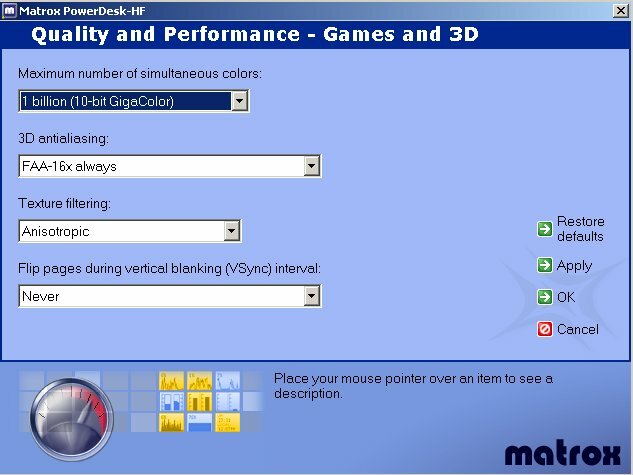
While the memory usage isn't really a big problem as it doesn't affect performance, and seems to release memory as it is needed, but it still seems like Microsoft's famous bloat has continued in .NET code. One major sore point that is rather strange is that Matrox has dropped support for both Windows ME and 98(SE) for the Parhelia before they even released a driver for these OS's. On a positive point Matrox has released basic 2D drivers for Linux, with support for TripleHead in Linux. The latest drivers for Win2K and XP (1.01.00.080) fix many problems that people had with the previous drivers, such as Madden 2003 menus, Moto Racer GP Pixel Shader issues, as well as one major problem that kept me from using Jedi Knight II, Fraps and 16X FAA together. They have also released an application for enabling/disabling TripleHead games very easily, called Appitimizer which I've found very, very useful. Lets see what these drivers look like though.
PowerdeskHF is a fairly nice program, as there are only about three levels of menus at the most, but in most cases it is only one click away from the main menu.
3D Features
As I'm sure that many have read about hardware displacement mapping, I will not go into detail about it, if you would like to read Matrox's documents on it . I find that this feature looks like it has allot of promise as it is included in the DirectX 9 spec and is supported by the Radeon 9700 as well, so far. The fact that it also uses small files (64*64 ~4kb) to create a large mesh, is something that lessens the dependency on bandwidth and still looks very nice as we can see below.

I think that this could be used in software programs, not only in games. A terrain generator program I use is based on the same principals as displacement mapping, in taking a topographic texture and then converting it to a 3D mesh for rendering as seen here:

To do something like this in real time would be a good enough reason to buy this card in my opinion, but as of yet this feature still is too new to have been added to many programs.
Now let us look at another very interesting feature, Fragment Anti-Aliasing. Unlike other anti-aliasing techniques used by ATi, Nvidia, Power VR and others, the antialiasing technology does not render the full screen multiple times, even though other techniques may be more efficient than rendering the screen 2-4X larger or 2-4X times. FAA uses a different technique to do the same thing as these other technologies, and it seems more 'elegant'. Instead of taking the same image and rendering it four times (or two times) FAA locates the edges of polygons, which are the cause of most of the jagged edges that we see on the screen.
Because there are less areas that need anti-aliasing, the amount of samples used by FAA is higher at 16 samples. There are problems with this technique however such as not working on stenciled shadows or any other jagged edges that aren't on a polygon's edge. This technique seems like it would only lose a little in the way of performance, but is any performance 'gain' lost in quality problems. We will see later on.
2D and TV Quality
Now, one thing that Matrox has been famous for is its 2D quality. Since we spend all our time on the computer looking at 2D images, it is only fitting to look at this most important feature of a video card. For this test we will use as a test monitor a slightly used (warning need Dell registration). The tests were run at 1600*1200 with a refresh rate of 85Hz (75Hz in the case of the limited Kyro II). The tests run were two html documents which filled up the entire screen, using IE 5.5 pressing F11 for full screen. As my eyes aren't the best I had my tester Peter from the audio tests of the Santa Cruz do the 2D quality tests, so note that this is one persons evaluation of the 2D quality and is a subjective test.
The three video cards used for four tests are as follows: G400 32MB DH; Parhelia Head 1; Kyro II 64MB; Parhelia Head 2 (Clone Mode). Let us see how he rated the cards (Out of 10):
| |
G400 (Reference) |
Parhelia (H1) |
Kyro II |
Parhelia (H2) |
| Black Text -White Back |
7 |
9 |
8 |
7.5 |
| White Text - Black Back |
7 |
8 |
7.5 |
8 |
| Overall Rating |
7 |
8.5 |
7.5 |
7.5 |
What can we see from these results? We see the Parhelia (at least the primary head) is the best when text is shown, as the reviewer said, it was a card that he would be able to use for a day in a normal work environment. The second head fairs worse, this may be due to it possibly using the 168MHz RAMDAC on the Parhelia and not the secondary 400MHz RAMDAC. The Kyro II is a fair surprise, as it is fairly good at displaying text. Overall the Parhelia seems to do better than my faithful G400 in these quality tests. In normal use I've found that the Parhelia is much brighter it seems on my monitor (after calibration), the G400 seems 'richer' and more to my liking, the Kyro II has very washed out colors and is fairly bad for normal use.
Now lets look at some TV Quality tests. For this test we used DVD-Max on both the Parhelia and the G400 to send a frame of the movie Chicken Run to my ATi TV-Wonder capture card. A 6ft S-Video cable was used for the video out, and was captured in IuVCR using HuffYUV compression at 720*480. The same frame was captured off the video using VirtualDub, and also the reference frame was also captured using HuffYUV compression direct from the DVD using Xmpeg 4.2a. As a note, both cards cropped some of the borders of the picture and as such there is a slight bit of missing image from the two cards in comparison to the reference image, also the default image quality was used. To download a uncompressed version of the pictures please click on this link. Lets see how the cards fair.

The Reference Image
|

The G400 Test Image
|

The Parhelia Test Image
|
We can see that the Parhelia gives a much brighter image, and in my opinion it gives a better image than the G400 does. The text is very nice with the Parhelia almost looking better than the reference images text. While the G400 has good TV-Out quality, in my opinion the Parhelia seems that much better, it may be the 10-bit precision decoding of the Parhelia that accounts for this, but whatever the case it does look very nice.
As for DVD decoding, the Parhelia's motion compensation helped it lower CPU usage on my 1.25GHz Athlon from the 26.9% CPU Utilization of the Kyro II (1:14 seconds to decode 4:45 of video) to 18.5% CPU Utilization (53 seconds to decode video). The video used was from "The Hitchhikers Guide to the Galaxy" as used in our video encoding tests. While not an extreme drop in utilization it is better than nothing, and can help free up resources that you need.
3D Quality
One thing that has increased immensely since the days of the Voodoo 1 apart from the obvious increase in speed, is the quality of the pictures drawn onto the screen. Matrox has always been a leader in providing quality 3D visuals with their cards, but is the Parhelia any different? As we have seen with technologies such as displacement mapping providing the option for more realistic landscapes, as well as the many other features included in the Parhelia and most other video cards, this card can give your eyes a visual 'feast'. Lets see how or if the quality changes if we add both FAA and ansiotropic filtering as options which can be used to enhance any game. Let us look at how these two features improve the level of detail/quality of the image using Villagemark. I will compare the Parhelia to the Kyro II which is the only other card that I have that supports both ansiotropic filtering and anti-aliasing.
|

Parhelia No AA or Ansiotropic filtering
|

Kyro II No AA or Ansiotropic filtering
|
|

Parhelia 16X FAA and 2X Ansiotropic filtering
|

Kyro II 4X FSAA and 2X Ansiotropic filtering
|
|

Parhelia 4X FSAA and 2X Ansiotropic filtering
|
Let us compare the two images. The images without anti-aliasing and only trilinear filtering are very hard to tell apart, in fact I couldn't tell them apart. When we get to the anti-aliased images with ansiotropic filtering we see a difference between the two cards. The Kyro II card seems to have the superior ansiotropic filtering, with more samples being used as we can see from about the middle left part of the grass. When we look at the anti-aliasing of both cards we see the Parhelia comes out on top. If we look at the hill in the background of the image there is a definite difference (at least in the uncompressed image found here). The quality of the 16X FAA is something that you can see as an improvement over the 4X SuperSampling of the Kyro II. However the ansiotropic filtering is something that should be improved as the current maximum setting is only 2X where 4-8X is much more common and usable.
Benchmark System
Before we see how this card performs, lets look at the system used for testing.
| CPU: |
AMD Athlon 1.25GHz (166MHz FSB) |
| Motherboard: |
Epox 8K3A+ (BIOS: 6/19/2002)
|
| Memory: |
256MB Generic Nanya PC2700, 256MB Corsair CM64SD256-2700 CAS 2; Corsair CMX256A-3200C2 |
| Hard Drives (In Order: Top-Bottom): |
40GB Maxtor 5400RPM (VL 40), 8.4GB Quantum CR 5400RPM, 2X40GB Maxtor 7200RPM (D740X) RAID0
|
| Video Card: |
Matrox Parhelia (200MHz/250MHz) |
|
Kyro II (195MHz/195MHz) |
| Operating System: |
Windows 2000 Professional Service Pack 2 |
| Drivers: |
Parhelia 1.0.4.231 (1.01.00.080 for UT2003 + JKII) |
|
Kyro II - 15.0084 |
| Other Cards: |
Sound Blaster Audigy, ATi TV Wonder, D-Link 538TX NIC |
| Cooler: |
Alpha PAL-8045T (50CFM Sunon Fan) |
| Case: |
Coolerguys Windtunnel IV |
| Power Supply: |
Enermax EG365P-VE 350Watts |
| Software: |
Fraps 1.8a |
| Direct X Benchmarks: |
Unreal Tournament 2003 Demo (First Bot Demo) |
|
Max Payne 1.05 (Final Scene VGA demo) |
|
Villagemark |
| OpenGL Benchmarks: |
Jedi Knight II Jedi Outcast (timedemo) |
|
Serious Sam SE (Little Trouble) |
|
DroneZmarK |
All game benchmarks were run at 1024*768 with maximum settings in the program, 1024*768 with maximum settings as well as ansiotropic filtering added as well 4X/16X anti-aliasing, lastly it was run at 1600*1200 with the maximum settings (no Ansio and AA). The synthetic benchmarks were run at 1024*768 and maximum settings with Ansio and AA and without these features. All tests were run 3 times with the highest frame of the closest two frame rates being used. Ansiotropic filtering as well as anti-aliasing were enabled in the drivers, in the case of the Kyro II ansiotropic filtering was enabled and FSAA was set to 4X, in the case of the Parhelia ansiotropic filtering was also set to enabled and FAA was set to 16X.
You will notice that most of the benchmark results will be not in just the average frame rate but rather the frame rate each second will be shown, this was done using Fraps 1.8a. These results are within a fairly small margin of error of only about <1%. which in my eyes is no different than any other anomaly that can come up between each system. The UT2003 demo used was using benchmark.exe, but after the tests were done, I went into the benchmark/results folder and used the frame rate for the first botmatch demo (dm-antalus).
Benchmarks
Synthetic Benchmarks
Let us first look at some synthetic benchmarks, and no there is no 3D Mark 2001SE, but rather Villagemark will show how well the 16GB/s of bandwidth the Parhelia does when there is many layers of objects to either render or not. DroneZmarK will be used to show how many triangles the card can put through in a more real world test. First lets see how the Parhelia fares against the Kyro II in Villagemark, which was designed to show off the Kyro II's tile based architecture, without AA and ansiotropic filtering.

| Video Card |
Min FPS |
Avg. FPS |
Max FPS |
| Kyro II: |
127 |
147.8 |
158 |
| Parhelia: |
50 |
73.51 |
94 |
What can we see with these results? It is obvious that the Kyro II outperforms the Parhelia in this test by about 2X. But we can see some interesting things with the graph. For instance the Parhelia had a much bigger swing between maximum and minimum frame rates at 44 frames while the Kyro II only had a difference of 31 frames, this could well indicate that the Parhelia is somewhat CPU bound even in this test designed to stress just the video card. What about if we turn on AA and ansiotropic filtering, is there any difference?

| Video Card |
Min FPS |
Avg. FPS |
Max FPS |
| Kyro II: |
8 |
9.98 |
11 |
| Parhelia: |
24 |
35.15 |
45 |
Isn't this interesting, the Kyro II has dropped to an average frame rate of 10fps and its maximum frame rate is only 11fps. The Parhelia on the other hand has its frame rate only cut in half compared to the non-AA tests. The slightly flatter curve shows that at these settings the Parhelia isn't as CPU bound as it was in the other test, but it is still has more headroom for improvement given a faster CPU.
What about DroneZmarK, how many triangles can this card push? Unfortunately DroneZmarK didn't work well with Fraps so we only have the maximum/minimum/average frame rates as well as the average T&L triangle throughput. First is 1024*768 without AA or ansiotropic filtering.
| Video Card |
Min FPS |
Avg. FPS |
Max FPS |
Avg. T&L Triangles |
| Kyro II: |
17.34 |
92.45 |
233.87 |
643583 |
| Parhelia: |
78.37 |
132.76 |
402.2 |
908510 |
Now for 1024*768 with AA and ansiotropic filtering.
| Video Card |
Min FPS |
Avg. FPS |
Max FPS |
Avg. T&L Triangles |
| Kyro II: |
4.7 |
12.14 |
39.18 |
85350 |
| Parhelia: |
68.73 |
104.72 |
277 |
732420 |
What do these results show? Like with Villagemark the Kyro II does not perform well with AA and ansiotropic filtering enabled offering 13% of its performance without these options enabled. The Parhelia only loses 22% of its performance when you enable these features, albeit that the ansiotropic filtering on the Kyro II is very superior in terms of quality. This benchmark allows the Parhelia to pull ahead of the Kyro II, as it does not stress the memory saving techniques of the cards, but rather looks at a slightly more realistic scene with complex T&L and other advanced OpenGL shaders.
But we don't play synthetic benchmarks (though some of us try), so let us look at some real world games, first OpenGL games and then DirectX games.
Jedi Knight II: Jedi Outcast
Jedi Knight was a highly anticipated game based on the Quake III Arena engine. With the quality of the first few games which are still played (Dark Forces, Dark Forces II) this game had a high level of quality to reach, and it seems to have succeeded. A bonus in this game is the addition of a demo that can be used to benchmark video cards, in our case, as well as other products. The quality of the models and textures is in my opinion much better than Quake III and as such is a better game to test the performance of video cards. The fact that frame rates in Quake III at 1600*1200 are well above what many consider 'playable' shows that that game is getting long in the tooth moves us to find a better alternative. So let us look at frame rates at 1024, 1600, and for the Parhelia only, 3072*768, yes that's right TripleHead benchmarks.
| Video Card |
Min FPS |
Avg. FPS |
Max FPS |
| Kyro II: |
51 |
72.93 |
97 |
| Parhelia: |
58 |
76.96 |
102 |

|

|
| Parhelia |
Kyro II |
What can we see at 1024 with no AA? Both cards perform about the same with the Parhelia having the larger variation in frame rates at the start of the test but the Kyro II acts in the same way in the second half of the test. Thanks to the newer drivers we see 2fps improvement at this setting. Both cards provide similar results with the Parhelia being only a few fps faster than the Kyro II, it seems that at least one if not both cards are CPU limited at this resolution. Do both cards perform the same when we turn AA and ansiotropic filtering on? Lets look at the results.
| Video Card |
Min FPS |
Avg. FPS |
Max FPS |
| Kyro II: |
6 |
10.30 |
16 |
| Parhelia: |
58 |
75.69 |
96 |

|

|
| Parhelia |
Kyro II |
Interesting, just as with the DroneZmarK tests the Kyro II plummets to less than 15fps while the Parhelia loses only about 1fps in total compared to the other 1024 settings. With the newest drivers I was able to actually run this benchmarks on the Parhelia. If we look at two graphs between the Parhelia with AA and ansiotropic filtering and without, we see that when these features are turned on the Parhelia becomes more GPU limited instead of CPU limited, but it still seems that a CPU upgrade might help improve the performance of this video card. How though does the Parhelia perform if we turn off AA and ansiotropic filtering and raise the resolution to 1600*1200 and in the case of the Parhelia 3072*768 as well?
| Video Card |
Min FPS |
Avg. FPS |
Max FPS |
| Kyro II 1600*1200: |
36 |
47.83 |
60 |
| Parhelia 1600*1200: |
50 |
73.26 |
89 |
| Parhelia 3072*768: |
52 |
65.10 |
79 |

|

|
| Parhelia 1600*1200 |
Kyro II 1600*1200 |

|
| Parhelia 3072*768 |
At 1600 the Parhelia doesn't lose much performance compared to 1024. The Kyro II loses a fair amount between 1024 and 1600 while the Parhelia doesn't lose much more than 5% between the two resolutions. The Parhelia is very CPU limited at all resolutions we tested, even at 3072*768 in TripleHead, the Parhelia only loses about 8fps on average and has a lower maximum frame rate than at 1600*1200. When we switched from the older 1.0.4.231 drivers to the newer 1.01.00.080 drivers, we noticed a 20fps improvement at 1600*1200 at high settings as well as at 3072*768.
Serious Sam SE Demo
When the first Serious Sam game came out many people were impressed with the quality of the graphics provided by this game. Needless to say the second game provides an even nicer set of graphics, with more realistic outdoor grass and trees. Let us look at how the Parhelia performs in this graphically demanding game. The settings were automatically detected for each video card with only ansiotropic filtering disabled, and anti-aliasing disabled, with it only being enabled in the drivers. Can the Parhelia perform as well as it did in Jedi Knight II?
| Video Card |
Min FPS |
Avg. FPS |
Max FPS |
| Kyro II: |
0 |
64.57 |
103 |
| Parhelia: |
18 |
51.92 |
97 |

Some interesting results here, the Parhelia can't beat the Kyro II. However the Kyro II did have a 'hiccup' where it went down to 0fps as we can see in the graph. It seems like the Parhelia can't go that far above 80fps for more than 1 second. Whether this is a result of Serious Sam not detecting the Parhelia correctly, as I could not get a correct reading when I ran benchmark() in the console, or a CPU limit, or even a video limit cannot be said for sure at this point, however the Parhelia still performs fairly well. What about when we add the extra features?
| Video Card |
Min FPS |
Avg. FPS |
Max FPS |
| Kyro II: |
1 |
6.9 |
13 |
| Parhelia: |
19 |
39.32 |
69 |

The Kyro II can't seem to perform all that well if we add ansiotropic filtering and 4X anti-aliasing, but things are different with the Parhelia. The Parhelia loses a total of 32% of its frame rate when we turn on ansiotropic filtering and 16X FAA. It also seems that the Parhelia is more GPU limited in this benchmark than as without these features turned on. Does the Parhelia perform the same in 1600*1200 as it does with AA and ansiotropic on?
| Video Card |
Min FPS |
Avg. FPS |
Max FPS |
| Kyro II: |
0 |
30.98 |
40 |
| Parhelia: |
18 |
33.68 |
56 |

As we see with this graph, the Kyro II is very GPU limited as its maximum frame rate is only 9fps faster than its average frame rate, and we can see that the frame rate graph for the Kyro II is flatter than the Parhelia. The Parhelia on the other hand is slightly more GPU limited than with AA and ansiotropic filtering enabled at 1024*768. We can see with Serious Sam that once the quality or resolution is turned up the Parhelia can beat the older generation Kyro II which previous performs about as good as a GeForce 2 in many games. Now let us look at some DirectX 8+ benchmarks.
Max Payne
Max Payne has been around for at least a year and was released soon after 3D Mark 2001 and offers much of the same technology seen in the lobby demo in 3D Mark 2001. The quality of this game is very nice and was the first DirectX game benchmark that I knew of since UT. The guys at made mod for Max Payne which we are using, and more specifically the Final Scene VGA demo. How does the Parhelia perform in DirectX, is it any different than with OpenGL?
| Video Card |
Min FPS |
Avg. FPS |
Max FPS |
| Kyro II: |
14 |
24.62 |
51 |
| Parhelia: |
21 |
39.91 |
66 |

|

|
| Parhelia |
Kyro II |
This test stresses the limits of the video card, in fact it is a worst case scenario for Max Payne as frame rates very rarely go this low during the game. But it is nice to see what would happen in the worst case, as this allows us to see how badly a card will perform and be able to see that card can do much better. These results are pretty good as the Parhelia performs about 62% faster than the Kyro II at 1024 without any extra features enabled. As we look at the graphs we see that the Kyro II is more GPU limited, while the Parhelia seems to be more CPU limited. The Parhelia peaks at about 6 or more places while the Kyro II only has 4 peaks that stand out, which helps show how CPU limited the Parhelia is.
| Video Card |
Min FPS |
Avg. FPS |
Max FPS |
| Kyro II: |
0 |
2.69 |
8 |
| Parhelia: |
16 |
30.48 |
61 |

|

|
| Parhelia |
Kyro II |
The Kyro acts like it has in all previous AA tests, it performs horribly with a frame rate of about 2.6 fps and a maximum of only 8fps. The Parhelia on the other hand loses only 30% of its average frame rate and only loses 5fps for its lowest frame rate. Does the pattern we've seen so far continue in this test at 1600?
| Video Card |
Min FPS |
Avg. FPS |
Max FPS |
| Kyro II: |
5 |
11.22 |
25 |
| Parhelia: |
10 |
24.95 |
45 |

|

|
| Parhelia |
Kyro II |
Here the Parhelia performs about the same as the Kyro II did at 1024*768 high settings, but in this case its at 1600*1200. However the graphs are very different, as the Parhelia performs better at one series of points (40-50seconds) than the Kyro did at 1024. The Kyro performs better than it did with AA and ansiotropic filtering enabled but it still performs only about half as well as the Parhelia does. All in all the game isn't as 'playable' unless it is fairly smooth, and this doesn't happen with the Kyro II, but does happen with the Parhelia at 1024 both with and without AA and ansiotropic filtering. Let us look at a demo that was just released on September 13, Unreal Tournament 2003.
Unreal Tournament 2003 Demo
This was a highly anticipated demo and when released it has some of the best graphics that I've seen so far. The inclusion of many DirectX 8.1b features that the Parhelia has is a nice bonus. Would the lack of a T&L unit slow the Kyro II down? Is the Parhelia CPU limited in this test? Lets find out.
| Video Card |
Min FPS |
Avg. FPS |
Max FPS |
| Kyro II: |
8 |
14.31 |
26 |
| Parhelia: |
19 |
25.54 |
36 |

|

|
| Parhelia |
Kyro II |
UT's heavy use of T&L in the game hurts the Kyro II which does not have a T&L unit, and makes the Kyro II very CPU limited, but even so you would need a 2.6GHz processor to be able to even theoretically be able to reach 30fps which many consider the minimum to play the game smoothly. The Parhelia fairs much better, but even at this resolution it is very CPU limited, as lowering the resolution doesn't change the frame rate much, if at all. Even with this worst case scenario at this resolution the Parhelia was playable in my eyes. Can the Parhelia still be playable when we add ansiotropic filtering and anti-aliasing?
| Video Card |
Min FPS |
Avg. FPS |
Max FPS |
| Parhelia: |
14 |
18.92 |
29 |

|
| Parhelia |
Unfortunately the Kyro II was running at a maximum of about 2fps with an average around 1fps, and as such was excluded from this test. The Parhelia loses about 7fps in average frame rates, but is still CPU limited, as we see the average is closer to the minimum. The minimum frame rate is found in the same general area in all the UT tests which help to show the areas that there is the most 'action'. How does the Parhelia fare when we turn the resolution up?
| Video Card |
Min FPS |
Avg. FPS |
Max FPS |
| Kyro II: |
4 |
6.92 |
10 |
| Parhelia: |
12 |
17.31 |
24 |

|

|
| Parhelia |
Kyro II |
We see at this resolution that both cards are GPU limited rather than CPU dependent. The Kyro II is almost completely GPU limited as we can see by the fact that the graph is almost fully flat. The Parhelia is fairly GPU limited, more so than in any other game so far, but it can still have some improvement by providing a faster CPU. Now that we've looked at four games as well as two synthetic results, we can see a better view of what this card can do.
Conclusion
We've looked at the card itself, the drivers behind the card, the features that are new on the card compared to other cards, the 2D/TV-out quality of the card, the 3D quality of the card, and lastly the 3D performance. So what can we conclude about this latest card from Matrox, can it compete with the likes of Nvidia or ATi?
The card comes with all the things that you need to use all three monitors correctly, in a DVI-VGA adapter, DVI-Dual VGA adapter, and a VGA-TV adapter, you do have all you need to use any function of DualHead or TripleHead. The fact that even though this was a OEM model it had all these additional pieces there to make sure you could use all your monitors without paying extra. The only difference between the OEM and the Retail model (apart from the box) is the speed, as the OEM is 20MHz/25MHz slower (Core/Memory). The installation was very good, in fact the board is shorter than the Kyro II and most newer video cards, which is a boon for most motherboards as it doesn't block the installation of RAM in my motherboard.
TripleHead is a useful progression of Matrox's DualHead technology. It can be used for multiple programs, or stretching a program over all three screens, or even be able to play a game over all three monitors. These features, in addition to the regular DualHead technology show that this is something that Matrox has put allot of effort into this feature of the card. What I'd like to see is an option for DVD-MAX when you have two monitors enabled (i.e. independent DualHead + a TV/Monitor with DVD-MAX).
The drivers are very good, but sadly there are no Win 98SE/ME drivers planned. There are however Linux drivers out and in fact Matrox has released 2D drivers only a couple months after the release of the card itself. The Powerdesk software uses the .NET framework which seems to take up a fair amount of system RAM. All in all the drivers are very nice and well laid out, with most options being just a click or two away.
The 3D features of this card are similar to what happened when the G400 was released with EMBM. Displacement mapping is also part of the DirectX spec and already the Radeon 9700 supports it which can help speed up the acceptance of this very good feature. FAA is one of the most elegant anti-aliasing techniques I have seen, although it does have some areas that it doesn't work on (i.e. anything not on the polygons' edge).
The 2D Quality of this card keeps up and raises the bar for Matrox, as our tester found it to be the best of our small group, and from use it is a better than most other cards for color quality. TV-Out is very nice, as it displays text in a DVD very crisply, and the movie itself is bright but not overly so.
The quality of ansiotropic filtering as well as FAA give this card very nice, and gives a quality boost even when the software doesn't support all the fancy new DirectX 8+ features. There is a problem with the amount of samples that ansiotropic filtering on the Parhelia uses, as it is only 2X or 16-tap where other cards can use 64-tap (8X) ansiotropic filtering. If Matrox can give the option for higher levels of ansiotropic filtering it would be a very nice.
Now on to the benchmarks. While we had no GeForce 4 or Radeon 8500/9700 to test this card against, we can see in all but two benchmarks the Parhelia performs much better than the Kyro II. This is a good thing considering that the Kyro II cost only $150 (Canadian) when I bought it. These two benchmarks the Kyro II performs better in are, Villagemark (1024 High settings) and Serious Sam SE (1024 High settings). This can be attributed to the Kyro II's better memory bandwidth technology (Villagemark), and Serious Sam can possibly be attributed to the the inability to detect the Parhelia correctly. When we turn AA and ansiotropic filtering on however the Parhelia shows its worth, being 'playable' in all the games I tried at 1024*768 with these options enabled, save UT2003 and possibly the NOLF2 demo. The Parhelia is about 6X or more faster than the Kyro II when the CPU is taken out of the equation, at least mostly. The Parhelia though is still very CPU limited on my 1.25GHz Athlon. It is nice to see that perhaps with a faster CPU, the currently 'unplayable' games would be very playable with the Parhelia at 1024*768 with AA and ansiotropic filtering enabled.
The price is a sore point however, as the video card is fairly high priced, though this is not unusual for a Matrox card as you are paying for the quality that Matrox delivers. The option for three monitors, with hardware OpenGL in TripleHead mode will definitely appeal to Professional users, with Matrox even releasing a driver for some professional programs, such as AutoCAD as well as others. Most people aren't willing to spend these large amounts of money for a video card every six months, and for those that need many 2D features and decent to very good 3D speed this is the almost perfect card. Even so the price in my opinion is still slightly too high for the average user with a price of over $550 (Canadian), unless you like these features (which I happen too) and plan on using them, either as a professional user, or as a long term purchase of your video card.
I would really like to thank for providing the Parhelia for testing. They helped me to purchase the Parhelia that I reviewed here, so go there now and if you mention that you came from Viperlair they might give you a discount. I would also like to thank Peter for his help in testing the 2D quality of the Parhelia.
Good Points
- Matrox Quality 2D and TV-Out
- Good Quality 3D images (FAA)
- Good Performance in 3D (Playable in most games at 1024*768 MAX)
- TripleHead
- Linux Drivers
Bad Points
- Price
- Not as 'fast' as other cards
- Could use some Bandwidth saving technology
- No Win 98/ME drivers planned
- No DVD Max on third monitor/TV
Bottom Line
I would like to see the price go down to about $200-275 (US) in which case this card would definitely be a Viperlair recommended card. Otherwise this is a very good card with many great 2D and 3D features, and some very good performance in most games I tried. A very good card but the price holds it back. If you got any comments, be sure to hit us up in our forums.