|
Introduction:
has been around for about 8 years as a division of Foxconn computers. CasEdge as the name implies, is specifically the chassis portion of the company that specializes in OEM, or the "whitebox" market. Since their introduction in 1995, CasEdge has been expanding in sales, and therefore product line. Today we look at the Diabolic series case, , aka the Minotaur.
A Few Notes:
While using this case I wanted to test it for three things: Ease of assembly/disassembly, cooling, and my personal taste on how the case looks. While using the case, I intentionally DID NOT look at the instruction manual in order to see how intuitively designed the Minotaur is. Simply enough, if the case requires a huge manual to figure out how everything is installed, then there is a problem, and I wanted a case that could be easily used. In doing this, I was as objective as possible to see if the case was easy to use. Also I used ONLY what the case gave to me. I did not use a single screw that did not come with the case.
The Package:
Because of my opportune location in Southern California, the shipping from CasEdge in Fullerton to my house only took 2 days. It arrived wrapped in plastic (not to be confused with shrink wrap) with the shipping details on top.

Unwrapped the box was as it would probably be if you found it on a retail shelf.

Inside, the case was in between two pieces of Styrofoam and covered to avoid damage during shipping, or harsh handling on a retail shelf.

The first time the case was revealed, it had sheets of plastic to make sure that the surfaces didn't get scratched while getting shipped. This is where I started to get a better idea of the quality of the case. The first thing I noticed was only the front bezel of the case was shiny. The rest of the case is sort of a matte black or a flat powder coated color (although not really a powder coat). The front bezel seems to look a little plasticy.

Inside The Box:
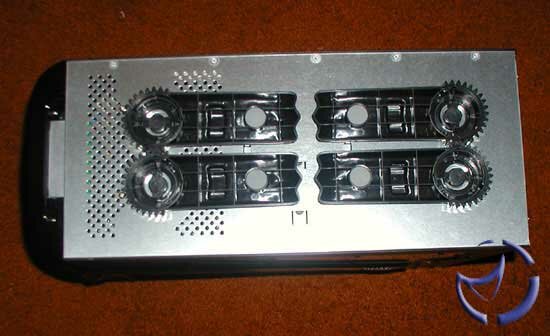
The bottom of the case has plastic casters that are attached to the case and are not meant to be removed. Pulling out one leg also moves the other via the gear teeth. The case doesn't stand very well without the legs being out, and has virtually no balance at all. Looking at the feet, I am reminded of gothic style architecture, specifically gargoyles. It's an interesting aesthetic touch.
Upon first opening the case, there we items taped inside to avoid getting jostled.

I first noticed the cold cathode, and the other items wrapped inside. Here are a couple of pictures of the inside of the case:
The green cup like thing is attached to the side panel, and is designed to let air in over your processor. Good idea, although I wonder why they choose green for the color rather than black or red.
On closer inspection I realized I hadn't found a box with screws or mounting items to mount peripherals inside the case with. But later I found out that all the mounting items were actually mounted inside the case underneath the harddrive mounting location here:

Those grouping of rails and screws mounted on the sides was all the installation equipment that came with the case. Rails are always a plus, but I later found out that these particular ones weren't as good as I thought. I will talk more on that later, during the installation process.
I noticed that the case had a motherboard tray, so I pulled it out and used it naturally. It wasn't the standard sort of motherboard trays that most companies give that usually slide out on rails. This one was a bit more difficult because I had to reach in and pull it out through the open side of the case. This process was compounded a bit due to the close quarters nature of the mid-ATX size of the case. The handle of the motherboard tray was coated in plastic (thank goodness), and it makes the task of getting the tray out a little easier.

The motherboard tray itself had edges left on it which one could cut themselves on if they were to use a bit too much friction. The tray itself already had all the mounting brackets already installed, and in fact are actually attached to the tray, and can never be removed.
Also I noticed that a motherboard barely out of ATX spec would not fit on this tray, due to the plastic handle on the motherboard tray. I wouldn't recommend any server boards in here. As you can see, with an a7n8x deluxe installed, looking down at the motherboard installed on the motherboard tray, the motherboard tray isn't visible at all! Only the green handle is visible on the side.
NEXT
|