Overclocking your PC for increased performance has its obvious benefits, since a faster PC will make your tasks quicker. Perhaps you encode a lot of video, are heavy into the Folding@Home scene or have some other CPU intensive task that you perform on a regular basis. Maybe you are a gamer and every fps counts. Perhaps you simply want to see how far you can push the limits of your system you have painstakingly put together. What ever your situation, when it comes to overclocking the first obstacle you will need to overcome is heat.
CPU's can be and are sold with a stock heatsink allowing you get up and running quickly. But everyone knows you rarely get any decent cooling performance from it, and overclocking is mostly a no go area. Performance heatsinks exist allowing you to substitute your stock heatsink for a cooler that will bring your temperatures down from the 50-60°C mark to the 40-50°C mark, increasing your chances for a successful overclock. But if you really want to take things further, it's time to look at watercooling. A decent watercooling kit will drop your 40-50°C to the 25-35°C mark, and do it with a lot less noise than a performance HSF can. Taking things yet another step further we find the TEC or Peltier, giving us CPU temperatures a little above freezing often around the 10C mark.
Beyond this is Vapor Phase Change Cooling which puts our temperatures into the subzero mark. DIY Phase Change Cooling Systems are built and used by a few folks, but they can be complicated to build, mostly messy, and dangerous; certainly not something you should get into without knowing what you are doing. But as with anything like this, there is always a turn key solution brought to market you can buy. Enter asetek, and their VapoChill series of Phase Change Cooling systems. What we have on the review bench here specifically is the asetek , a case separate enclosure containing a Phase Change Cooling system for your PC's CPU.

| Specifications |
" Extremely efficient compressor based AC cooling unit 115/230V
" State-of-the-art microchip based ChillControl - the brain of the VapoChill system which controls temperature, noise, sensors, fans and safety of the entire PC
" LCD display
" Computer stand-alone case in aluminum
" CPU-kit that supports AMD K8 and Intel P4 in one kit (Socket T Available)
" Cooling performance load/idle 200W @ -25.5°C / 0W @ -48°C
" Case color: Aluminum or Aluminum Black
" WEIGHT: 15 kg
" Base measure of 210x490mm. |
Theory and Technology
The act of overclocking a CPU increases the temperature since more work is being done at one time. As we often increase the voltages for increased stability as we go, we also increase the heat yet again, usually more so than increasing the frequency alone. These two factors coupled are why most users hit a ceiling in their overclocking attempts, so the lower your cooling is able to take you, the higher your overclock is likely to be. Another factor here is that your CPU runs on semiconductor physics; the lower the temperature, the greater the efficiency. Phase Change cooling is one way to get your CPU temperatures into the subzero, increasing your CPU's efficiency and allowing you a much greater ceiling for overclocking, assuming the rest of your system is up to the task.
A 'Phase change' might be better understood as a change of state; much like when you boil a kettle, the water is changed to steam or to go the other way, changing water to ice. Phase Change Cooling systems like the VapoChill are essentially not all that different from the fridge that's likely in your kitchen right now, however of course the end application is different. There are a total of 4 main components in the VapoChill system; the Compressor, the Condenser, the Capillary tube and the Evaporator (the CPU cooling head).

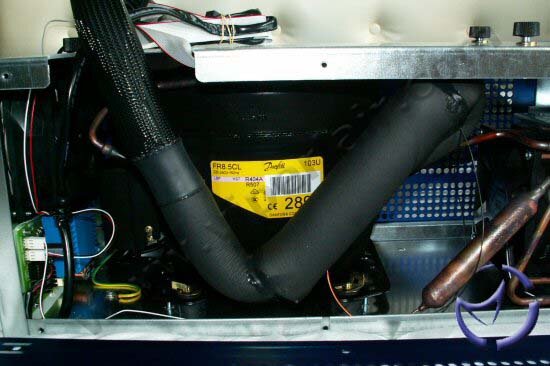
The Compressor – Exactly as it says on the tin, the Compressor in the VapoChill unit sucks the R507* refrigerant in its gas state from the Evaporator and puts it under a great deal of pressure, pushing the widely spread gas molecules together. This increased pressure has the side effect of creating heat.

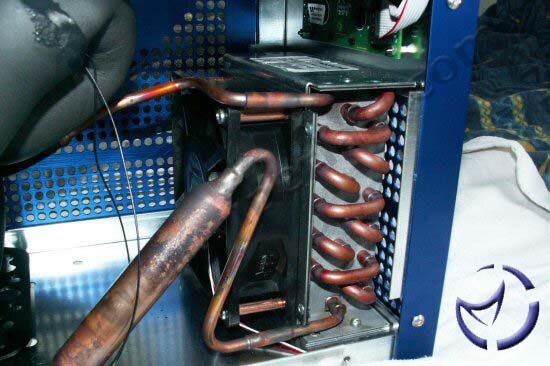
The Condenser – The compressed gas is passed through the condenser (a radiator basically), condensing the gaseous R507 down into a liquid state and in turn removing the heat produced by the Compressor.
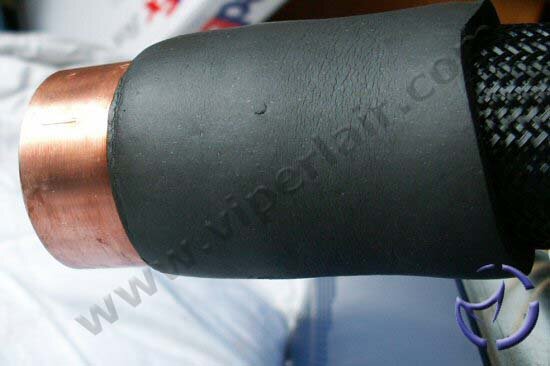
The Capillary Tube – By this stage the R507 is a pressurized liquid which is forced through the Capillary Tube, lowering in pressure as it goes on to the Evaporator.

The Evaporator – The molecules of the liquid disperse and evaporate back into a gaseous state, absorbing the heat from the CPU as part of the process, and in turn cooling the CPU. The gas is then passed back into the compressor and the entire cycle starts again.
*Phase change cooling systems for your PC are not a new concept, and the technology and components involved have undergone the usual evolution that any item would over time. This is true of the refrigerant used in the systems too, with the Vapochill moving from R134 to the currently used R507 in the Lightspeed [AC]. R507 is more effective with higher heat loads than previously used gases, allowing the Vapochill Lightspeed [AC] to remove 200w of heat.
NEXT


![asetek VapoChill LightSpeed [AC]](/images/reviews/cooling/misc/asetek/vpls/thumb.jpg)