|
The ATI Radeon 9800 Pro arrived in time to remind enthusiasts that they aren't about to hand back the performance crown to nVidia so easily. It's still a back and forth struggle between the two, with each manufacturer claiming victories in different areas.
One area ATI continues to dominate is the TiVo, multimedia market of consumer cards. With a Personal Cinema FX based card nowhere in sight, ATI has upped the ante with the release of the All-In-Wonder 9800 Pro. Like the AiW 9700 Pro before it, ATI puts jams PCB real estate with functional multimedia features, and their baddest VPU on the block. This is a departure from past cards where the VPU was slightly neutered, but which is no longer the case. Armed with the 9800 Pro, the All-In-Wonder series has gotten faster no doubt, but we'll also determine if the added speed will be worth the purchase price.
Specifications
The 9800 Pro is more than a speed-bumped 9700 Pro, as ATI have added a few other key improvements to their new flagship VPU.
DirectX 9++: The older 9700 Pro offers DX9 support, while the 9800 Pro exceeds specifications by offering support for Floating Point 3D textures and Cube Maps. Multiple Render target, Displacement mapping, and N-Patches are also supported. SMARTSHADER 2.1 adds a new F-Buffer technology (Fragment-stream FIFO buffer), which allows for improved pixel shader performance with an unlimited number of instructions.
SMOOTHVISION 2.1: AntiAliasing and Anisotropic Filtering (AA and AF respectively) can be a real video card killer, and with SMOOTHVISION 2.1, there are improvements made to the memory controller (in hardware) that allows for better performance.
HyperZ III+: The 9800 Pro has an enhanced Z-Cache that improves the VPU's ability to render real-time shadow volumes. When Doom 3 comes out, the 9800 Pro will be able to handle the stencil buffer data more efficiently than its predecessors.
The ATI All-In-Wonder 9800 Pro

Compared to the AiW 9700 Pro, both cards share a similar PCB layout. The AiW 9800 Pro is a little smaller than the reference 9800 Pro, and shouldn't have too many problems fitting in most setups.

One physical change from the 9700 Pro is the newer heatsink. Rather than being anodized black, it is now silver. It kept our card stable, though I found the heatsink to be very warm to the touch. The noise the fan generates isn't very loud, and your CPU and case fans will easily drown out the fan noise on the card.
The AiW version uses a four-pin floppy-type power connection. ATI pre-installs a molex-to-floppy power cable adapter in case you're out of those connections on your PSU. Manufacturer specifications suggest using a 300W PSU, but as we've always stressed, quality is of utter importance. I got the card to function reliably on a 200W PSU in our MEGA 651 and Shuttle XPC, but for most applications, I suggest sticking with a brand name 350W and up.

The AiW 9800 Pro uses ram, rated at 350MHz. The ram is clocked at 340MHz, so there is a little bit of headroom for overclocking.
ATI provides a standard DVI connection, with a DVI-to-VGA adapter. There is also a cable input and S-Video in. Unfortunately, there is no way (that is supported by ATI) to power two CRT/LCD monitors simultaneously. I have read where somebody managed to get this working with a DVI splitter, but I've also read there have been more cases of this not working.
The Theater 200

The Theater 200 is ATI's latest Video Processing Engine (VPE). Previously, the Theater and the Micronas stereo decoder handled the duties for the All-in-Wonder line, so the Theater 200 effectively kills two birds with one stone by doing both chores. The new chip is more than the sum of its parts though, and a few improvements were made along the way.
Thanks to its dual 12-bit analog-to-digital converters (ADC), image and sound quality gets bumped up a notch. The earlier cards used 9-bit converters, so the 12-bit ADC should improve things quite a bit by cleaning up some of the noise associated when converting an analog stream.
Image quality wise, there is a new (actually, it's third generation) 3-line comb filter. For composite video signals, the picture is improved because they are more accurately processed. Previously, only 2-lines were used for NTSC. Given the limitations of cable TV technology, the improvements may not be readily obvious, but a side-by-side comparison with an AiW Radeon 8500DV showed a slight improvement.
TV-Tuner

Since the 8500DV, ATI has reverted back to an analog TV-Tuner, rather than continuing with a digital tuner. I was a little confused with this decision, but since the majority of the public still uses an analog cable for TV viewing, there isn't really any point adding the digital tuner, which makes the chip more complex than it needs to be. This is also a cost saver, and in real-world use, the AiW 9800 Pro was no slower than the AiW 8500DV when it came to switching channels.
The Phillips TV-Tuner is used with the AiW 9800 Pro. Capable of tuning in 125 channels, in stereo where applicable, it should be enough for anyone with a standard cable connection. For satellite use, you'll have to tune into channel 3 or 4, and change channels via your satellite receiver.
One thing that has always bothered me was the inability to have picture-in-picture, or the ability to watch one station while taping another. The AiW 9800 does support this feature, aka MulTView, but you will need to have a separate TV-Tuner for this. I cannot verify what tuners are supported, but according to ATI, the TV-Wonder is required for this to work.
The Cobra Engine
Usually found in high end pro-sumer video cards, the AiW 9800 brings hardware MPEG-2 decoding and MPEG-2 encoding to the consumer level. The Cobra Engine is capable of Inverse Discrete Cosine Transform (iDCT), which is really a fancy way of saying it can decode MPEG-2 streams with minimal CPU usage. This can make a difference when viewing DVDs on your PC, as you no longer have to shop for a dedicated DVD decoder, and no longer have to rely on software based decoding.
Discrete Cosine Transform (DCT), or MPEG-2 encoding, is done in hardware, which for casual video editing buffs, means less work on your CPU. ATi claims a maximum of 20-25% of the encoding process can be taken off the CPU, which could result in less time needed to encode a movie file, or at least, more CPU processing power to perform other tasks.
Videosoap is a feature found within the Cobra Engine that cleans up the image. It isn't designed for MPEGs you already have, but rather, it uses four filters to clean up the signal coming in from the input video. Other than cleaning up the image, it also serves to reduce the file size since noise isn't something that can easily be compressed, so with less noise, you'll end up with smaller files.
ATI Remote Wonder

No TV package would be complete without a remote. You can read our full review here, but in short, it is a RF remote with a thirty foot range. It works through walls, though I doubt that will be something a lot of you will be doing while watching TV.
Installation
An important connection is the output cable, which is the Line Audio Out. You have to plug this into the line-in connection on your sound card. If you don't do this, you won't get any sound at all from the AiW 9800 Pro.
Video is outputted by a couple of methods. You have your standard DVI-to-VGA connection, or the video-out connection. How to use the VGA connection is obvious, and if not, you better click on the small "x" on your browser because I'm not going to explain why.
The AiW 9800 Pro comes with a video output cable that plugs directly into the video out of the card. This cable is used to output video (be it something you already pre-recorded, or if the PC is acting as a conduit for your home theatre setup) to a TV or VCR. Depending on the type of TV or VCR you have, you can output the video via S-Video or composite. Generally, as most home theatre junkies know (which I didn't, somebody just told me this), S-Video will result in a better picture, which makes sense, since the "S" means "Super".
The one obvious input is for the coaxial cable input. Be it cable or satellite, just plug the coax cable into the coaxial cable input, and you have access for up to 125 channels.
Other than being a TV-tuner, as well as a gaming beast, the other selling point of the AiW 9800 Pro is the ability to edit video. You have a 4-headed block, which is identical to that of the AiW VE, for the inputs that plugs into the video in port. The block provides a S-Video input and a composite video input. Like the output, you can only use one input at any given time, and which one you use will depend on how the video (VCR or camcorder) is being outputted into the input block.
For audio, the block also has left and right audio inputs. You will need to plug something in there if you want audio in whatever video you are outputting to the AiW 9800 Pro. The S-Video-in or composite-in only serves to run video into the card, so you'll need to run audio cables from the output device into the appropriate left/right channel inputs.
Oddly missing from the package is a FireWire connection. I suppose that there wasn't enough PCB real-estate, but since most new motherboards have onboard FireWire, this is not that big a problem.
Software
There are four major parts to the software bundle of the All-In-Wonder 9800 Pro.
ATI Multimedia Center 8.5
The real gem of the AiW software package is the new ATI Multimedia Centre (MMC) 8.5. As with previous versions, you can use this software to watch TV, play VCDs and DVDs, record your shows, as well as playing files much like Windows Media Player. The change with this version is the introduction of EASYLOOK. Those of you who have hooked up their computers to their TV are probably well aware that the interface for past MMCs was dreadful when viewing them from the couch. EASYLOOK is designed to make it less painful by offering a cleaner interface, which is friendlier for lower resolution TVs.
Guide Plus+
If TiVo functionality is what you want, Guide Plus+ is about as close as you'll get for the PC. From here, you can preview shows, set up recording schedules, and see what'll be on later that day or week. Every week, the program will need to download the latest schedule, and the big feature that it is free! Unlike TiVo, no monthly fees required.
One problem with the Guide Plus+ though is it isn't supported by EASYLOOK. As the standard EASYLOOK menu is easy to navigate from ten feet away, the Guide Plus+ is not.
Pinnacle Studio 8.4
For the aspiring Speilbergs, ATi packages Pinnacle Studio 8.4, which is an easy to use video editing software. It's not at the level of Adobe Premiere, but for casual directors, you can be editing Uncle Joe out of your home videos in no time.
Drivers
The days of shoddy ATi drivers are behind us. The ATi engineers have been pumping out great drivers since the introduction of the Catalyst, and they're quick to fix problems as they arise. They don't come out at the same frequency as nVidia's leaked drivers, but ATi is committed to making sure their drivers are WHQL certified.
Morrowind
Not really my kind of game, and not the best one to include to showcase the 9800 Pro's gaming ability, but I'm sure some of you will be happy it's included.
Test Setup
ABIT IS7 Max II Advance: Pentium 4 2.4C (12x200: 2.4GHz), 2 x 256MB Corsair TWINX PC3200 Ram, ATI All-In-Wonder 9800 Pro, 80GB Western Digital, Windows XP SP1, ATI Catalyst 3.6.
ABIT IS7 Max II Advance: Pentium 4 2.4C (12x200: 2.4GHz), 2 x 256MB Corsair TWINX PC3200 Ram, MSI FX5900-VTD128, 80GB Western Digital, Windows XP SP1, Detonator FX 44.03.
Test Software will be:
Code Creatures
Unreal Tournament 2003
Jedi Knight 2
Return to Castle Wolfenstein
Splinter Cell
Specviewperf
The comparison video card will be the MSI FX5900-VTD128. Benchmarks will be shown with and without AntiAliasing and Aninsotropic Filtering. We'll also be covering image quality and overclocking after the gaming benchmarks. All benchmarks are run at high quality, "Balanced" in the control panel settings.
For those of you who don't know, there are a lot of problems with high levels of AA and some games, which happens to be the majority of those tested today. We'll present some games where we didn't experience abnormalities, but in many cases, 6xAA was faster than 4xAA, which cannot be, but was the case during benchmarks.
Code Creatures @ 1024x768
This is a DX8 benchmark that makes good use of vertex and pixel shaders. Given that the AiW 9800 Pro is a DX9 part, we can get an idea of how it will handle an older video shader specification.

Code Creatures @ 1280x1024

Code Creatures @ 1600x1280

The MSI FX5900 previously scored the best in our labs with this benchmark, but the AIW 9800 Pro retakes the crown for ATI. With No AA or AF enabled, the AIW runs away in this benchmark, but the lead does get smaller as we increase AA/AF.
Unreal Tournament 2003
We used the from [H]ard|OCP and selected the high quality batch run at all resolutions. We'll be presenting Antalus, Citadel and Inferno benchmarks, with AA/AF on and off.
Antalus @ 1024x768
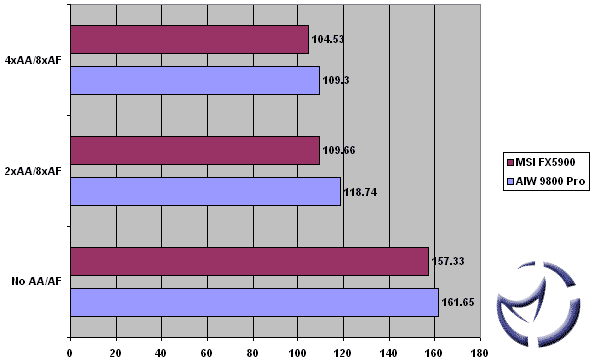
The AIW 9800 Pro maintains a healthy lead over the FX5900 at 1024 resolution. Though I prefer playing at higher resolutions, the majority of online gamers play at lower resolutions to maintain a higher framrate. Even then, 4xAA/8xAF stays above the 100FPS mark.
Antalus @ 1280x1024

A bit of a turn around here, as the FX5900 convincingly outpaces the 9800 Pro at 1280. Note that the 9800 retakes the lead at 4xAA/8xAF. What wil this do at 1600?
Antalus @ 1600x1200

At 1600, the 9800 Pro takes 2/3 of the tests. With no AA/AF, the FX5900 holds a 10FPS lead, but that quickly disappears once we turn on the AA/AF. At 4xAA/8xAF, the 9800 Pro leads by almost 14FPS.
Citadel @ 1024x768

Citadel @ 1280x1024

Citadel @ 1600x1200

For the Citadel benchmarks, not much has changed. At each resolution, similar trends for each card can be observed. It's a close call, but the 9800 Pro seems to have the overall edge at UT2003.
|


