Nvidia has been around for a while in the video world. They have continually improved the products that they have released, from the Riva 128/ZX cards to today's GeForce 4's. Since the release of the original TNT and then the TNT2 Nvidia has positioned itself as a performance leader in 3D gaming, taking the place of the famous (and dead) 3dfx. They have managed to hold on to this spot of fastest video card until the release of the Radeon 9700. But they have not just focused on providing the fastest video card, they have also used the advances in technology to improve the quality/speed of mainstream products. As such many technologies such as Hardware T&L and Vertex Shaders have been moved to the mainstream, and one product based on that is the GeForce 4 MX series.
As we have previously mentioned in other reviews of MSI products, MSI has diversified their established product line of motherboards to include CD-RW's and Video cards, one of which we are looking at today. Has the fact that MSI's video division is not the specific focus of the company mean that the quality of the video cards is not as good as it could be? Let us look at one of those cards, the GeForce 4 MX 440 with 8X AGP or as MSI calls it MS-8888.
The MSI GF4 MX440 8X-VTD8X (MS-8888, V: Video-in/T:TV-out/D: DVI)
What does this card have that all the other GeForce 4MX's don't? Or is there anything interesting in this card compared to other MX's? First lets look at the card itself for any visual clues.
The card itself is eye-catching as soon as you take it out of the box, as the red PCB is very different from what is considered standard, i.e. the green PCB. The retail box itself is also eye-catching as the picture screams (literally) at you. Another thing you notice as you look at the card is the inclusion of at least one DVI-I port, as well as a TV-in/out connector. Here is a quick list of what you get with the retail card:
- The Card
- TV-in/out connector
- 6' - 1.8m SVHS cable
- 10 CD's - games/applications
Overclocking
Due to the fact that the GeForce 4 MX is based on a refined .15µ process, and has 'only' 29 million transistors as well as using Hynix HY5DU283222F-36 FBGA 3.6ns RAM, this card has a very good overclocking potential. So how high did this card go, in allowing me to run all the benchmarks and games I felt like?
Albeit the normal speed I used for running this is about 390MHz core speed with a memory speed of 350MHz (700MHz DDR). But this is a very nice overclock, almost 50% for both the memory and GPU (42% and 47% respectively). We will see all the benchmarks with the overclocking settings used to see how much overclocking improves the performance of the MSI 8888. When overclocked I was able to play most games comfortably at 1024*768 with Quincunx AA and 2X Ansio enabled, but some games just didn't perform well enough (such as Madden 2003 and NBA Live 2003 demo), another point is that playing the NOLF2 demo there was a major loss in frame rate when the pocket light is turned on, making the game unplayable at any resolution.
Accuview Antialiasing
Now aside from the fancy name used to describe the antialiasing and ansiotropic filtering techniques employed by the GeForce 4 series, this is a fairly important area that helps 3D quality immensly in most, if not all, games, not just a few that support its features. I was unable to achieve anything over 2X ansiotropic filtering via the drivers (which is all I used) so if anyone can tell me how to unlock/access higher ansiotropic filtering modes, I would like to know. The antialiasing methods have been improved over the previous versions used by Nvidia, with samples now being taken from a better sample of areas. Another new mode is called 4XS (only available in DirectX) but provides better coloration by increasing the amount of data used to decide the color used in each pixel. Let us see how the these features stand up against the Kyro II and Parhelia (reviewed here). If you would like the uncompressed images please e-mail me.
| Parhelia |
MSI GF4MX 440-8X |
Kyro II |

No AA or Ansiotropic filtering
|

No AA or Ansiotropic filtering
|

No AA or Ansiotropic filtering
|
| |

2X AA
|

2X Horizontal AA
|
| |

Quincunx AA - Ansio
|

2X Vertical AA
|

4X AA + 2X Ansio
|

4X AA + 2X Ansio
|

4X AA + Ansio
|

16X FAA + 2X Ansiotropic Filtering
|

4XS AA + 2X Ansiotropic filtering
|
|
We can see the 4XS mode of antialiasing is a very large improvement over the previous maximum AA setting of Nvidia based video cards. If we look at the pictures of 4X AA and 4XS AA of the MSI card we see that this setting brings the image fairly close to the quality of the 16X FAA of the Parhelia, though it is still not quite as good as the Parhelia. The ansiotropic filtering of the Nvidia card is better than the Parhelia is in my opinion at the same settings, and is equal to the quality of the Kyro II's ansiotropic filtering. All in all given 4XS and 2X ansiotropic, this card is almost as good as the Parhelia for AA and better than the Parhelia and similar to the Kyro II in ansiotropic filtering.
Drivers
Most companies do not even modify the drivers that they brand as their own, and as such we will look at the latest drivers from Nvidia the 41.03's. Before we get on to some images of the menus, I would like to mention my experiences with the drivers before I was able to download the 41.03's. The 40.72 beta drivers we just that with this card, beta, in fact I could not get any testing done with them as the drivers caused what looked like overclocking errors on the screen as soon as windows was running. The previous drivers, the 40.42's had some interesting problems as I was not able to access the refresh rates higher than 75Hz with my Dell monitor (which does support 85Hz refresh rate at 1600*1200). But the most recent drivers are different than those older drivers in that all these problems are fixed. Lets look at some of the driver menus that are part of the new drivers.

The Nview main control panel
|

The Performance settings for both OpenGL and Direct 3D
|

The OpenGL settings menu
|

The Direct 3D refresh rate settings
|

The Nview rotate settings
|
The main panel on the left is an interesting addition, as it goes away once the focus is not on that window. One of the menus, NV Rotate is function that I found to be especially useless as all it can do is rotate the screen, so unless you have a LCD that can rotate, this feature is pretty useless. Otherwise the drivers are well laid out with most things being easy to access and not more than a click or two away from the main menu. I especially like the inclusion of a Direct 3D refresh rate tool, as this allows you to set the refresh rate you want when playing a game so that your eyes do not get sore from the low refresh rate default of 60Hz.
2D Quality
We all know that 2D quality is something that is very important to many people, and as was first introduced in our Parhelia review we will test the 2D quality of this card, both with black text on a white background and vise-versa. Also new is a image test with 4 800*600 pictures stitched together to create a 1600*1200 background image. The monitor used was a refurbished Dell 19" P991 Trinitron monitor, and all tests were run at 1600*1200. Even though the monitor used for testing is not the best in the world, it is still fairly evident of what many users are using/looking at. We used the Parhelia and MSI 8888's ability to clone the primary screen to test four of the 5 video out ports of these two cards (cannot test the third head of the Parhelia with clone). The reference video card was a Matrox G400 (not MAX) which is one of the better 2D video cards that have been released. So how did the MSI card do against these two 2D champions, in the eyes of our tester from the previous 2D test?
| |
G400 |
Parhelia (H1) |
Parhelia (H2) |
MSI (H1) |
MSI (H1) |
| Black Text |
7 |
8 |
8 |
7 |
7 |
| White Text |
7 |
7.5 |
7.5 |
7 |
7 |
| Bitmap |
7 |
8 |
8 |
8 |
8 |
| Overall Rating |
7 |
8 |
8 |
7.25 |
7.25 |
We can see that in this case (and note that it's just one person's testing) that the Parhelia has equal or better image quality than the MSI card. The text tests show a fair difference between the two cards, and the tester mentioned that the text displayed by the MSI card was visibly squished and thus harder to read, while Parhelia didn't have any such problems. Also note that the tester is a very conservative marker and does not raise marks easily, so this might just as easily have been a larger discrepancy between the two cards. One good note for the MSI card is that the tester couldn't tell the difference between the two heads of the MSI card.
TV-In/Out Quality
One major feature of this card is its TV-in/out capabilities, as this is one of the few distinguishing features between this card and most other GeForce 4 MX's available. The TV-in/out capability is provided by the Philips SAA7114H controller seen below, which connects via the SVHS port on the back of the card, to a 4-port in/out connector also seen below.


One problem I've found with the TV-in on this card is that it enables Macrovision, everybody's favorite answer to copy protection, but this can also enable itself when copying your home video's or other video work that you try to capture, which can lead to many headaches.
But what kind of quality can the TV-in part of this card produce, compared to the ATi TV Wonder. Both used the SVHS ports with the reference video being provided by the Matrox Parhelia video card's DVD MAX function. The video is the same used in our TV-out tests mentioned in our Parhelia review. So lets see how the MSI card fairs with video in, and if anyone would like the uncompressed images please e-mail me.

GeForce 4 MX TV-in from Parhelia
|

ATi TV Wonder TV-in from Parhelia
|
We can see that the ATi TV tuner crops the video fairly badly (look at the right part of the fence on the ATi version and the reference image below). We can also see a 'honeycomb' design on the ATi image, while the MSI image is nice and smooth. It seems that the MSI card is doing some realtime smoothing of the video while the ATi card isn't, as we can see by looking at the text as the ATi version is sharper.
What about TV-out quality? Let us see how all three competitors (G400, Parhelia, and GF4MX) handle sending the images to the TV-in of the MSI card. First we will see the reference image taken directly from the VOB file used for testing.

Reference Image
|

Parhelia TV-out
|

G400 TV-out
|

MSI 8888 TV-out
|
There was very little difference between the three cards, with the Parhelia and MSI 8888 taking the lead (note that this was just a loop back for the MSI test). All three are slightly brighter than the reference image, but this is a slight difference. All in all there should be no problem using any of these cards as a DVD out system or other TV based application.
Nview
One of the newest features of all Nvidia based cards since the GF4 is the inclusion of two monitor ports on the back of the card. This is something I've been waiting to see ever since I bought my G400, as I loved the ability to use two monitors via a single 2D/3D video card. Now that Nvidia and ATi have put this important feature into their mainstream video cards more support will be built into OS's and software. Nvidia's version, Nview, is more or less a piece of software that allows for more functionality to be used from the two monitors.
One of the most important features in my opinion, is the ability to drive two monitors at independent resolutions in Windows 2000. The way that Nvidia does this is very similar to what Matrox thought up to overcome the inherent limitations of Windows 2000, which does not support this feature (unlike 9x and XP). This feature allows you to use your old monitor that may not support the high resolutions of your primary monitor at its most comfortable resolution and still have more screen 'real-estate'. How do you enable this feature, well in the 41.03 drivers used to test you just click the check box in the image below and then reboot and you are able to use independent resolutions.

Another 'hidden' feature that I've found is that of a DVD Max clone. As I mentioned in my Parhelia review, this is the feature that I have found most valuable. It allows me to watch DVD's, though to enable this, you have to take an extra step using WinDVD, than you would normally, by going into setup and making sure the option in the picture below is activated. This is one more step than has to be done with the Matrox Parhelia or G4XX series of cards, which automatically send the video out off of any overlay surface. I didn't notice any other problems with this video mirroring option in the drivers, as it worked fairly well with all kinds of media, but does not work with non overlay surfaces. As such I don't really see much difference between this feature and DVD Max supplied by Matrox.

WinDVD Settings for Full Screen TV Video
|

Overlay controls
|
Lastly we will look at the rest of the Nview suite quickly. I found that there are many features that I couldn't find or didn't like with Nview. The most glaring problem I found is that you cannot only maximize to a single screen unless you change a setting and press another button ( ). I found this to be annoying as I don't always use the top right hand controls to maximize and minimize a screen, I would like to see the option in the Nview settings to only maximize to a single screen unless a key is pressed, much like what Matrox has done with their drivers. Another 'feature' I didn't like is the multitude of extra menus and buttons that Nview adds to your system when you enable it, in my book simplicity is best for these situations.
Let us now look at some 3D benchmarks of this card, but first lets look at our test setup.
Benchmark System
| CPU: |
AMD Athlon XP 1700+ @ 1539MHz (139FSB) |
| Motherboard: |
Epox 8K3A+ (BIOS: 6/19/2002)
|
| Memory: |
2 * 256MB Corsair DDR RAM - (173MHz, 2-2-5-2 2T) |
| Hard Drives (In Order: Top-Bottom): |
40GB Maxtor 5400RPM (VL 40), 8.4GB Quantum CR 5400RPM, 2*40GB Maxtor 7200RPM (D740X) RAID0
|
| Video Card: |
Matrox Parhelia (200MHz/250MHz) |
|
Kyro II (195MHz/195MHz) |
|
MSI 8888 (275MHz/257MHz) - (405MHz/364MHz) |
| Operating System: |
Windows 2000 Professional Service Pack 2 |
| Drivers: |
Parhelia 1.2.0.31 |
|
Kyro II - 15.0084 |
|
MSI 8888 - 41.103 |
| Other Cards: |
Sound Blaster Audigy, ATi TV Wonder, D-Link 538TX NIC |
| Cooler: |
Alpha PAL-8045T (50CFM Sunon Fan) |
| Case: |
Coolerguys Windtunnel IV |
| Power Supply: |
Enermax EG365P-VE 350Watts |
| Software: |
Fraps 1.8a |
| Direct X Benchmarks: |
Unreal Tournament 2003 Demo (HardOCP demo - Modified to Run dm-antalus Bot demo) |
|
Max Payne 1.05 (Final Scene VGA demo) |
|
Villagemark |
| OpenGL Benchmarks: |
Jedi Knight II Jedi Outcast (timedemo) |
|
Serious Sam SE (Little Trouble) |
|
DroneZmarK |
All tests were run at 1024*768 with all settings at maximum except antialiasing and ansiotropic filtering were not enabled, also they were run at 1024*768 with AA (4XS/4X for MSI, and 16X for Parhelia) and 2X Ansiotropic filtering. 1600*1200 was run without ansiotropic filtering and AA enabled. All tests were run 3 times with the highest of the closest two frame rates being used. Synthetic benchmarks (Villagemark and DroneZmarK) omitted 1600*1200 tests. All frame rates were graphed using Fraps 1.9 to measure the frame rate each second, as seen in the Parhelia review mentioned previously.
Benchmarks
Synthetic Benchmarks
We will again have no 3D Mark 2001SE in this review, but rather look at the very bandwidth intensive Villagemark as well as the game based DroneZmarK. First lets look at Villagemark, we have the 16GB/s bandwidth of the Parhelia, the extreme memory efficiency of the Kyro II, the 8.2GB/s of the MSI GeForce 4 MX, and lastly the 11.7GB/s of bandwidth of the MSI card when its overclocked. So lets see how the MSI card does in this Power VR based benchmark.

| Video Card |
Minimum FPS |
Average FPS |
Max FPS |
| Kyro II: |
127 |
147.8 |
158 |
| Parhelia: |
53 |
77.34 |
97 |
| MSI 8888 (405/729) |
37 |
47.11 |
59 |
| MSI 8888 (Stock) |
32 |
41.62 |
54 |
With the obvious exception of the Kyro II, with its almost 100% memory efficiency what can we see. The MSI card can't seem to improve very much, as a 42% increase in memory bandwidth only gives a 13% improvement in average frame rate. Compared to the 16GB/s of the Parhelia the MX needs at least 18GB/s, and probably more, to get near to the frame rate the Parhelia attains. It seems that the MX doesn't perform very well in memory bandwidth intensive applications, but as this is only one synthetic test, we cannot conclude anything about the card as of yet.

| Video Card |
Minimum FPS |
Average FPS |
Max FPS |
| Kyro II: |
8 |
9.98 |
11 |
| Parhelia: |
27 |
38.10 |
49 |
| MSI 8888 (405/729) |
13 |
16.91 |
21 |
| MSI 8888 (Stock) |
9 |
11.83 |
14 |
Here the results are slightly different, with the Kyro II plummeting from first all the way to last place. The AA and ansiotropic filtering of the MX is much better than that of the Kyro II, 'only' losing 75% of its performance while the Kyro II loses over 93% of its average frame rate. The Parhelia shows the efficiency of its AA technique only losing about half of its average frame rate. Now what kind of 'real world' triangle throughput can the MSI card give?
As we mentioned in the Parhelia article, Fraps and DroneZmarK do not really like each other, so therefore we will only show the average frame rate and triangle throughput as well as the maximum and minimum frame rates. Lets see how it performs at 1024 without any antialiasing or ansiotropic filtering.
| Video Card |
Minimum FPS |
Average FPS |
Max FPS |
Average Triangles |
| Parhelia: |
98.9 |
162.21 |
413.17 |
1099930 |
| MSI 8888 (405/729) |
119.28 |
193.25 |
391.3 |
1312900 |
| MSI 8888 (Stock) |
116.88 |
157.78 |
304 |
1099650 |
We can see that the MSI card performs very well in this test, at stock speeds it is a paltry 5fps behind the Parhelia, and has a much higher minimum frame rate. When overclocked the MSI card gains an extra 22% in the way of frame rate, and another 20% in the way of raw triangle output, out of the extra 45% improvement in both GPU's and Memory speed.
| Video Card |
Minimum FPS |
Average FPS |
Max FPS |
Average Triangles |
| Parhelia: |
90.64 |
125.96 |
309.38 |
873380 |
| MSI 8888 (405/729) |
39 |
62.50 |
106.68 |
437200 |
| MSI 8888 (Stock) |
27.16 |
43.10 |
99.21 |
302590 |
When AA and ansiotropic filtering are enabled, we see the MSI card looses a fair bit in the way of performance, about 66%+ of it to be exact. Overclocking this card yields better improvement than with no AA, as the improvement is almost perfectly in line with the increase in core/memory speed, showing a lack of CPU dependence in this test. However synthetic benchmarks are not what we use everyday, rather lets look at some real games that are played.
Jedi Knight II
Jedi Knight II is based on the heavily modified Quake III engine, which allows for very good graphics using this OpenGL based engine. So let us look at how the MSI 8888 performs in this game.

Parhelia
|

MSI 8888 (275/257)
|

MSI 8888 (409/364)
|
| Video Card |
Minimum FPS |
Average FPS |
Max FPS |
| Parhelia: |
75 |
97.5 |
120 |
| MSI 8888 (405/729) |
88 |
108.28 |
141 |
| MSI 8888 (Stock) |
86 |
107.78 |
137 |
We can see that at this resolution the MSI card is CPU limited, though it does have a 10fps lead over the Parhelia at this resolution, though this could be a driver issue. Overclocking this card doesn't do anything for the card as the improvement is only 0.5fps at the most. The graphs are completely different as we can see the final seconds moving in opposite directions, and the MSI card seems to peak at a higher level and its lowest frame rate comes in the final few seconds of the graph. Does this result change when we turn AA and Ansio on? Or does the card perform as it had in the previous tests, lets see.

Parhelia
|

MSI 8888 (275/257)
|
MSI 8888 (409/364)
|
| Video Card |
Minimum FPS |
Average FPS |
Max FPS |
| Parhelia: |
75 |
91.47 |
105 |
| MSI 8888 (405/729) |
48 |
59.03 |
70 |
| MSI 8888 (Stock) |
33 |
43.11 |
57 |
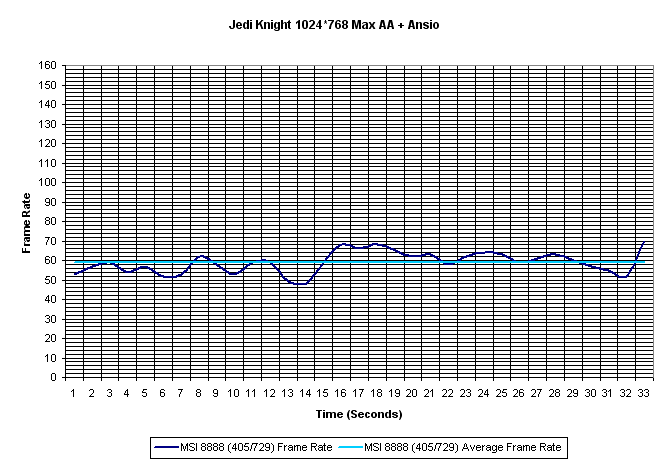
Just like with the synthetic tests the MSI's scores plummet, but not as much as some other cards do when AA is involved (Kyro II), though when overclocked the MSI card almost manages to reach the magical 60fps. When overclocked this card has a very small difference between minimum and maximum and as we see in the graphs, the video card seems to be fairly smooth as there is not allot of difference in the ranges. How does the MSI 8888 perform when we up the resolution to 1600*1200?

Parhelia
|

MSI 8888 (275/257)
|

MSI 8888 (409/364)
|
| Video Card |
Minimum FPS |
Average FPS |
Max FPS |
| Parhelia: |
75 |
85.39 |
98 |
| MSI 8888 (405/729) |
69 |
88.77 |
105 |
| MSI 8888 (Stock) |
56 |
74.65 |
90 |
The MSI card does very nicely at this resolution, outperforming the Parhelia at this resolution when overclocked. Overclocking the card helps very much, adding 14fps to its average but it does 'stretch' the graph, perhaps making it less 'smooth' to the user. Here the Parhelia wins, as we can see it is a smoother graph, even though it may not be the 'fastest' video card. Let's now look at another OpenGL game to see if the results seen here continues.
Serious Sam SE
Now let us look at another game, Serious Sam the Second Encounter. This game has some of the best graphics that I've seen in a game recently. As such it is very demanding on the video card, thus making it a very good benchmark. Lets see the results at 1024 without AA.

| Video Card |
Minimum FPS |
Average FPS |
Max FPS |
| Parhelia: |
23 |
62.1 |
121 |
| MSI 8888 (405/729) |
24 |
64.90 |
117 |
| MSI 8888 (Stock) |
33 |
51.52 |
89 |
We see the same type of results as we saw at 1600*1200 in Jedi Knight II. Here when overclocked, the MSI card is able to beat the Parhelia in this test. We note a small point as when overclocked and also with the Parhelia the minimum frame rate is slower than that at stock settings, which is most likely a small glitch in the benchmark test. We see a rather large jump in frame rates in this game, but still we see the overclocked MSI card do very well in this setting. What about when enabling AA and ansiotropic filtering.

| Video Card |
Minimum FPS |
Average FPS |
Max FPS |
| Parhelia: |
23 |
46.83 |
88 |
| MSI 8888 (405/729) |
18 |
24.75 |
37 |
| MSI 8888 (Stock) |
13 |
17.91 |
26 |
Here we see the results of a efficient antialiasing method in action. But even so when we overclock the MSI card it does help it improve by a large amount, though many will still call it unplayable with these settings. The MSI card loses 2/3 of its average frame rate by enabling these options. So how does the MSI card perform at 1600*1200, lets see.

| Video Card |
Minimum FPS |
Average FPS |
Max FPS |
| Parhelia: |
23 |
36.40 |
66 |
| MSI 8888 (405/729) |
25 |
36.46 |
64 |
| MSI 8888 (Stock) |
19 |
26.14 |
44 |
When we bump up the resolution we see that the MSI card does perform better than it does with AA enabled. When overclocked this card catches the Parhelia and has a very similar graph, which is nice to see, and it manages to be fairly 'playable' at this resolution. We've looked at a couple of OpenGL games, now lets look at some DirectX games.
Max Payne
When Max Payne was released, many found some of the features employed by it very nice. The graphics of this game were very good, with many textures being very highly detailed. Lets look at how the MSI GF4MX performs in this game, using the benchmark made by 3D Game Center. First we will look at 1024*768 without AA or Ansio

| Video Card |
Minimum FPS |
Average FPS |
Max FPS |
| Parhelia: |
24 |
46.71 |
85 |
| MSI 8888 (405/729) |
29 |
52.27 |
86 |
| MSI 8888 (Stock) |
21 |
41.90 |
85 |
Even at this resolution the MSI card is definitely GPU limited, as the increase in core/memory speed nets a 24% improvement in raw frame rates. The MSI card has some higher peaks than the other cards, as well as some other areas with much higher frame rates compared to the other two cards. We can also see that the MSI doesn't seem to have a problem with a particularly intensive area (71-80 seconds), perhaps at this point the memory efficiency is kicking in as most of the polygons are hidden behind the doorway. In any case we see the MSI card lose to the Parhelia at stock speeds, and beating the Parhelia by the same margin at overclocked settings.

| Video Card |
Minimum FPS |
Average FPS |
Max FPS |
| Parhelia: |
18 |
35.25 |
65 |
| MSI 8888 (405/729) |
7 |
17.54 |
39 |
| MSI 8888 (Stock) |
4 |
12.50 |
30 |
Just like the other games when AA and Ansio is enabled the MSI card takes a nosedive in performance. Even when overclocked the MSI card only has about half the average frame rate of the Parhelia. Looking solely at the MSI graphs we see something interesting, in seconds 30-40, the non-overclocked card has a higher frame rate than the overclocked card, where in all other parts of the test the overclocked card performs as good as or better than at its stock settings. In fact at these settings the MSI card is almost completely GPU limited as it gets a 40% improvement in frame rate over stock settings.

| Video Card |
Minimum FPS |
Average FPS |
Max FPS |
| Parhelia: |
10 |
27.23 |
56 |
| MSI 8888 (405/729) |
12 |
29.44 |
80 |
| MSI 8888 (Stock) |
8 |
21.80 |
57 |
We can see here as with most of the other tests that the MSI card outperforms the Parhelia when overclocked, by about 2fps. We notice that apart from the final 10 seconds of the test both the overclocked MSI card and the Parhelia perform about the same, give or take a frame here or there. When at standard speeds the MSI card doesn't perform very well, giving a average frame rate of 21.80 with lows that are under 10fps. Overall this resolution might be playable with the overclocked MSI card and on the outside the Parhelia, but at stock speeds the MSI card isn't playable at this resolution.
Unreal Tournament 2003
This is another game turned benchmark that was recently released. The detailed graphics are the best that I've seen so far, and thus makes a good video card benchmark. We will see how well the MSI card does in this very grueling test.

Parhelia
|

MSI 8888 (275/257)
|

MSI 8888 (409/364)
|
| Video Card |
Minimum FPS |
Average FPS |
Max FPS |
| Parhelia: |
18 |
26.01 |
46 |
| MSI 8888 (405/729) |
33 |
44.15 |
61 |
| MSI 8888 (Stock) |
26 |
34.94 |
48 |
Interesting results, the MSI card does very well in this test, especially when overclocked, as it almost doubles the Parhelia's average frame rate. When overclocked the range of frame rate increases but the minimum frame rate doesn't change much in comparison to the average frame rate. What about when we turn AA and Ansio on does the Parhelia win as it has in previous games?

Parhelia
|

MSI 8888 (275/257)
|

MSI 8888 (409/364)
|
| Video Card |
Minimum FPS |
Average FPS |
Max FPS |
| Parhelia: |
10 |
14.20 |
29 |
| MSI 8888 (405/729) |
12 |
15.40 |
22 |
| MSI 8888 (Stock) |
8 |
10.65 |
16 |
We see here that the MSI card loses to the Parhelia, but only when at stock speeds. When overclocked the MSI card manages to beat the Parhelia by about 1fps on average. but as we look at the graphs we see something interesting, the MSI cards graphs are very flat, with very little change throughout the test, while the Parhelia's frame rate graph does not have this problem. While the Parhelia's graph is flatter than with AA and Ansio turned off, it is still slightly CPU limited at this resolution.

Parhelia
|

MSI 8888 (275/257)
|

MSI 8888 (409/364)
|
| Video Card |
Minimum FPS |
Average FPS |
Max FPS |
| Parhelia: |
10 |
15.59 |
29 |
| MSI 8888 (405/729) |
19 |
26.33 |
36 |
| MSI 8888 (Stock) |
13 |
18.12 |
26 |
We see the same results as at 1024, the overclocked MSI card manages a 68% performance boost compared to the Parhelia. We also see the minimum frame rates of the MSI card, at both stock and overclocked speeds, is higher than the Parhelia. The overclocked MSI card is a bit more CPU limited at this resolution than the other cards as we can see more 'peaks' in frame rate with this card.
Conclusion
We've looked at many features of this card, from the packaged software, to the drivers, dual display technology, quality of all aspects of the card, its overclocking ability, and also its 3D performance. So what can we conclude about this card?
First lets look at the software. MSI was very generous in providing many pieces of software in this retail pack. From full games (4), to DVD software, to video editing software, as well as some other interesting utilities. Some of the software I found useless (GoodMEM, 3D Desktop, WMInfo, and Trend PC-Cillin) but some may have a need for a anti-virus program. Overall MSI did a good job on the included software.
What about the drivers, which are the only thing allowing you to use the card to its full potential. Some of the older drivers didn't work or work well with this card (40.41, 40.72b) but the latest 41.03 drivers had allot of features that the older ones didn't. I only found a few 'nitpicky' points about them, at least with my system you couldn't select more than 2X ansiotropic filtering, and also I would have liked for the independent display selection to be automatically selected, and as such be able to us all the Nview options with it enabled.
This brings us to the dual display technology of this video card. I liked the fact that the options for independent displays was present, as well as a rather obscure and hard to activate DVD MAX clone. These are the two major features that I use in my normal computer usage as they allow for more desktop space with a smaller monitor or the ability to send full screen video to a TV or second monitor without having to maximize the video on the main display, thus allowing you to get on with your work. However there is one point to remember, which is mentioned in the manual, you cannot use the bottom VGA only port at the same time as you are trying to use the video out features of this card, its an either/or situation, VGA or TV-out only.
But one of the most important parts of any video card is its quality, because if the quality isn't good then its worthless. The 2D quality was fairly good, but had problems displaying text correctly without squishing it. 3D quality was very good once 4XS AA was enabled, as it was looking very close to Matrox's 16X FAA in terms of removing and smoothing the 'jaggies'. TV-out quality was very good, but I was unable to test it fully as the best TV-in I had was courtesy of the cards TV-in port. The TV-in quality was better in some respects than that of the ATi TV Wonder, as it accurately represents the reference image, though it does 'smooth' the video (seen in text).
The overclocking of this card was very impressive to say the least. With both the core and memory gaining an additional 40%+ improvement from overclocking it shows that MSI was committed to providing a overclocking friendly board. While these kinds of improvements probably will not be seen on every board, ever half of this improvement is still better than no improvement at all.
Lastly the 3D benchmarks, which many people find the most interesting. In most cases the MSI card can beat or tie the Parhelia but only when overclocked. When AA and Ansio are turned on, the MSI scores plummet, sometimes performing at about half (or even less) the frame rate as it has without these features enabled. In most cases with newer games the MSI card isn't really that playable with AA and Ansio enabled.
So what kind of card is this? To my eyes this is a basic all-around card with most anything the learning (very early on) video editor needs, apart from software. This card has fairly good 3D abilities that allow it to perform well at 1024*768 in all games, though turning AA and Ansio on isn't always a good idea. The price of this card is very attractive as it is only about $110(US) according to pricewatch.com (about the same price as some Ti4200's) but has many more features included, and here in Canada at my local parts dealers, it is far cheaper than any Ti4200 card available.
However I did run into problems with this card, and more specifically the Intervideo WinProducer software which wouldn't install on my machine. I e-mailed MSI's technical support and received an automatic reply (check FAQ's, forums etc.) which I did but I found no solution to my problem there. Therefore I e-mail technical support back over two weeks ago and still haven't received a reply, and the solution was fairly simple (software needs a c: drive while I only use d: and up).

Good Points
- Video In/Out
- Good 3D Performance
- Great Overclocker
- Very nice software bundle
- Good dual display modes
- It's red :)
Bad Points
- 2D isn't the greatest
- Fairly bad support
- Some special requirements for dual display
- Older drivers have problems
- AA + Ansio performance fairly bad
- Some software problems
- AGP 8X Useless
Bottom Line:
If you are looking for a good all-around card, then this may be the card for you. It has plenty of extras (software, overclocking ability, etc) and good performance (for a MX), though its 2D quality may let it down. If you got any comments, be sure to hit us up in our forums.