The Motherboard - LAN/CoreCell
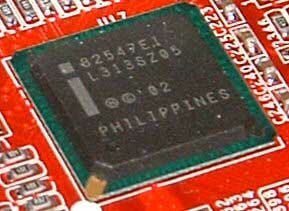
Next there is the Gigabit LAN card, that uses the controller. What is so interesting about CSA, that makes it so different from using a standard PCI 32/64 gigabit card? Simply put CSA, or Communication Streaming Architecture is just like the Hub link between the 865PE and the ICH5. This means that the gigabit card doesn't have to go through the PCI bus, which if used to its maximum, would saturate the PCI bus very quickly. It also means that the Gigabit LAN card can get its maximum bandwidth of 2Gbps (266MHz bus * 8 bit). But does this controller help get faster speeds or does it help lower PCI bus usage for everyday use? In our benchmarks we will find out.
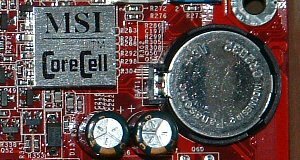
Now let us look at a very interesting piece of hardware/software that is fairly unique to MSI. This is a feature of both hardware and software, called CoreCell™. What does this chip do that makes it so unique so as to have its own special name? Basically its a combination of a temperature monitor, as well as a built-in thermal control. There are four basic areas that CoreCell works at, they are BuzzFree, LifePro, PowerPro, Speedster. Lets look at all the pieces of this piece of hardware/software.
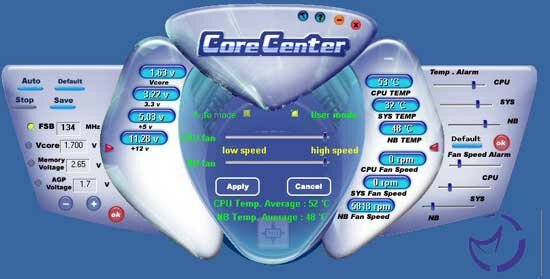
BuzzFree is basically about lowering the noise of your system, hence the name. With the Corecenter software installed you have the option of allowing the system to automatically control the fan speed of the CPU fan as well as the Northbridge fan. While this will not reduce the noise level of your video card fan, or most other fans, especially those not connected to the motherboard 3 pin header. Their reference of 50% less noise is, even in their publication only during the time the system is idle. However this will not happen if you have multiple other fans included in the system. It is nice to see a software program that controls the CPU's fan speed, but you can do the same thing in hardware with many different controllers.
LifePro is the same thing as BuzzFree, it 'prolongs' the life of your fans by using it as little as possible, which makes less noise at the same time. This also checks on the motherboards status to see what needs to be utilized. PowerPro takes the form of controlling the power that the system uses, perhaps allowing for a longer life and better stability for the system. It also promises better overclocking, though how it can do that while increasing power management it is hard to understand.
The last feature of CoreCell is its overclocking ability, called Speedster by MSI. MSI has provided many overclocking features in the BIOS of this system but also from the software for Windows. We will look at the overclocking abilities more so when we look at the BIOS. However most of the features of the BIOS can be found in the Wndows software.
The Northbridge is cooled by a small but fast fan with a multicolored LED inside it. The heatsink itself is an adequate size, being slightly taller than the heatsink of the 845PE MSI board we have, by about 1-2cm. The northbridge is actively monitored by the system, and was about 50ºC in a 23ºC room, while the case temperature was about 30ºC. So the cooling aspects of the heatsink aren't the best around, especially since this temperature was taken with thermal paste replacing the thermal pad on the northbridge. Below is an image of the static heatsink, as well as a link to a short 320*240 DivX 5.03 video of the fan, and as such the LED's in action.
Software
MSI has included much in the way of software with this motherboard. However from looking at the amount of CD's it doesn't look like much as there is only two CD's in total, as well as two floppy disks (which are driver disks). Lets take a look at the software both on the extra CD's and also the MSI based software.
 |
- Adobe has had a reputation for creating very high quality software, with their Photoshop line of software. Recently they have started moving towards the home user as well. With Photoshop elements Adobe moved toward the standard user with their Photoshop software. Now with Photoshop Album Adobe has added an organization aspect to its line, much like ACD See. When I tried this found it something that I wouldn't use but those with alot of images to manage would like this program. The only downside to the version (SE) that MSI provided is that its limited to only 200 images period.
|
 |
- WinDVD is one of the two top DVD programs that are available to the user. The version provided here is not the most recent version, which is now up to version 5, but is still good for playing in all the operating systems I used. It is very nice to see this included, but it is pretty standard for MSI to include with their products.
|
 |
- WinRip is a CD ripping program, as the name obviously suggests. The software is fairly basic and doesn't have a built in MP3 encoder above and beyond the integrated rates included with Windows. Otherwise this program plays well and does access CDDB databases to get the CD information.
|
 |
- Media Ring is takes your standard internet connection, even cable or DSL and turns it into a phone, with long distance rates and standard rates. The rates are pretty good, but can be considered average compared to some of the better long distance deals there are.
|
 |
- VirtualDrive is simply a program that allows you move a CD to a virtual drive which replaces the actual CD drive for standard uses. So if you have any games that you play alot then this program can help speed up the access times to the game, as the CD is located on the hard drive.
|
 |
- RestorIT! is a program that allows you to restore your software from a problem with your software such as a crashing OS or a major virus problem. Basically like Symantec Ghost, which I happen to use more often. But this is still a good program for recovering from disasters.
|
Other than these programs mentioned here, there is a few programs that are included on the driver CD. Apart from the standard DX9, Acrobat Reader, Utilities for the network and the RAID array. Also included is PC-cillin 2002, which gives you a decent antivirus program, if you don't have one currently. Also included are MSI's specific ultilities such as GoodMem, i-Speeder (modem speedup software), and CoreCenter. CoreCenter is the main program used for overclocking and also for keeping an eye on voltages. This is also where the CoreCenter hardware comes to the software side. Below is a couple of images of the software showing the BuzzFree function, as well as the temperature monitor and lastly the voltage and Speedster as well, which I found useful in finding the maximum FSB that I could get (so far).