|
The All-In-Wonder series have been a great success for ATI. Recently, they've been coupling some great TV-Tuning functionality with a modern VPU. This is a far cry from early All-In-Wonders (AIW) where the VPU was based on a handicapped version of their fastest card.
Another smart decision was releasing different variants of the AIW cards, each targeting a different market segment. The AIW VE was aimed at the budget market, where potential users may not have an AGP slot available. This AIW lacked a remote, and used a two year old VPU, but it was priced very low, and the multimedia aspect matched the top-end AIW 9700 Pro (now discontinued in favour of the faster 9800 Pro VPU). The AIW 9000 was another mainstream part, but supported DirectX 8.1 gaming. This card suffered something of "middle child syndrome" and didn't seem to get as much fanfare as the other AIW parts. The AIW 9800 Pro is ATI's current top dog, matching their quality multimedia features with their most modern VPU (until the XT came out).
Though the VPUs (and hence, the price) differed, what all three cards had in common was the TV-Tuner and the Theater 200 Video Processing Engine (VPE). Another thing they had in common, was the inability to output to dual CRT monitors. Considering that multimedia authors live and die with multi-displays, this was quite an omission in the AIW series. Today, we'll be looking at the AIW 9600 Pro, which has everything current AIWs have, and includes DirectX 9 support, Theater 200, FM-Radio (a new feature), and the previously MIA dual CRT display support.
Specifications
You can grab ATI's , but I thought it would be good to outline a few important features.
TV-ON-DEMAND: Exactly as it sounds. With the AIW 9600 Pro, you can record your favorite programs, and pause live TV (playing it back whenever you want) directly on to your hard drive. The Gemstar GUIDE Plus+ is a software and web based application that works much like a TiVO's TV guide.
FM-ON-DEMAND: New to the AIW series is the AIW 9600 Pro's ability to listen to and record live radio. This works by attaching an antenna to the IO panel on the card. Unfortunently, this antenna isn't included, and you'll need to pick up your own.
THRUVIEW: Like other AIW cards, you can view TV through a translucent overlay on your desktop. This will allow you to work on your primary window, while still being able to watch TV. In theory, this sounds great, but I found it too distracting to use in a practical environment.
Remote Wonder: A fully wireless remote, that works by radio frequency, rather than infrared. That means the signal will pass through most walls found in homes, and at a range of about 30 feet. We reviewed it here, so check that review for our full thoughts.
EAZYLOOK: Also known as the "10 foot interface". An issue with past ATI TV-Tuning based setups was the interface was too small to read on an actual television set. Add the typically low resolution of TVs, and you can see the problems. EAZYLOOK uses a much friendlier and simplified menu, and the font size is much larger, making it easier to use.
MulTView: This is a feature that will enable dual TV tuner capabilities including Picture-in-Picture and independent channel surfing. Want to watch one channel, while recording another? You couldn't do it before, but now you can, so long as you have an additional ATI TV Wonder. Hopefully, this is something ATI can integrate into one card in the future.
DirectX 9: The AIW 9600 Pro offers full DX9 support.
The ATI All-In-Wonder 9600 Pro

Unlike earlier ATI products, the shipping boxes are squarer now, as opposed to being rectangular. This is probably a cost saving measure, but unpacking the box reveals the items better organized for shipping purposes. On the back of the box, the AIW 9600 Pro's features are clearly illustrated.
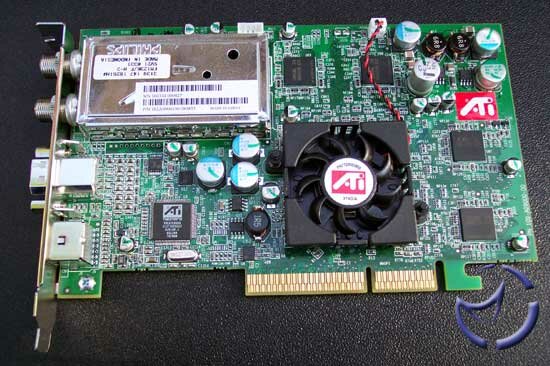
The layout of the AIW 9600 Pro is very clean, and like the standard 9600 Pro, no external power is needed to operate the card as the 9600 consumes less of it. The back IO panel contains all the connections needed to use the card. You have the TV-Tuner and antenna connections, and a video-in connection. There is also a connection for a dongle used for A/V input and output, which we'll detail on the next page.
The 9600 Pro's achitecture is based on a four-pixel pipeline, with one texture unit per pixel pipeline. This saves on the number of transistors on the VPU, thus saving on the cost. The consequence is a lower fillrate, but ATI makes up for this by increasing the core clock to 400MHz (almost double than the eight-pixel pipeline of the 9500 Pro).
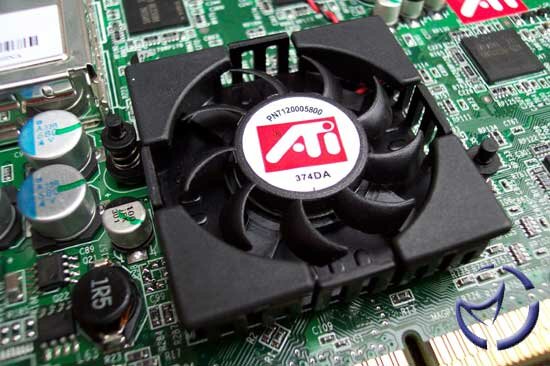
The AIW 9600 uses the same heatsink as the ATI Radeon 8500 cards. The smaller heatsink and fan will produce less noise than the larger fan (though still quiet) found on the AIW 9800 Pro. The smaller fan was used, since the 9600 Pro uses less power, and thus less heat, as well as a 0.13-micron manufacturing process.

The ram modules are lined up identically on the top and bottom of the card. The chips ATI chose to use are . The number after GC (24) isn't listed on their site, but the memory is 128-bit, and on the AIW 9600 Pro, it is clocked at 325MHz. This is an improvement of 25MHz when compared to the 300MHz on the Radeon 9600 Pro, and marks the first time an AIW's spec exceeds the card it was based on.
Connections
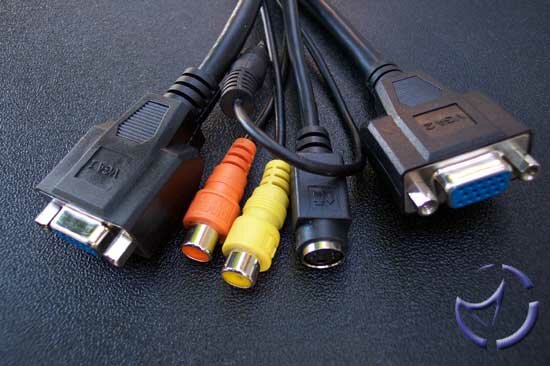
The A/V dongle is the life blood of the AIW 9600 Pro, so you better not lose it or break it. On the dongle, you have two VGA to CRT connections, but no DVI connection. No doubt, this will annoy some people, but sacrifices needed to be made to be able to output to dual CRTs. There is an S-Video connection, a digital audio-out and the ever important stereo line-out. The stereo line out needs to go into your sound card's line-out if you want sound in your TV viewing.
Watching TV and playing video games isn't all the AIW 9600 Pro can do, as it also has the ability to edit video. You have a 4-headed block for the inputs that plugs into the video-in port. The block provides a S-Video input and a composite video input. Like the output, you can only use one input at any given time, and which one you use will depend on how the video (VCR or camcorder) is being outputted into the input block. Personally, I use it for my PS2 and satellite dish.
For audio, the block also has left and right audio inputs. You will need to plug something in there if you want audio in whatever video you are outputting to the AIW. The S-Video-in or composite-in only serves to run video into the card, so you'll need to run audio cables from the output device into the appropriate left/right channel inputs.
Like other recent AIW cards, missing from the package is a FireWire connection. Since most motherboards have included onboard FireWire as a standard feature, this is not that big a problem.
Theater 200
The Theater 200 is ATI's current Video Processing Engine (VPE). On the pre-R300 AIWs, the Theater and the Micronas stereo decoder handled the duties, so the Theater 200 effectively kills two birds with one stone by doing both chores. The new chip is more than the sum of its parts though, and a few improvements were made along the way.
Thanks to its dual 12-bit analog-to-digital converters (ADC), image and sound quality gets bumped up a notch. The earlier cards used 9-bit converters, so the 12-bit ADC should improve things quite a bit by cleaning up some of the noise associated when converting an analog stream.
Image quality wise, there is a new (actually, it's third generation) 3-line comb filter. For composite video signals, the picture is improved because they are more accurately processed. Previously, only 2-lines were used for NTSC. Given the limitations of cable TV technology, the improvements may not be readily obvious, but a side-by-side comparison with an AiW Radeon 8500DV showed a slight improvement.
The Cobra Engine
Usually found in high end pro-sumer video cards, the AIW 9600 Pro brings hardware MPEG-2 decoding and MPEG-2 encoding to the consumer level. The Cobra Engine is capable of Inverse Discrete Cosine Transform (iDCT), which is really a fancy way of saying it can decode MPEG-2 streams with minimal CPU usage. This can make a difference when viewing DVDs on your PC, as you no longer have to shop for a dedicated DVD decoder, and no longer have to rely on software based decoding.
Discrete Cosine Transform (DCT), or MPEG-2 encoding, is done in hardware, which for casual video editing buffs, means less work on your CPU. ATI claims a maximum of 20-25% of the encoding process can be taken off the CPU, which could result in less time needed to encode a movie file, or at least, more CPU processing power to perform other tasks.
Videosoap is a feature found within the Cobra Engine that cleans up the image. It isn't designed for MPEGs you already have, but rather, it uses four filters to clean up the signal coming in from the input video. Other than cleaning up the image, it also serves to reduce the file size since noise isn't something that can easily be compressed, so with less noise, you'll end up with smaller files.
TV-Tuner
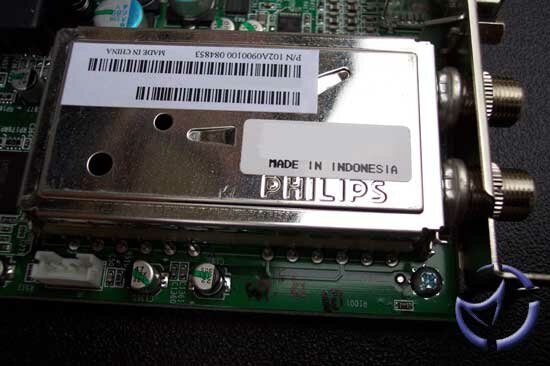
As with all current AIWs, ATI uses an analog TV-Tuner, rather than the digital tuner introduced with the AIW 8500DV. Since the majority of the public still uses an analog cable for TV viewing, there isn't really any point adding the digital tuner, which makes the chip more complex than it needs to be, which also cuts down on the cost.
Capable of tuning in 125 channels, in stereo where applicable, it should be enough for anyone with a standard cable connection. For satellite use, you'll have to tune into channel 3 or 4, and change channels via your satellite receiver, unless you buy an IR adapter.
As mentioned earlier, MultiView is supported, which will allow watching one channel, while recording another, but you'll need a PCI based TV Wonder for this to happen.
ATI Remote Wonder

No TV package would be complete without a remote. You can read our full review here, but in short, it is a RF remote with a thirty foot range. It works through walls, though I doubt that will be something a lot of you will be doing while watching TV. There is also a voucher for the Remote Wonder II, which doubles the range of the RF, as well as a couple tweaks. The remote is a free upgrade, but shipping and handling is not covered.
Installation and Issues
The A/V dongle should go into the back of your video card. An important connection is the output cable, which is the Line Audio Out. You have to plug this into the line-in connection on your sound card. If you don't do this, you won't get any sound at all from the AIW 9600 Pro.
Whether you have one or two monitors, you then plug them into the appropriate VGA connection on the dongle. Make sure you plug them in correctly, meaning, the primary display goes into VGA #1. For TV viewing, you'll have to plug the coaxial cable into the Phillips coaxial input. Same goes for those who wish to use the FM-Tuner, though remember that the antenna isn't included, so don't go rummaging through the box thinking it's been misplaced.
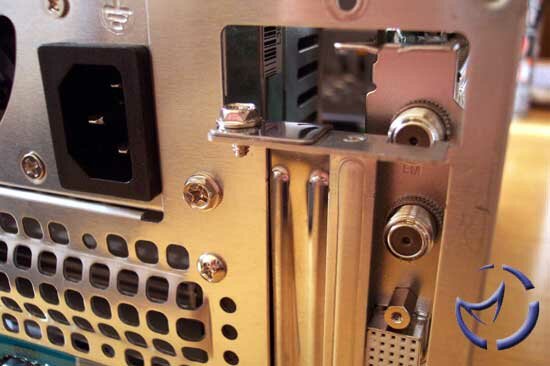
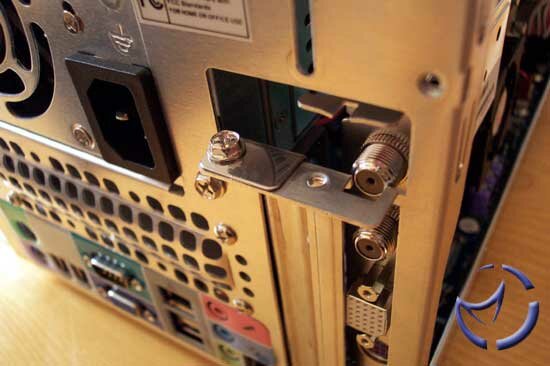
For small form factor PCs, there may be potential problems getting the AIW 9600 Pro to fit. The problem appears to be caused by the FM-Tuner connection, as pictured above. If you read our AIW 8500DV mod, you'll see that this is an issue that has haunted ATI in the past. The FM-Tuner, being at the top of the backpanel, cannot fit through PCI slot backpanels that are tapered (which happens to be the case most of the time). In mini to full tower cases, this shouldn't be a problem as the PCI backpanel tends to be a bit longer before tapering, but not so on SFFs.
I have read reports where Shuttle SFFs had problems, but I definitely had issues with the MSI MEGA PC. the problems on the MEGA PC are compounded by the fact that the AGP slot is the inner slot on the motherboard. You can forget about angling and wiggling the card into there.

On our FIC Ice Cube, I did get the card to fit, through it wasn't easy. The card needed to be inserted at an angle, tipped forward, then pulled back into the slot. Luckily, the AIW's PCB didn't bend, but there was certainly some force applied.
Software
There are five major parts to the software bundle of the All-In-Wonder 9600 Pro.
ATI Multimedia Center 8.7
The real gem of the AIW software package is the new ATI Multimedia Centre (MMC) 8.7. As with previous versions, you can use this software to watch TV, play VCDs and DVDs, record your shows, as well as playing files much like Windows Media Player.
Guide Plus+
If TiVo functionality is what you want, Guide Plus+ is about as close as you'll get for the PC. From here, you can preview shows, set up recording schedules, and see what'll be on later that day or week. Every week, the program will need to download the latest schedule, and the big feature that it is free! Unlike TiVo, no monthly fees required.
One problem with the Guide Plus+ though is it isn't supported by EAZYLOOK. As the standard EAZYLOOK menu is easy to navigate from ten feet away, the Guide Plus+ is not.
Pinnacle Studio 8, Matchware Mediator 7, Muvee AutoProducer DVD Edition
For the aspiring Speilbergs, ATI throws in a few editing packages. It's not at the level of Adobe Premiere, or some other high-end tools, but for casual directors, you can be editing Uncle Joe out of your home videos in no time.
Drivers
The days of shoddy ATI drivers are behind us. The ATI engineers have been pumping out great drivers since the introduction of the Catalyst, and they're quick to fix problems as they arise. They don't come out at the same frequency as nVidia's leaked drivers, but ATI is committed to making sure their drivers are WHQL certified.
Half Life 2
Yessir, the game everybody wants, but nobody has, is sort of included here. As some of you may know, the source code was leaked before launch, so Valve is re-writing portions of it to address the potential problems of front-end hacks.
ATI does package a voucher which is good for a free download of the game when it becomes availalble. The voucher is also good for a CD copy, though shipping and handling is on you. Don't lose this, as it contains the required key to play the game.
Test Setup
MSI K8T Neo-FIS2R: Athlon 64 3200+ (10x200: 2GHz), 2 x 512MB Kingston HyperX PC4000, AIW 9600 Pro, 120GB Western Digital SE 8MB Cache, Windows XP SP1, VIA Hyperion 4in1 drivers 4.49, ATI Catalyst 3.9

|
|
|
Direct 3D
|
OpenGL
|
Above are a couple screenshots of our video settings. While the screenshots show AA, and AF to be disabled, we will enable them when doing the AA/AF tests. All driver settings were set to high quality.
Test Software will be:
Unreal Tournament 2003
Halo
NHL Hockey 2004
Max Payne 2
Splinter Cell
The comparison video cards will be the XFX 5600 Ultra, and FIC Radeon 9600 Pro. The Radeon 9600 Pro has a 25MHz memory clock speed disadvantage, so we thought it would be interesting to check it out. We'll also be covering image quality and overclocking after the gaming benchmarks. was used to measure in-game performance where applicable.
For those of you who don't know, there are a lot of problems with high levels of AA and some Direct 3D games, which happens to be the majority of those tested today. We'll present some games where we didn't experience abnormalities, but in many cases, 6xAA was faster than 4xAA, which cannot be, but was the case during benchmarks.
Unreal Tournament 2003
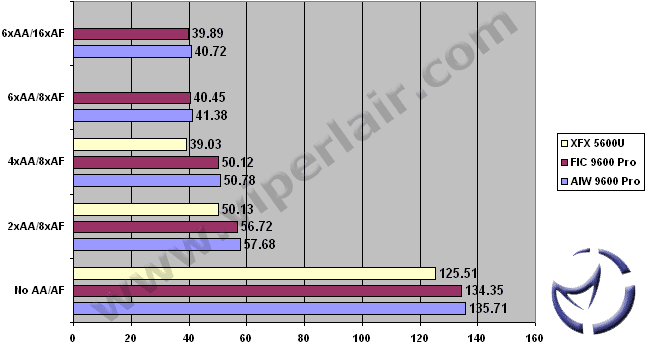
We used the from [H]ard|OCP and selected the high quality batch run at all resolutions. We'll be presenting Antalus benchmark, with AA/AF on and off.
Antalus - 1024x768, Maximum Quality
Antalus - 1280x1024, Maximum Quality
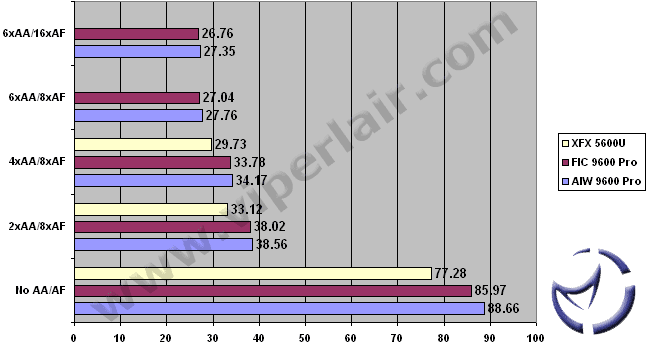
At all resolutions, and various AA and AF levels, the AIW 9600 Pro outpaces the FIC 9600 Pro just barely. The extra memory speed seems to be the deciding factor here. The XFX FX 5600 Ultra doesn't do as well as the Radeon based cards, but does a good job nonetheless. Keep in mind that the FX 5600 doesn't do 6xAA or 16xAF, hence the N/A scores.
Halo
A big hit on the XBOX, no doubt there are plenty of gamers heralding this as the second messiah when the announcement was made that it was coming to the PC. Ok, maybe not, but it does have a scripted demo which cobbles in-game cutscenes together and tally up a score. These are the results we'll be presenting, as well as using FRAPS to gauge real-gaming performance.
Video settings were configured at 1024 x 768 (and 1280x1024), Refresh rate of 100 Hz, No Vsync, Specular, shadow, and decals set to yes and Texture Quality set to High. Note that AA is broken here, and although framerates do reflect AA changes, image quality does not alter one bit.
Halo @ 1024x768 and 1280x1024 w/Timedemo

Like we've seen in our UT2003 benchmarks, the AIW variant of the Radeon 9600 Pro holds a slight lead here. This is a scripted benchmark, and not a true indication of actual gameplay, so let's take a look at real-world framerates with Halo and Fraps.
Halo @ 1024x768 and 1280x1024 w/Fraps
For all Fraps benchmarks (except NHL 2004), we ran through a repeatable route through a level, and ended up with an average framerate reading which Fraps outputs to a log file. In the case of Halo, I went around the initial control room, did some key actions, and went into the energy powerup chamber.

Both ATI cards perform within 1% of each other, with the AIW's memory clock speed advantage likely accounting for the improved performance. The FX5600 Ultra makes a strong showing, but easily trails the ATI based hardware.
|